Introduction
kanade — 奏 is an endpoint management system for Windows, Linux and Apple Silicon macOS fleets. It gives an operator a single CLI / SPA to run scripts, install software, gather inventory, and stream live perf data from hundreds of PCs at once. The pieces:
| Component | What it is |
|---|---|
| kanade-agent | Service that runs on each managed PC. Subscribes to NATS, executes commands, ships results. |
| kanade-backend | HTTP API + projector. Persists state, serves the SPA, exposes operator endpoints. |
| kanade-client | Optional end-user Tauri app on Windows and Apple Silicon macOS 14+; macOS native notification/startup integration is deferred. |
| NATS server | Message broker for command fan-out + result aggregation. Agents use NATS for commands and telemetry; installer jobs can also fetch artifacts over backend HTTP. |
| kanade CLI | Operator-facing command line: publish binaries, fire jobs, query state. |
This site covers two audiences:
- Operators running a kanade fleet — how to update each component without ssh-ing into endpoints (see Agent-mediated updates).
- Developers writing PowerShell jobs the agent will execute — what works, what doesn't, what changed in recent agent versions (see Writing scripts for the agent).
The detailed protocol / on-wire spec lives at Spec (the legacy single-page document; will be split into chapters as the docs site fills out).
Developer Quickstart
This guide gets you up and running with a local kanade development environment.
1. Prerequisites
Before starting, ensure you have the following installed on your Windows machine:
- Rust toolchain (stable channel)
- cargo-make (run
cargo install --force cargo-make) - bun (for SPA dependency management and build execution)
- gsudo (for local service deployment tests)
- nats-server (runnable from PATH)
2. One-Time Setup
Run the following command at the workspace root to register the git pre-push hooks and install agent skills defined in apm.yml:
cargo make setup
3. Launching the Dev Sandbox
You can spin up a fully isolated, multi-component development stack on your local host using a single command:
cargo make dev
This task runs the following services concurrently in a loopback sandbox:
- nats-dev: Unauthenticated NATS broker listening on port
4223. - backend-dev: Dev API server listening on port
8081with auth disabled. - agent-dev: Local dev agent talking to the dev NATS broker on
4223. - web-dev: Vite dev server for the React SPA listening on
http://localhost:5173.
Press Ctrl+C to tear down all components cleanly.
4. Multi-Agent Fleet Simulation
To debug behavior that only shows up when managing multiple machines (e.g. concurrent execution result projection or ID collisions), you can launch a multi-agent sandbox:
cargo make dev-fleet
This spawns the NATS broker, backend, and SPA, plus three separate dev agents with independent IDs (dev-pc-1, dev-pc-2, dev-pc-3) and isolated state databases.
5. Local Deploy Testing
If you want to test the full lifecycle of installing components as Windows services (mirroring production environments), use the local deployment scripts:
# Installs CLI, agent, backend, and NATS services locally via gsudo elevation
cargo make local-deploy
After deployment, you can verify and interact with the real Windows services. Use the following task to stop and cleanly delete the services when finished:
cargo make local-undeploy
Screenshots
What the operator console looks like in use. Every image on this page was
captured from the demo stack (cargo make demo), which serves an invented
248-PC fleet from a mock backend — no NATS, no agents, no real hosts. Names,
hostnames and sign-in accounts are fiction; nothing here came from a
deployment.
Desktop captures are 1440×900, mobile 390×901.
The console is shown in English here; the Japanese edition of this page has the same shots with the interface in Japanese. The data stays Japanese in both, because the fixture is a Japanese company — widget titles, group names and check descriptions are operator-authored, so they are whatever the operator wrote, not something the interface translates.
The fleet at a glance
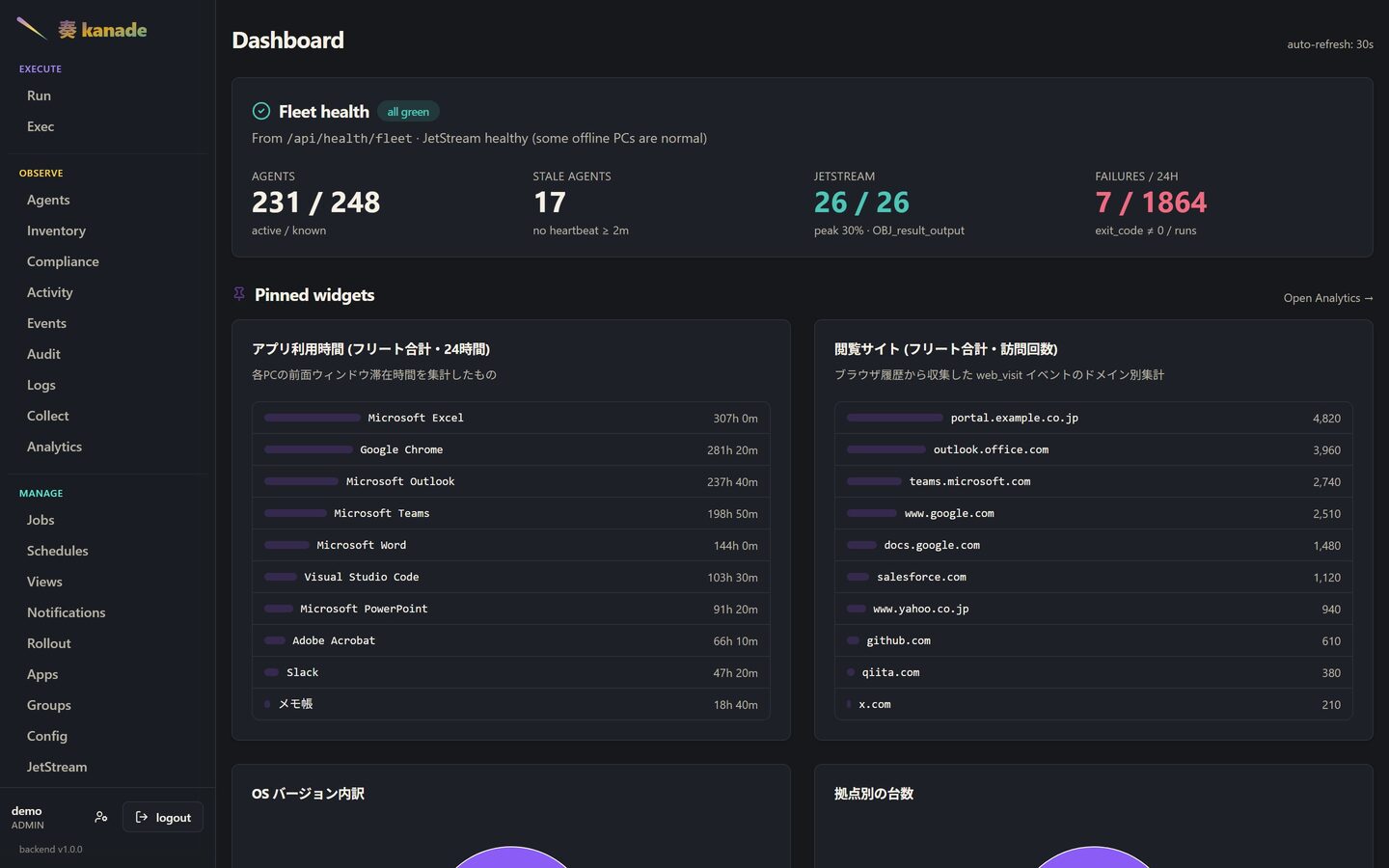
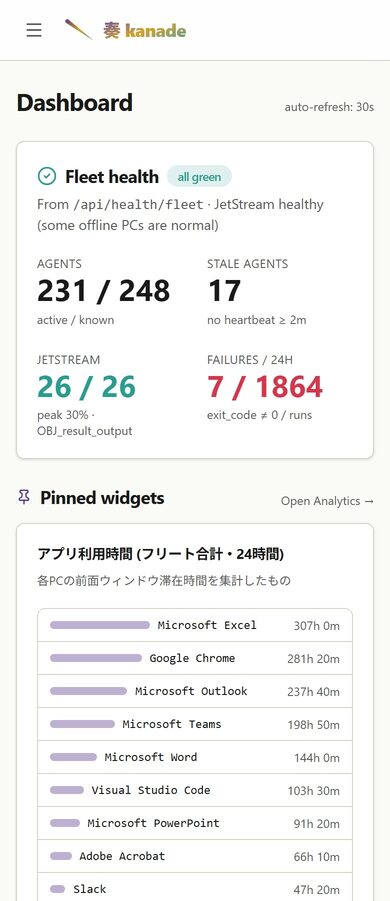
The dashboard opens on the numbers an operator checks first: how many agents are reporting, how many have gone quiet, whether the broker's streams are within their limits, and how many job runs failed in the last day. Each figure links through to the page that explains it.
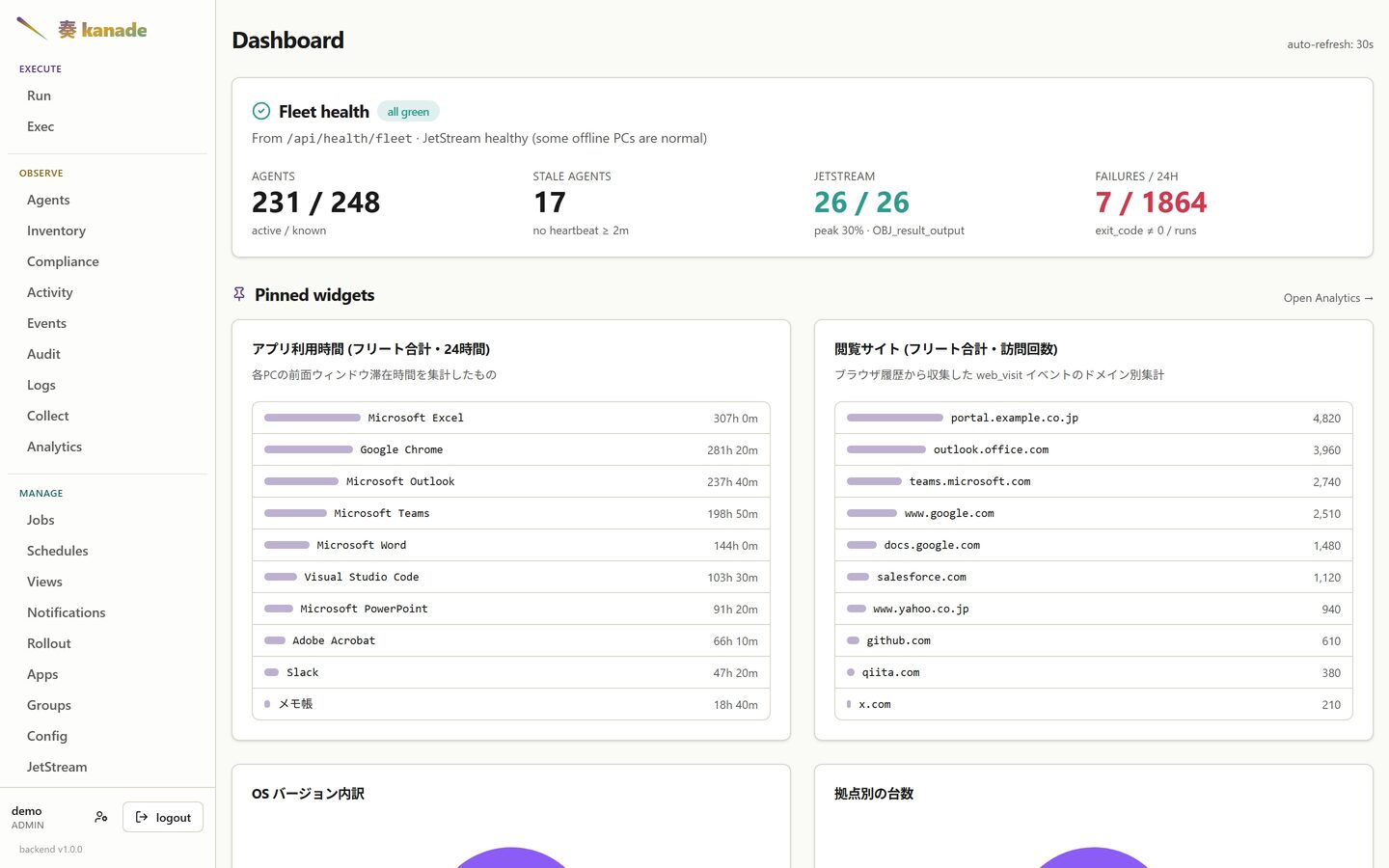
The pinned widgets below are operator-defined — they come from the same analytics views you can build yourself, pinned to the dashboard from the Analytics page.
Agents
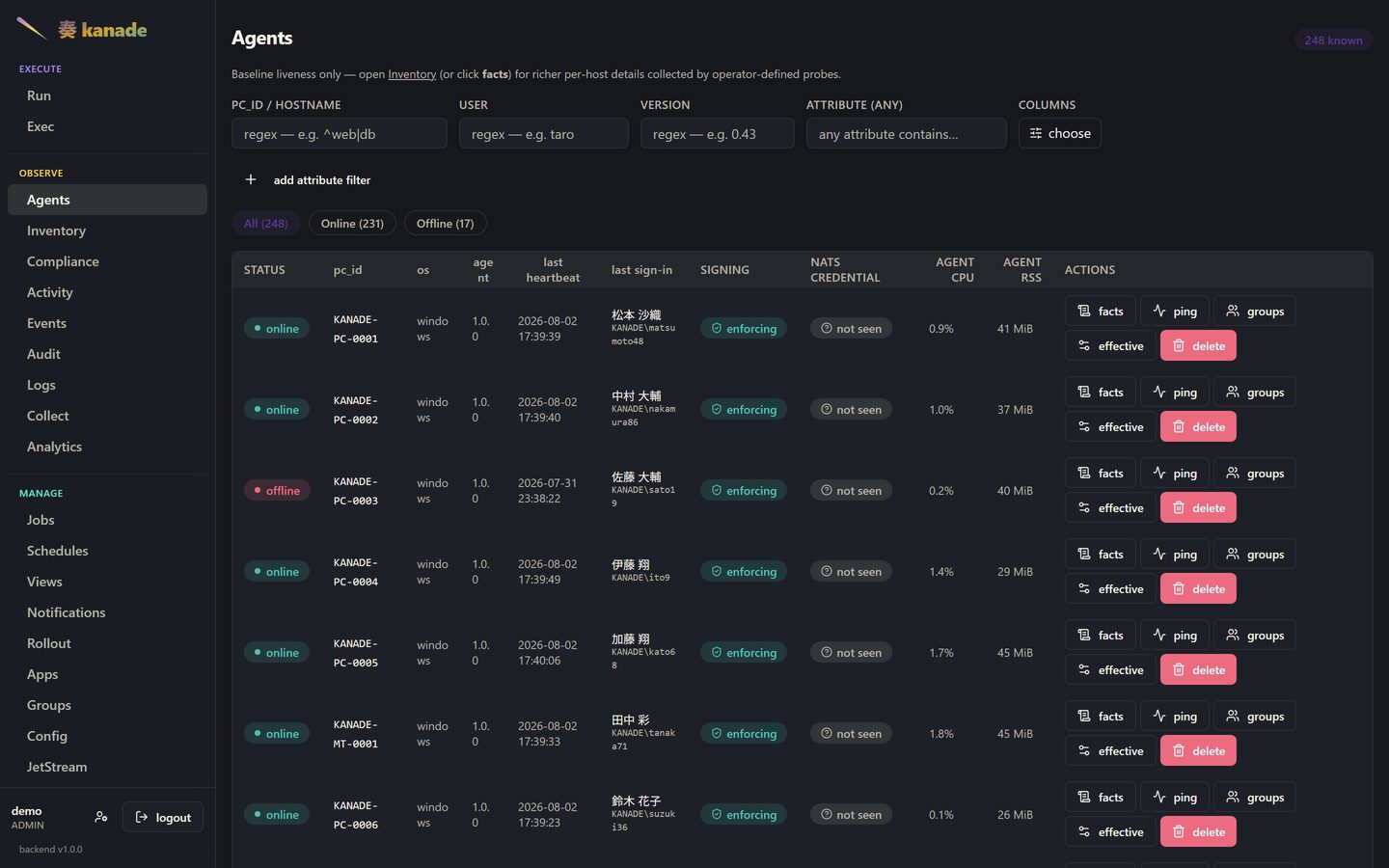
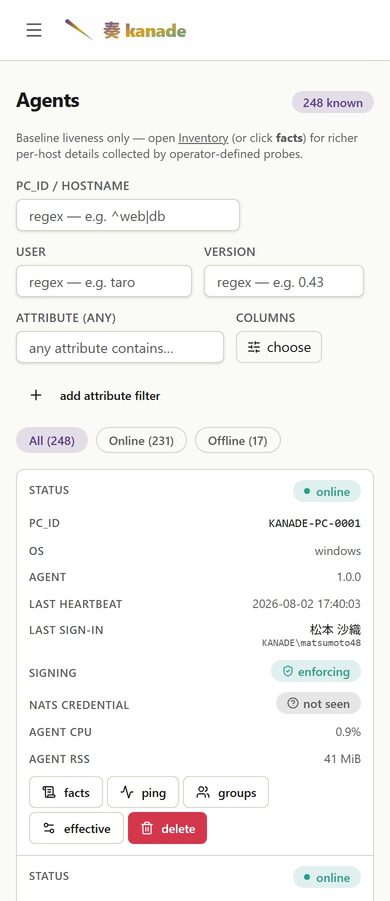
Liveness only: who is online, on which agent version, and when each host last checked in. Detail belongs to Inventory; this page answers "is it there".
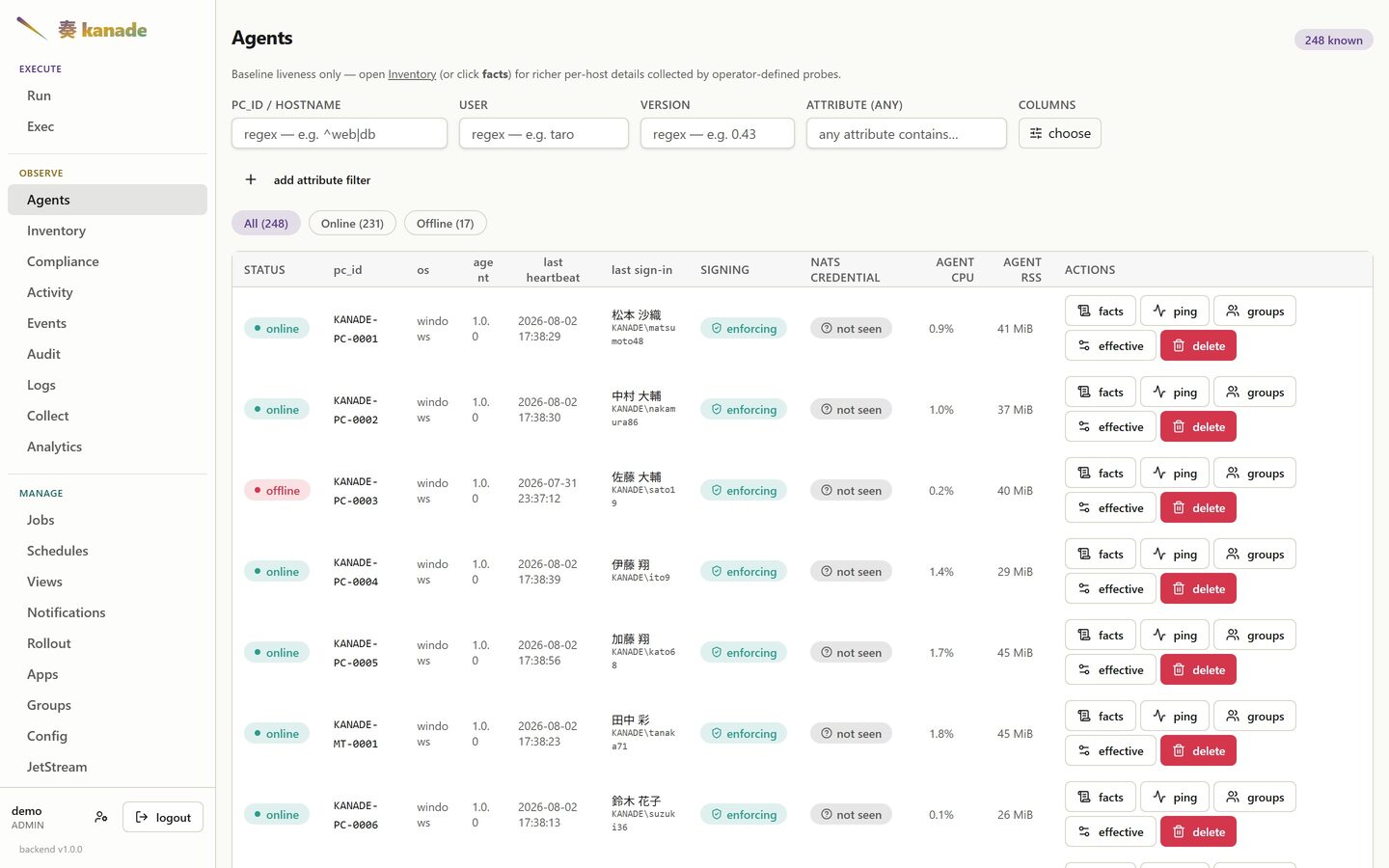
The columns are yours to choose — the shot above hides the ones this fleet does not need, which is what the columns picker is for.
One host
Opening a row gives that machine's own numbers: CPU, memory, disk and network sampled by the agent, over a window you pick. The agent measures itself too, so the chart can answer "was it the machine, or was it us".
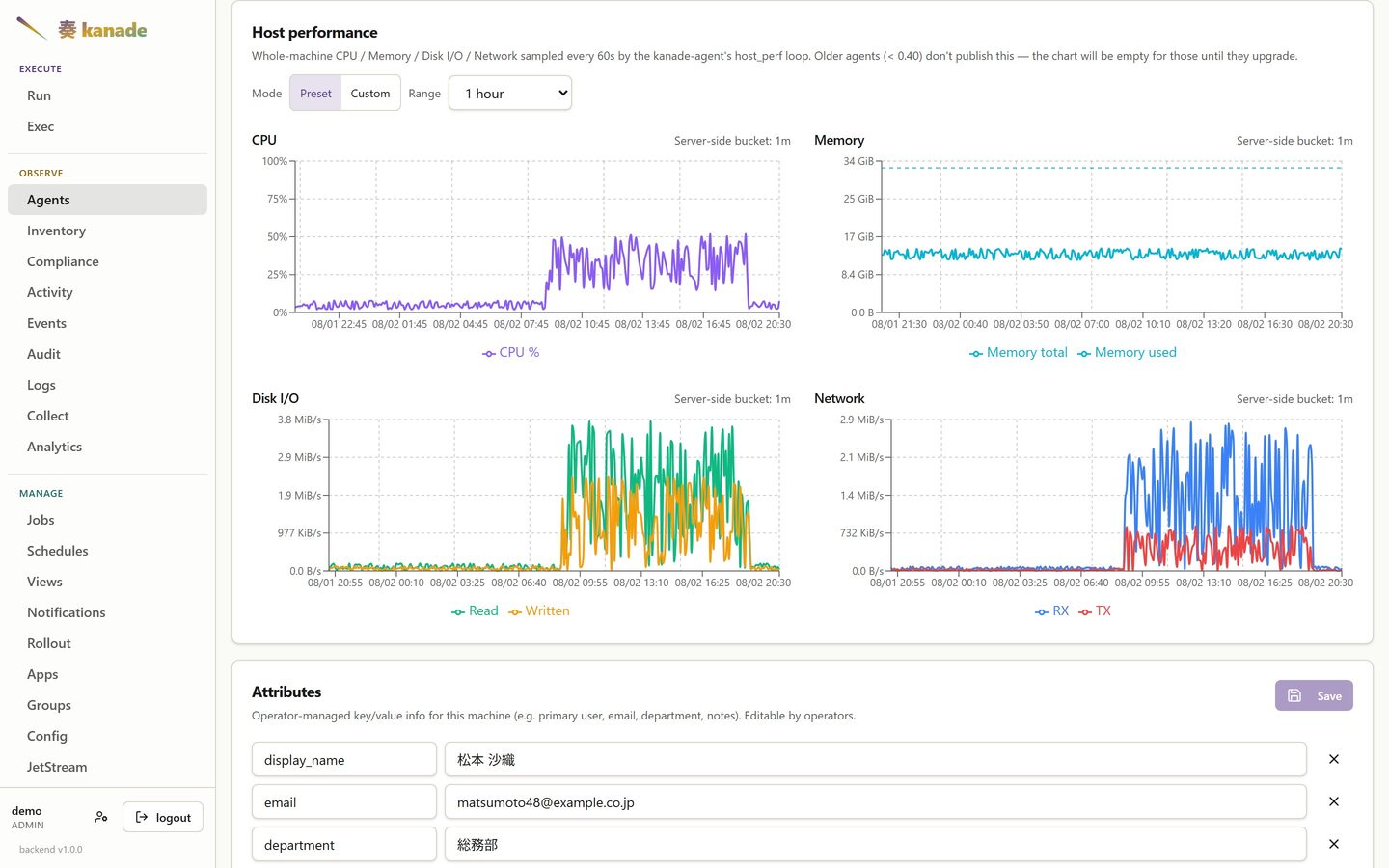
Whatever else you know about it
A machine reports what it can see about itself; it cannot know whose desk it is on or which cost centre pays for it. So every host carries a free-form key/value card an operator can edit — primary user, email, department, site, asset tag, a note about why this one is special.
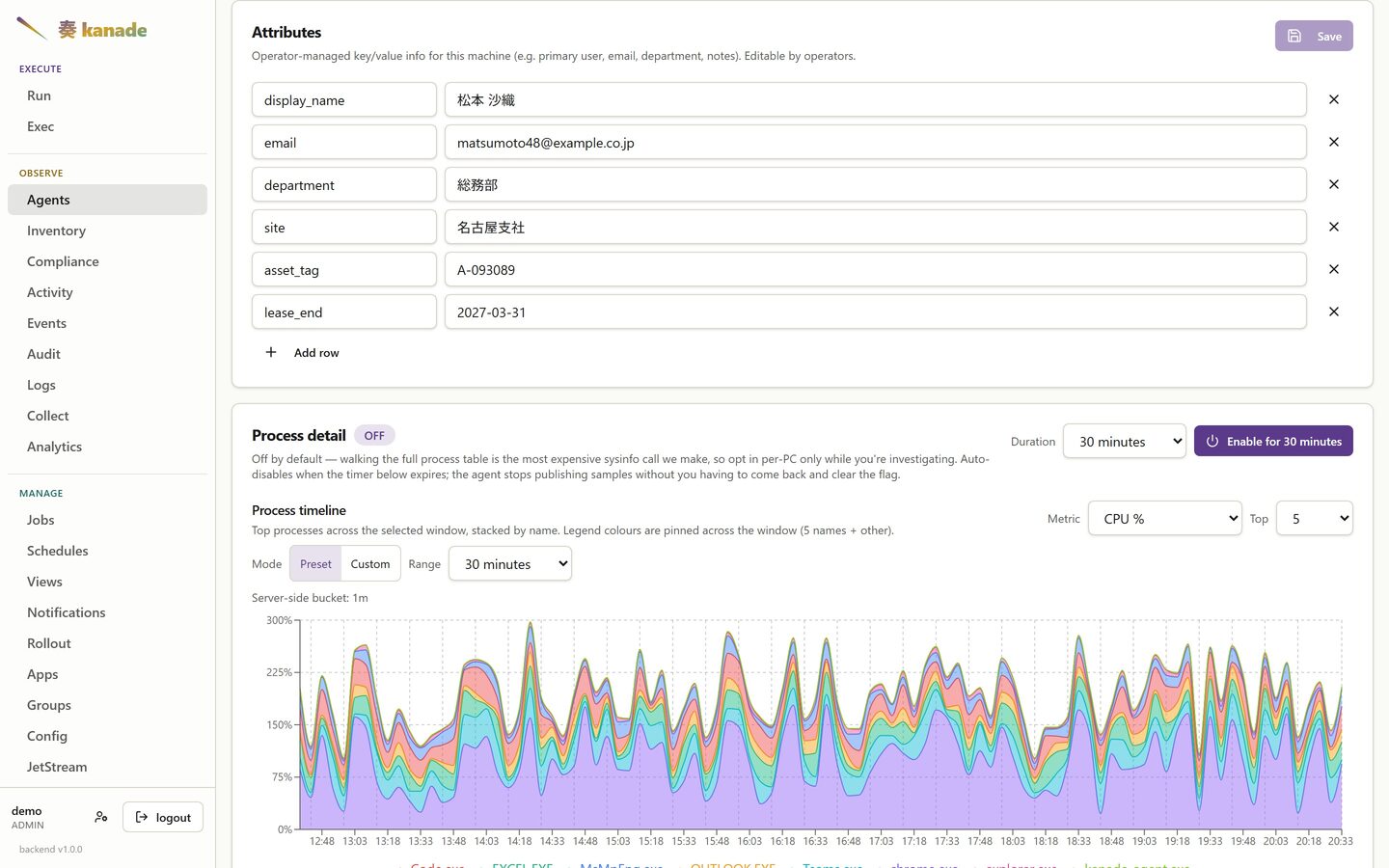
These are ordinary fields, not a fixed schema, and they are writable through
the API — which is how a directory-sync job keeps display_name and
department current without anyone typing them. Once set, they are columns
you can show and search on across the fleet.
The writes go through the backend API (kanade meta set / rm / clear, or
the per-key endpoint behind them), so they are authenticated, role-checked
(operator or above) and audited. A directory-sync job that calls
kanade meta set therefore needs a KANADE_AUTH_TOKEN even when it runs on
the backend host; it touches only its own keys, so hand-entered ones survive.
Watching the screen
Sometimes the only way to understand a report is to look. From the host's own page an operator can open its screen and watch it live.
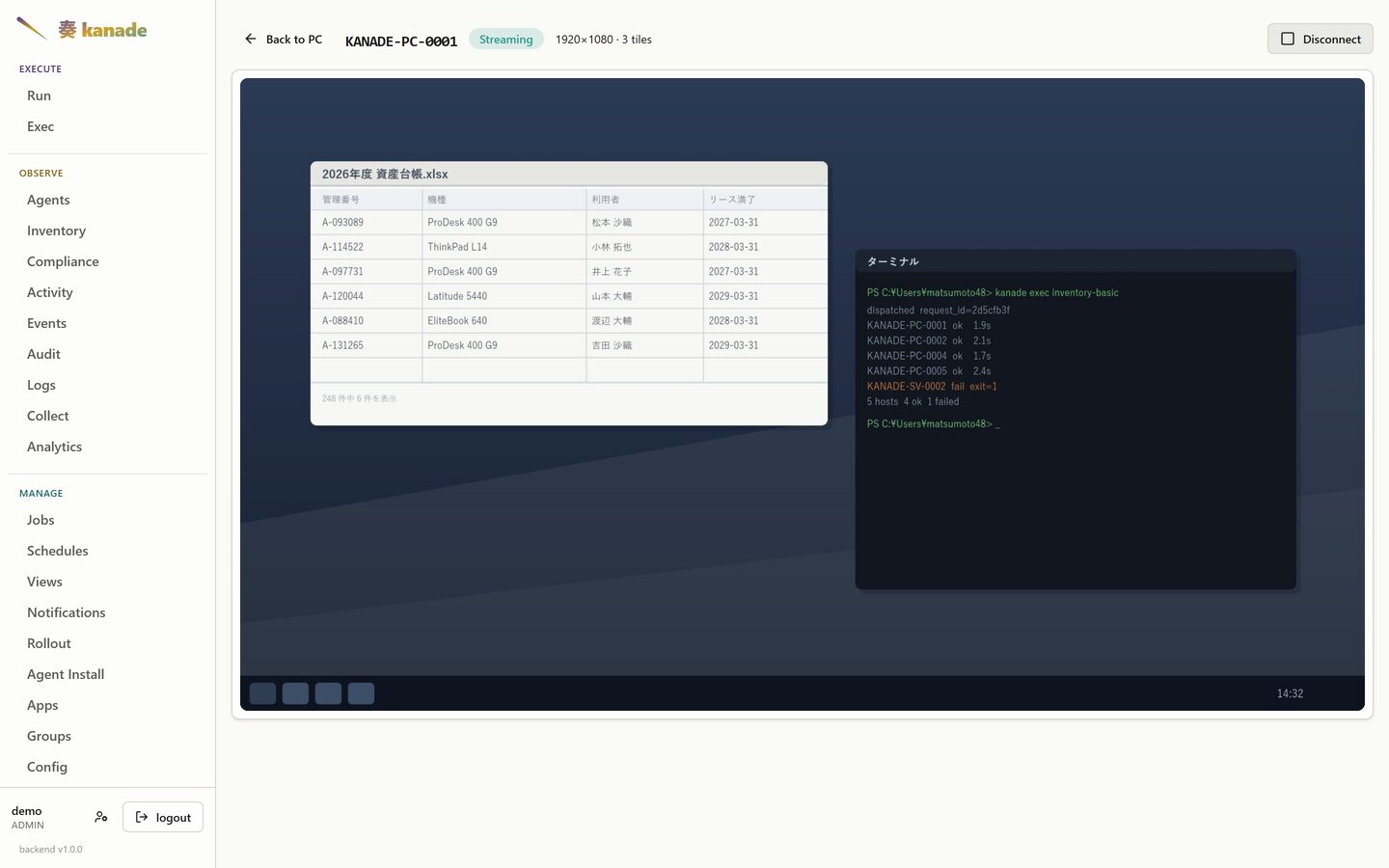
Nothing listens on the endpoint for this. The agent already holds one outbound connection, and the session rides it — so a PC behind NAT, on a branch-office line, or on someone's home wifi is reachable on exactly the same terms as one on the desk next door, with no inbound path opened to it. The header reports the desktop size and the tile count, because a session that has stopped updating should be distinguishable from one showing a screen that simply isn't changing.
The desktop above is synthetic — it is drawn by the demo stack, not captured from a machine.
Inventory
Whatever your manifests collect. The probes are operator-authored PowerShell
tagged inventory: in a YAML job, so the columns reflect what you decided to
gather, not a fixed schema. Clicking a row opens that PC's full facts.
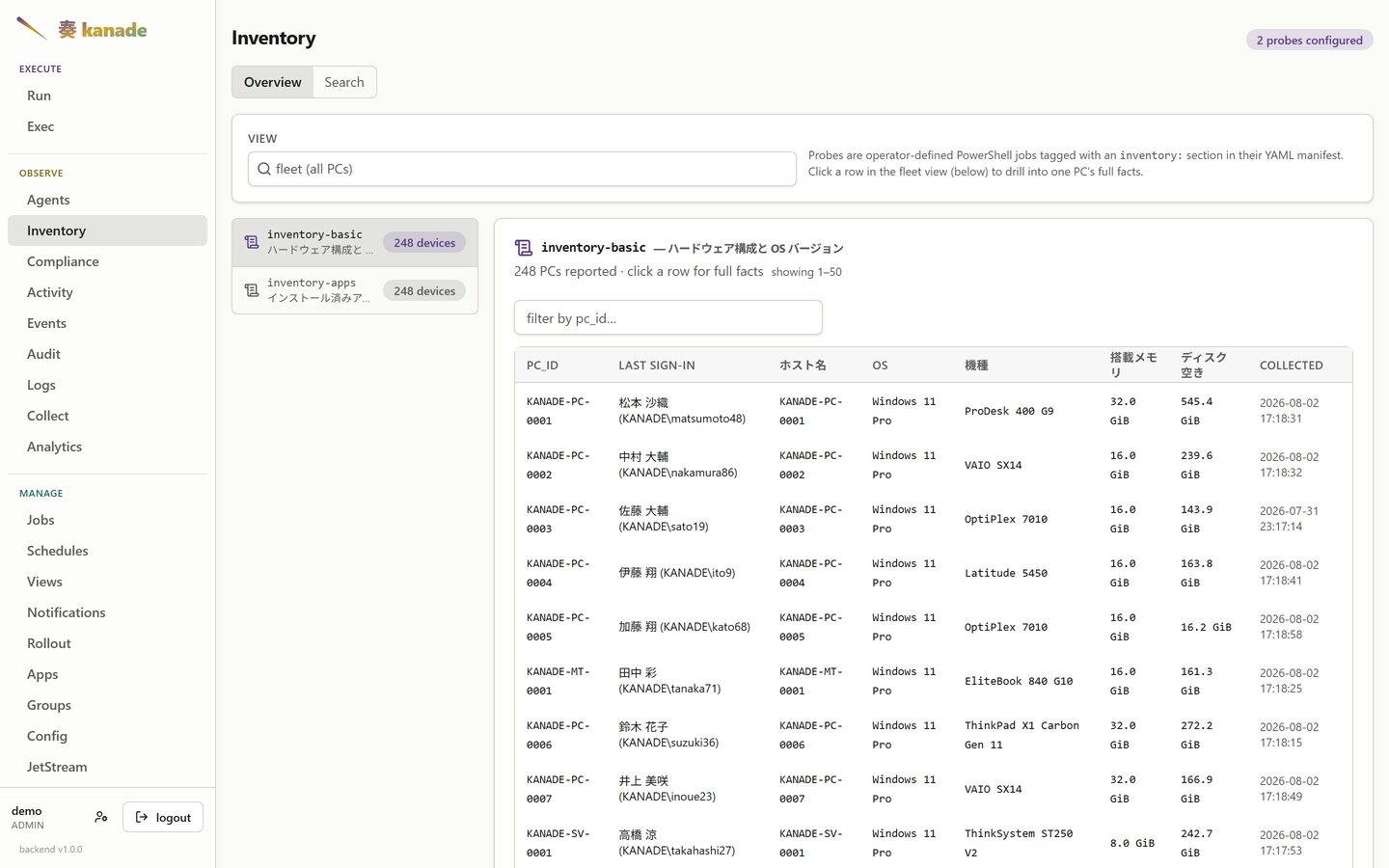
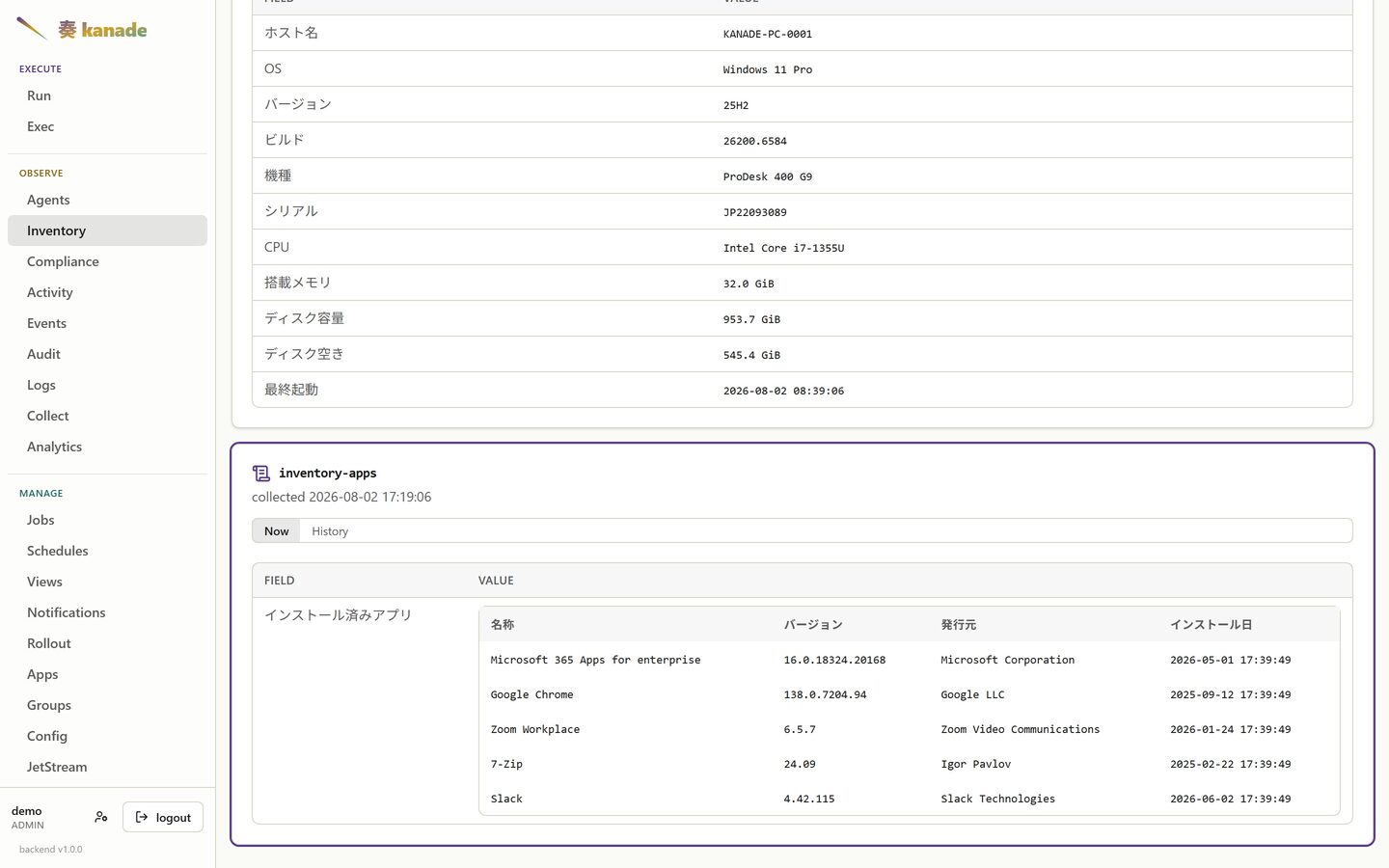
Clicking through gives every fact that PC reported, one card per probe:
What changed, and when
Each fact card has a History tab. Inventory is not only a snapshot — every run is diffed against the last one, so an installed application carries its own timeline: when it appeared, every version it moved through, and when it went away.
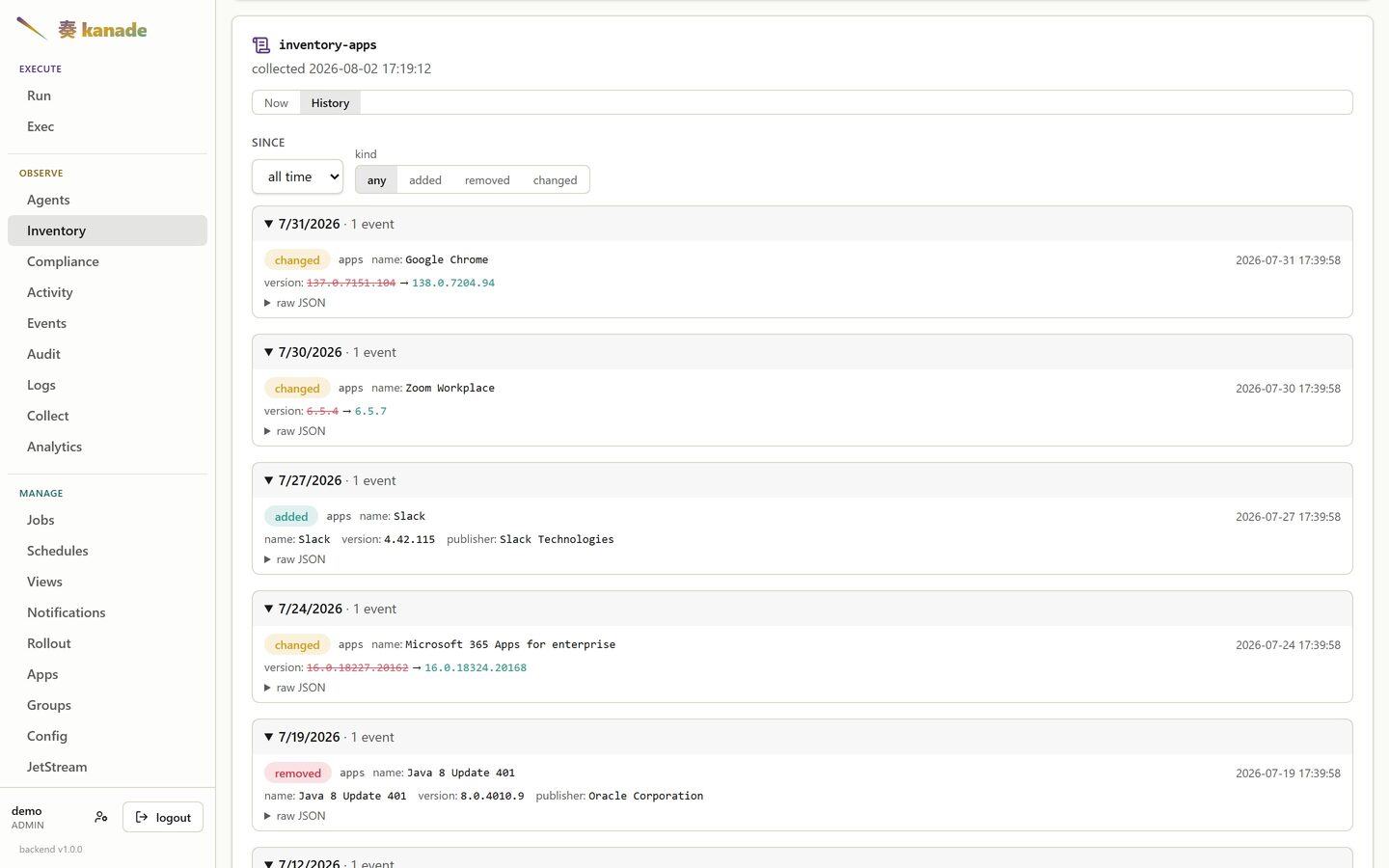
Nothing here was configured to be tracked. The probe reports a list of installed applications; the added / removed / changed rows fall out of comparing consecutive runs.
Compliance
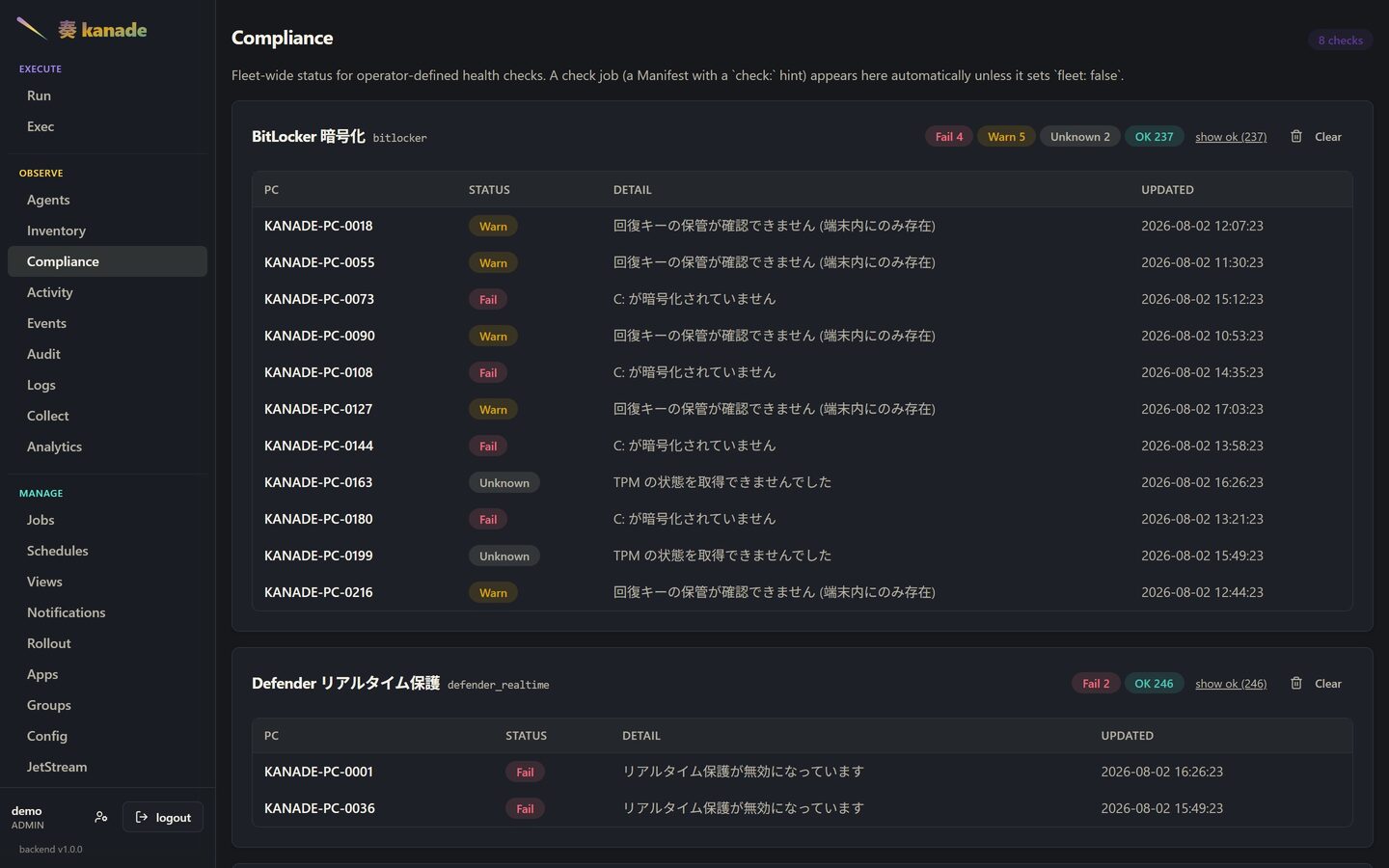
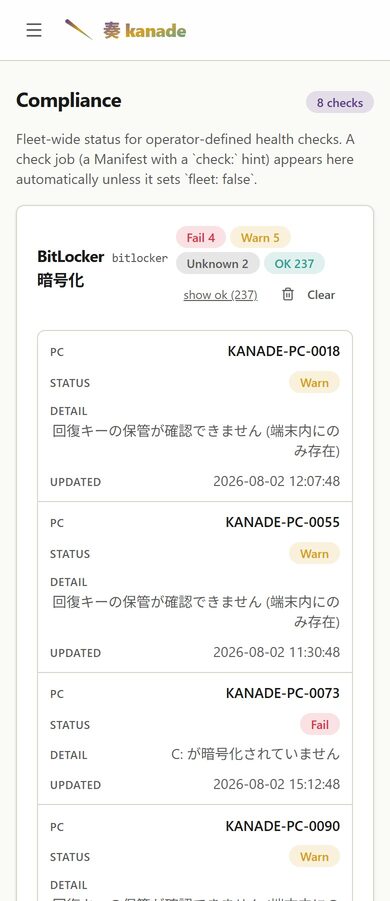
Fleet-wide status for every health check, grouped per check with its own
counts. A check is just a job carrying a check: hint, so adding one is
writing a manifest — there is no hard-coded list of things kanade knows how to
verify.
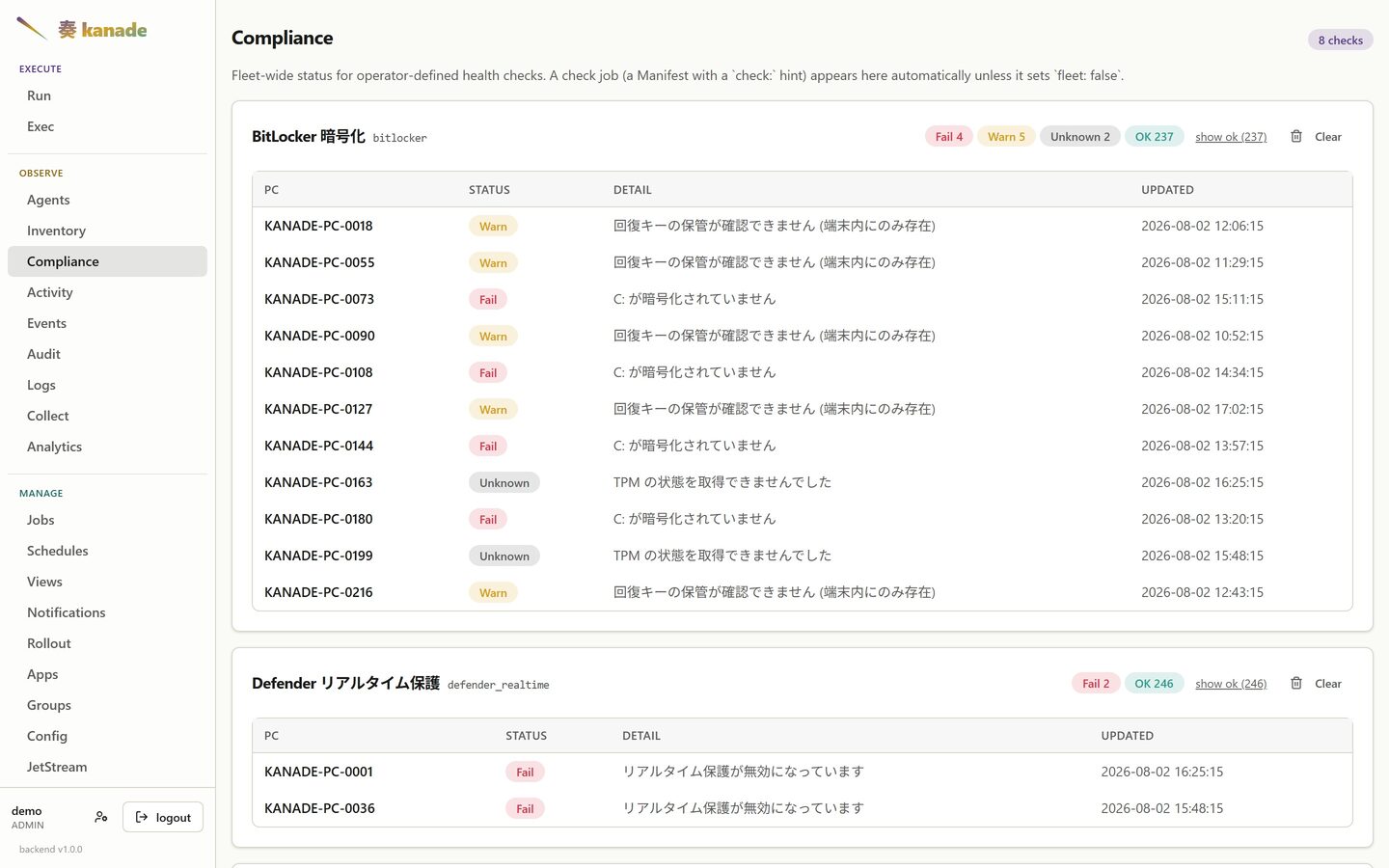
The detail column is the point: it says why a host is unhappy, in that host's own terms.
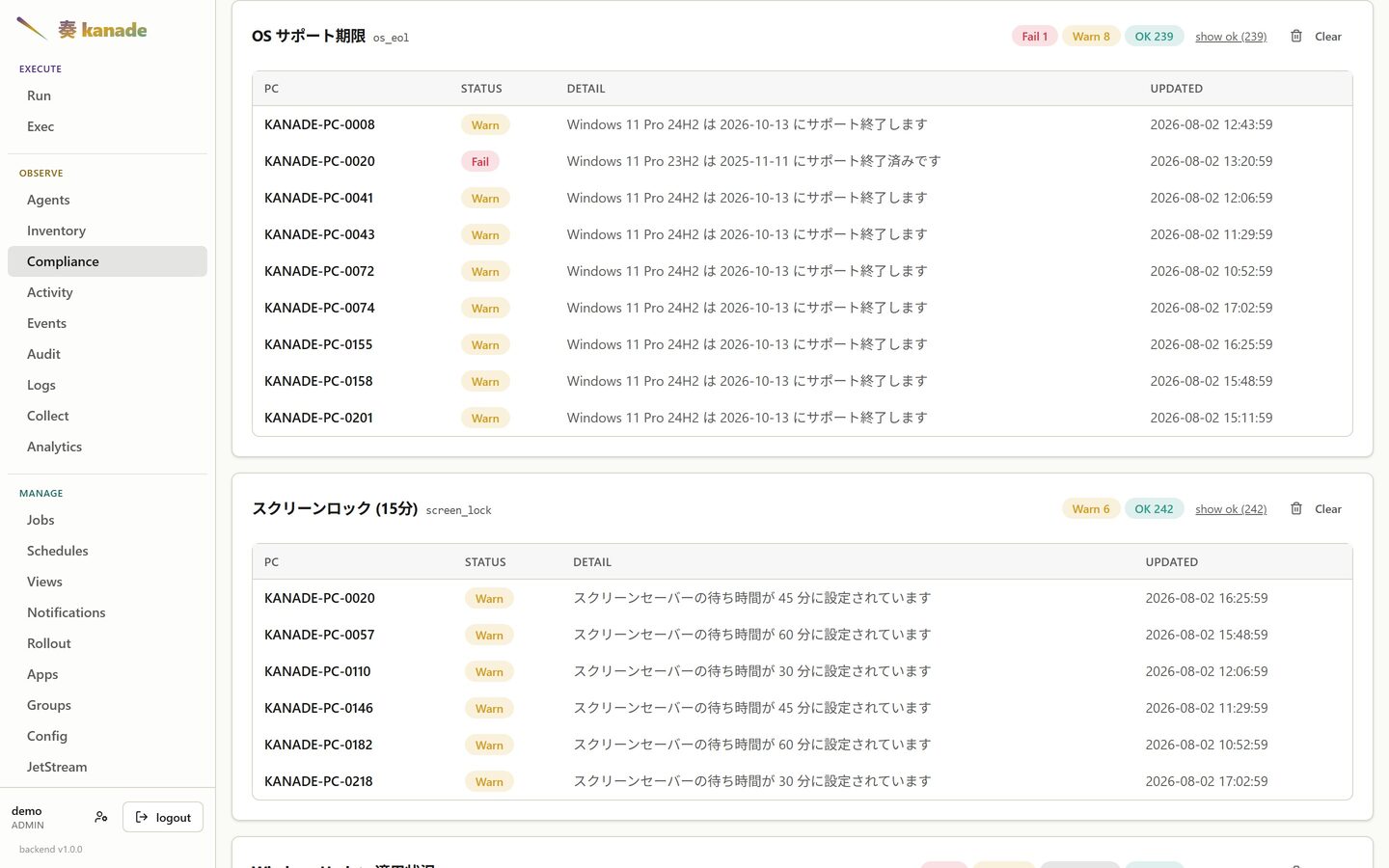
Support deadlines
The same mechanism, pointed at dates rather than settings. This check reads each host's OS build, looks its end-of-life date up, and reports it as fail, warn or ok against how far out that date is — so a build that is fine today starts warning on its own, months before anyone would have thought to ask.
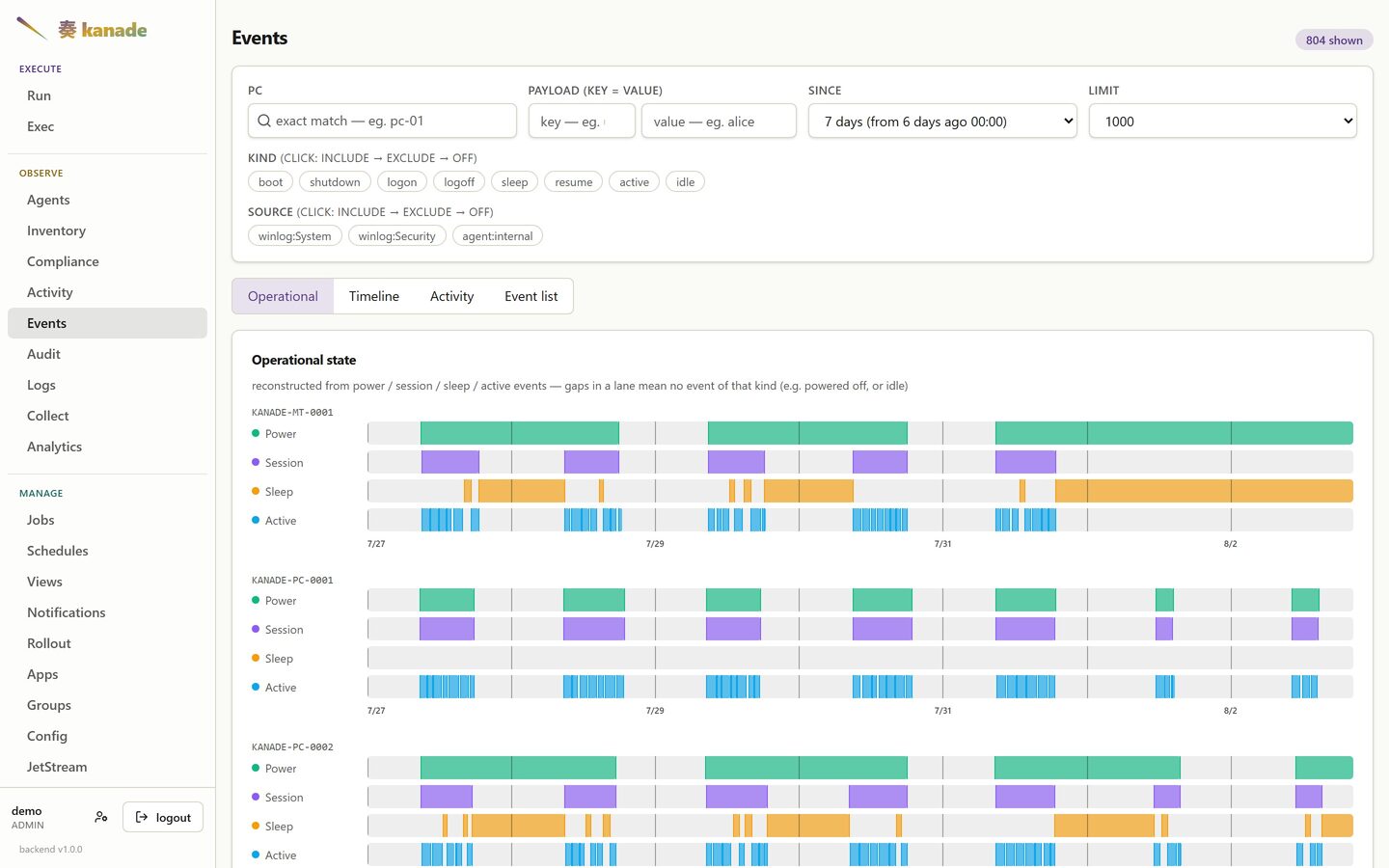
Uptime and activity
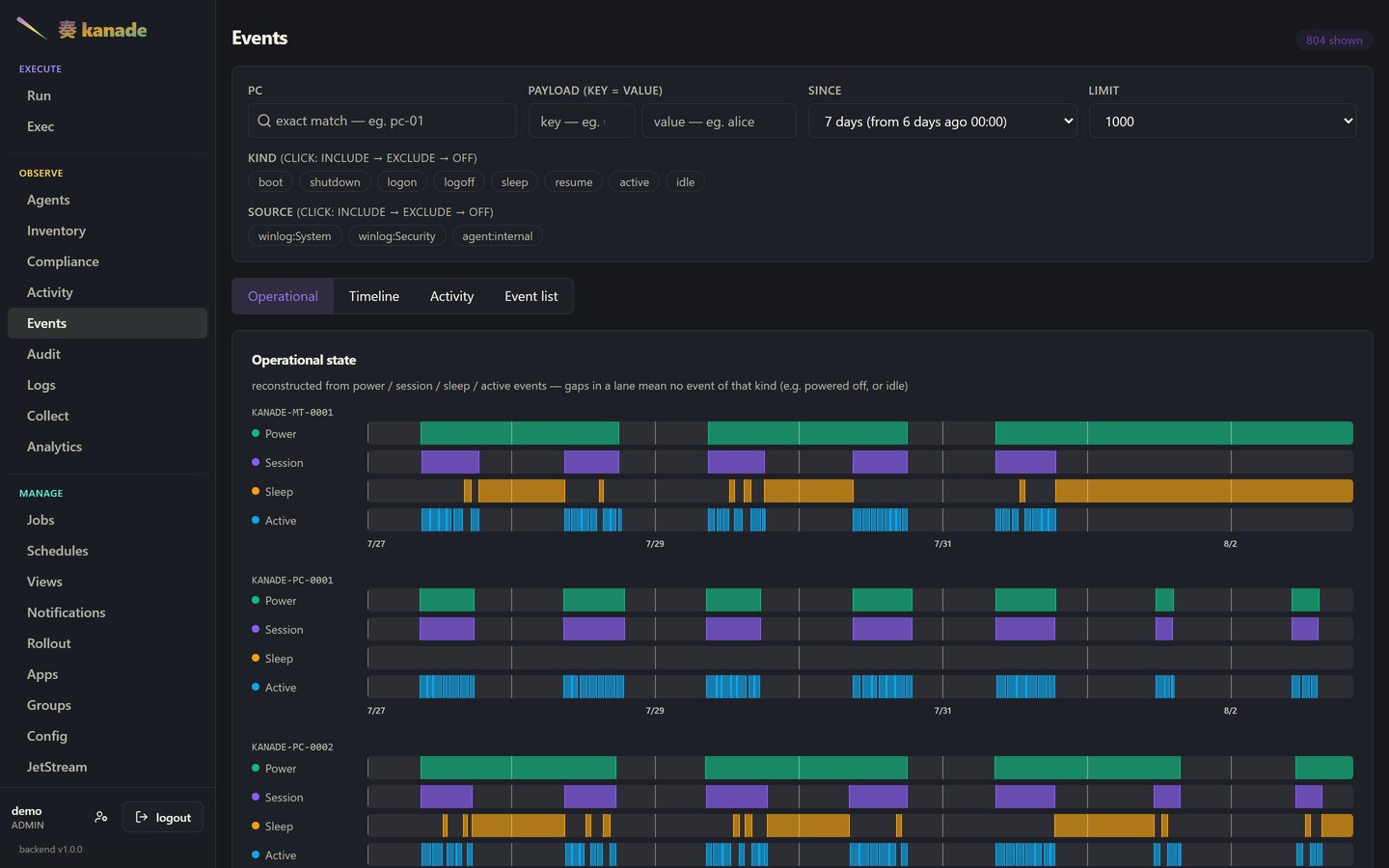
Power, session, sleep and active intervals reconstructed from Windows event log entries, one lane per kind. A blank lane means no event of that kind in the window — the machine was off, or idle.
Analytics
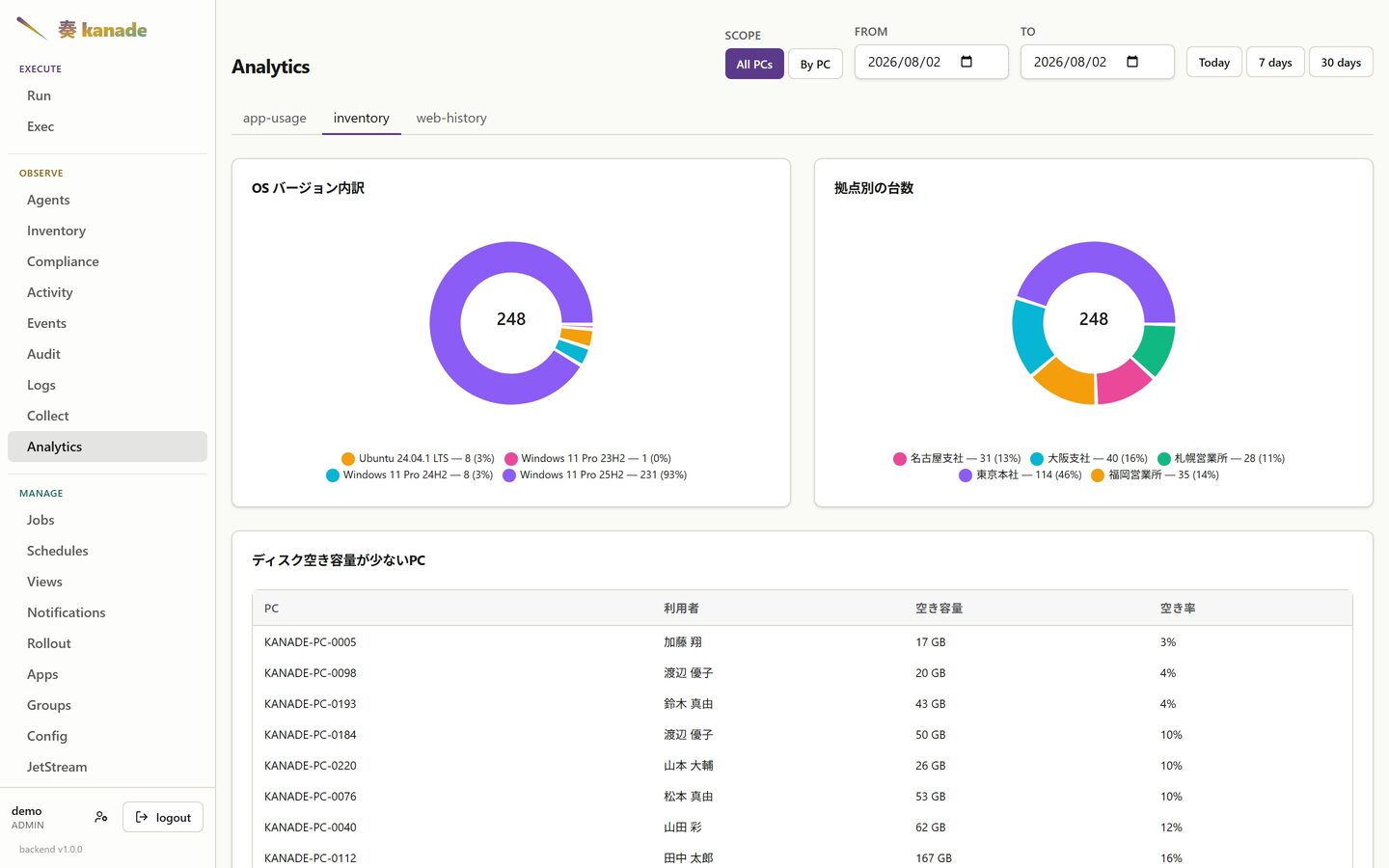
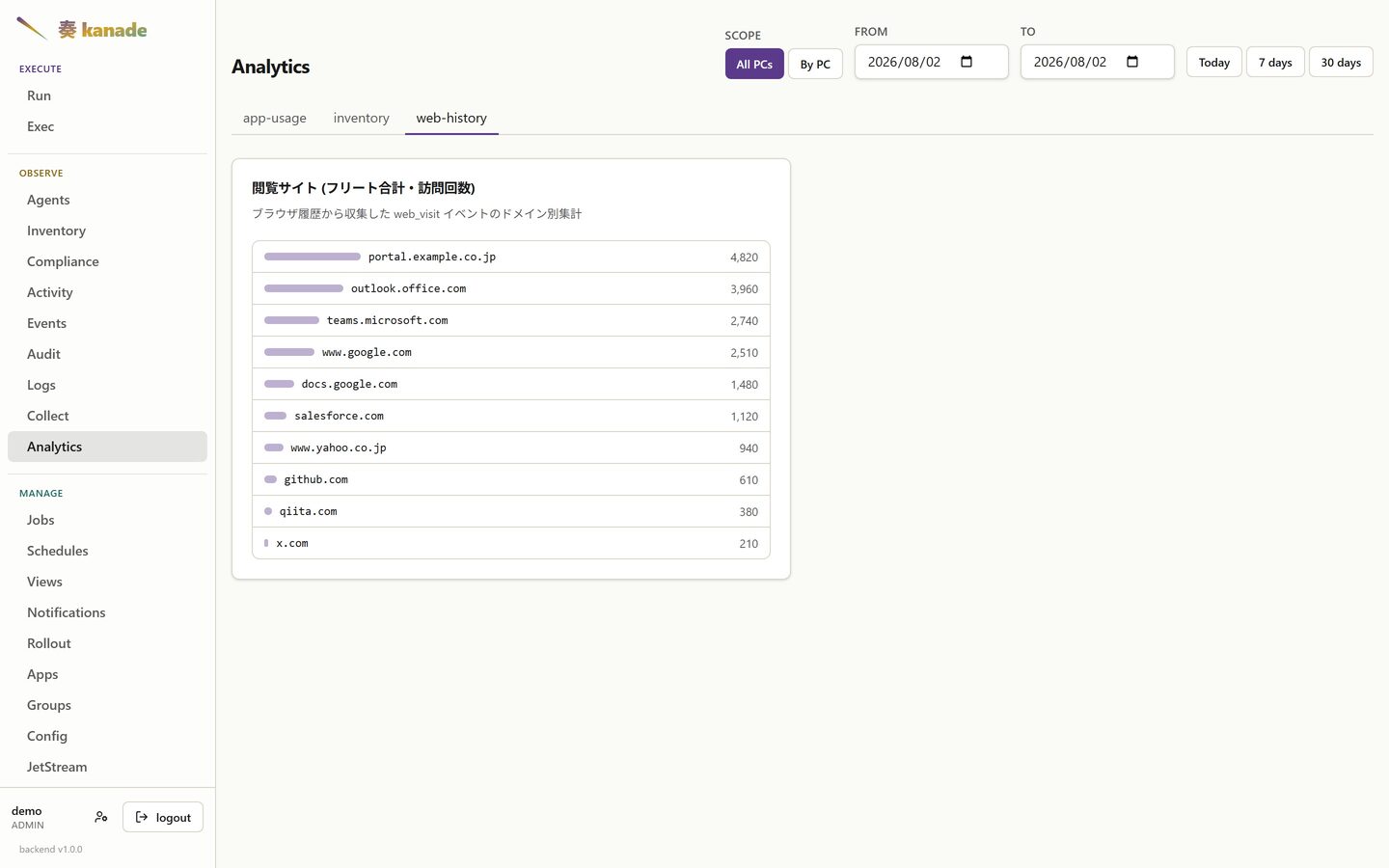
Aggregations over whatever your jobs emit. App-usage, browsing history and inventory facts are shown here; the widgets are defined in YAML and can be pinned to the dashboard.
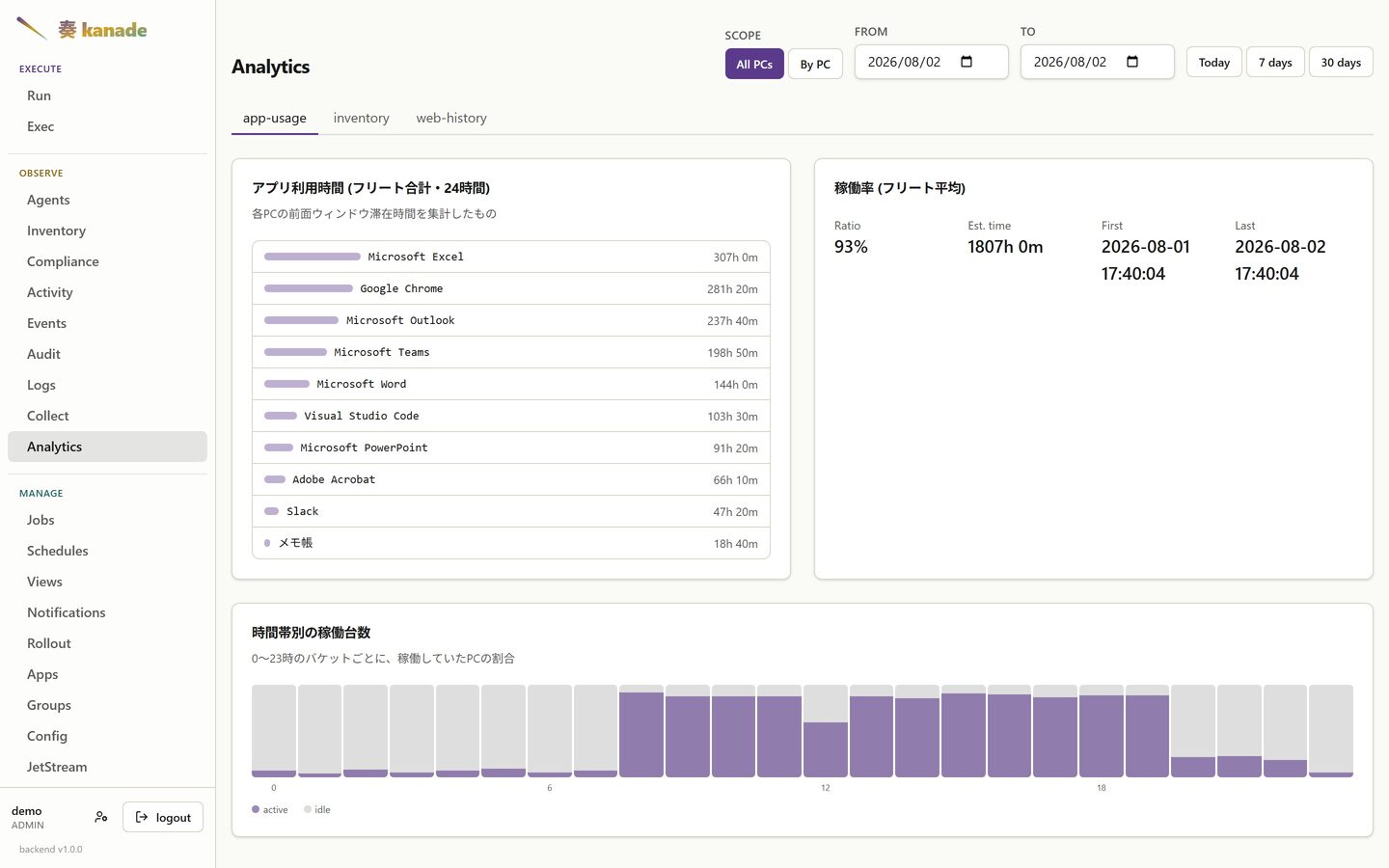
The tabs are not a fixed set of reports — each one is a dashboard: name
some manifest declared, so a new tab appears by writing a widget that claims
it. These two came with the fixture:
Groups
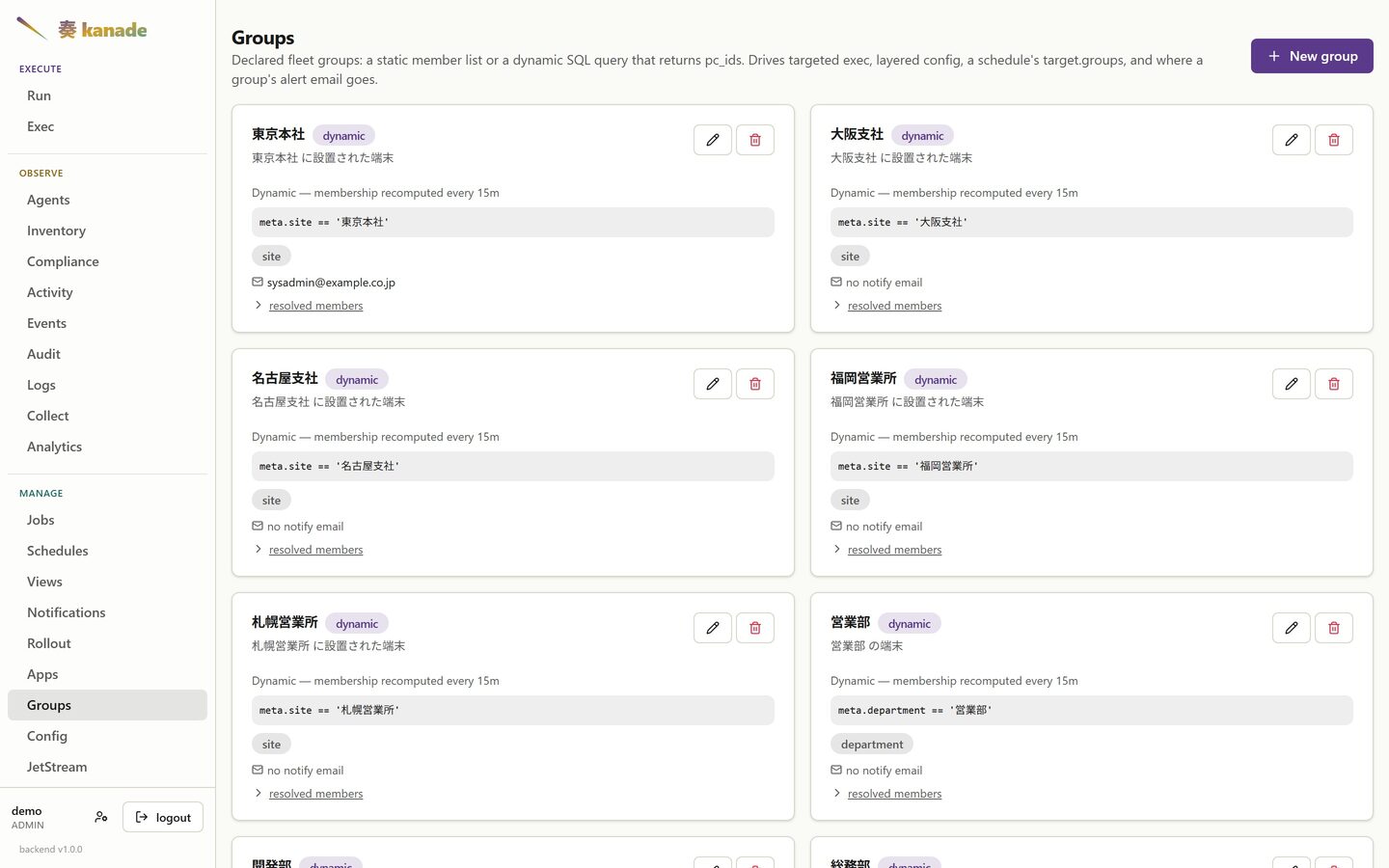
Declared fleet groups. A dynamic group carries a query the backend
re-evaluates on a schedule, so membership follows the fleet as metadata
changes — stamp site and department onto an agent once, and a PC that
moves office lands in the right groups by itself. A static group carries a
literal member list, for membership no query can express.
Notifications
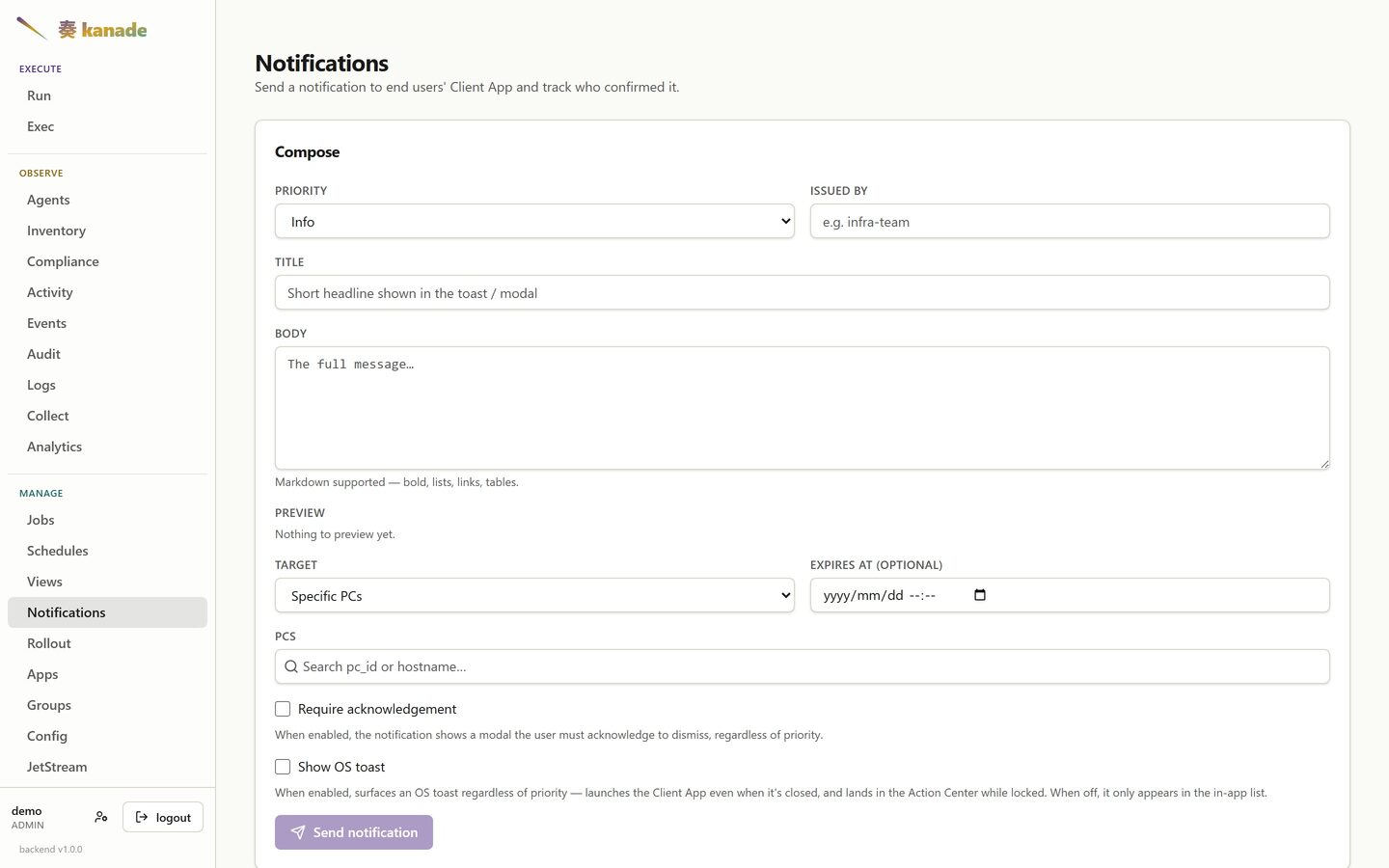
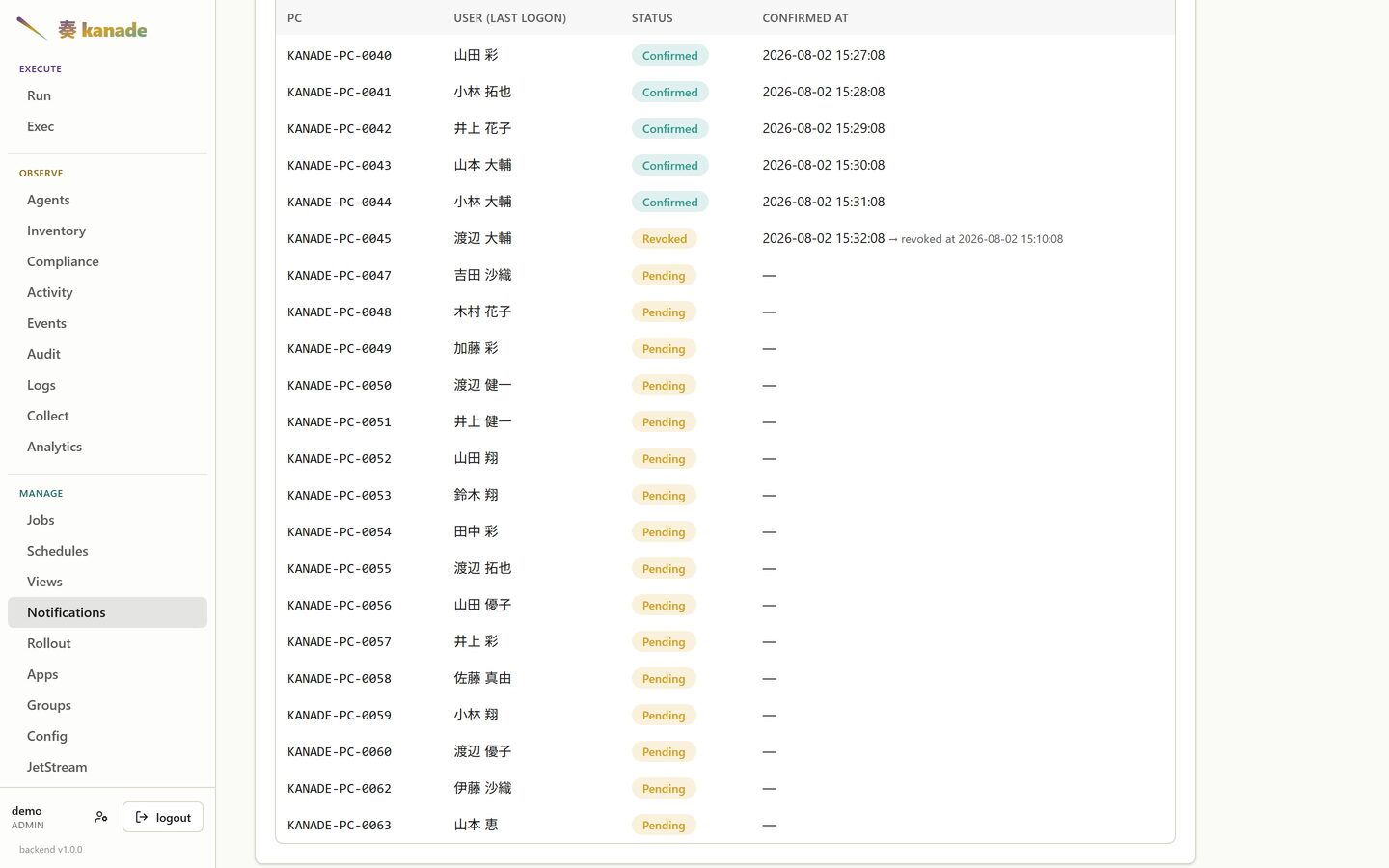
Send a notice to the Client App and track who confirmed it. Bodies are Markdown — headings, lists, tables, links — so a fleet-wide notice can be a document rather than a paragraph.
Who confirmed, and who took it back
Opening a notice tracks it per recipient, against the person who was signed in on that machine. Three states, not two: confirmed, still outstanding, and withdrawn — someone who confirmed and then took it back. A withdrawn row keeps both times, so "everyone has read it" cannot quietly become true again after the fact.
Jobs
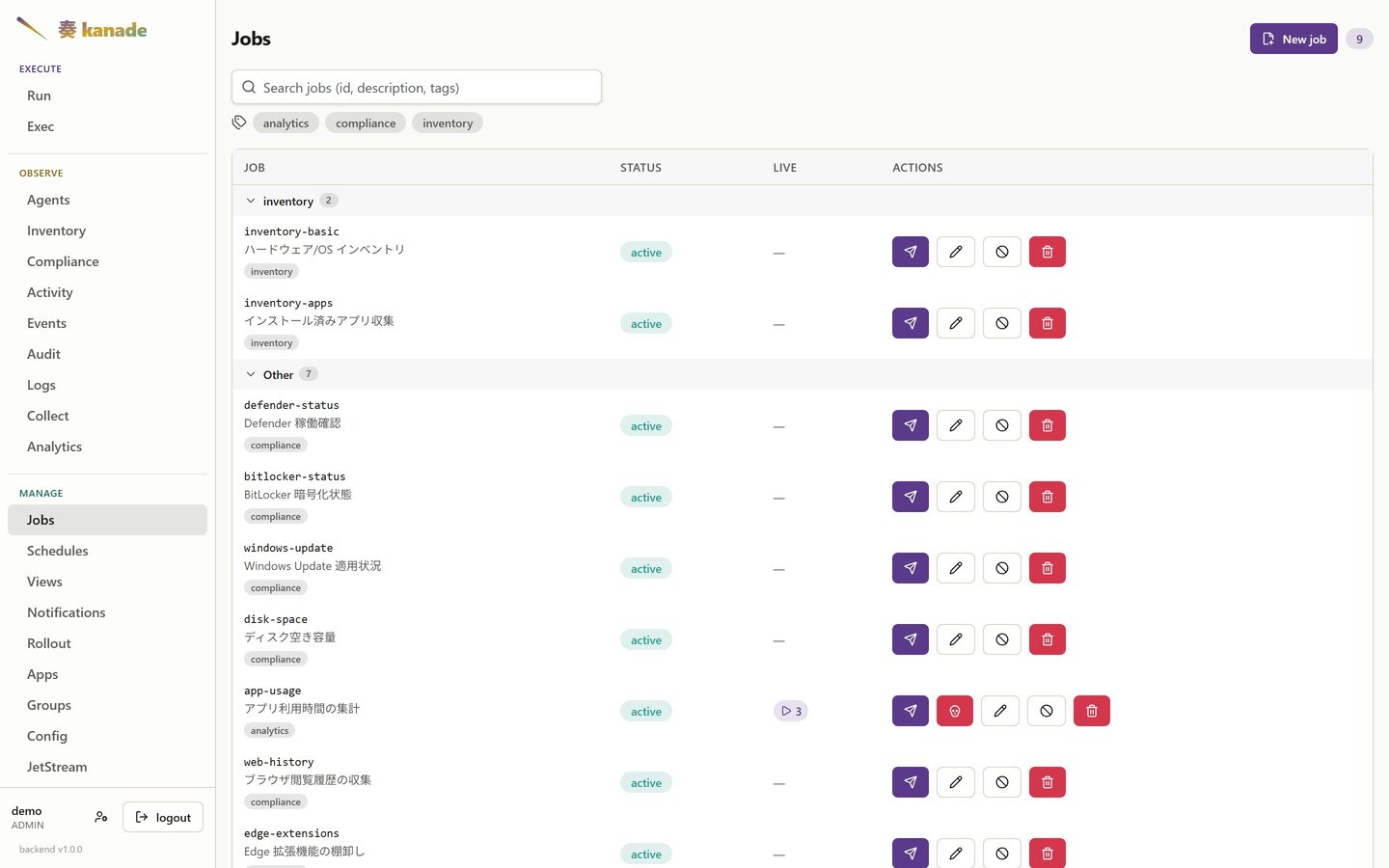
The manifests themselves, grouped by tag. Everything kanade runs on an endpoint is one of these.
The manifest itself
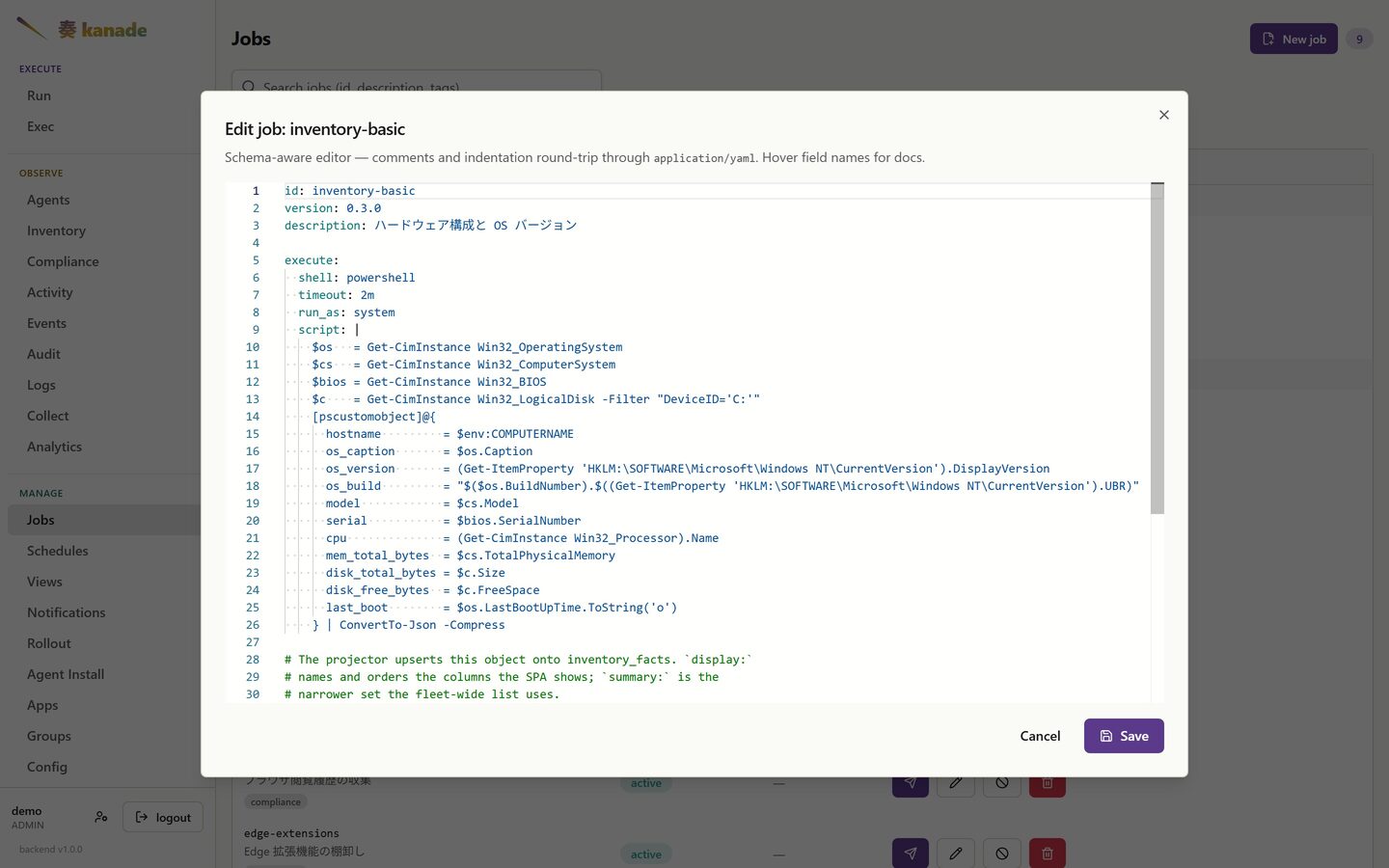
Opening one shows the YAML an operator wrote, not a form generated from it. Comments and block-scalar indentation survive the round trip, because the source is stored verbatim rather than re-serialised from a parsed object — so the file you get back is the file you saved. The editor knows the schema: hovering a field name shows what it does.
A manifest kept in Git opens read-only instead, pointing at the path in the repository — the SPA will not let an edit here diverge from the source of truth.
One run
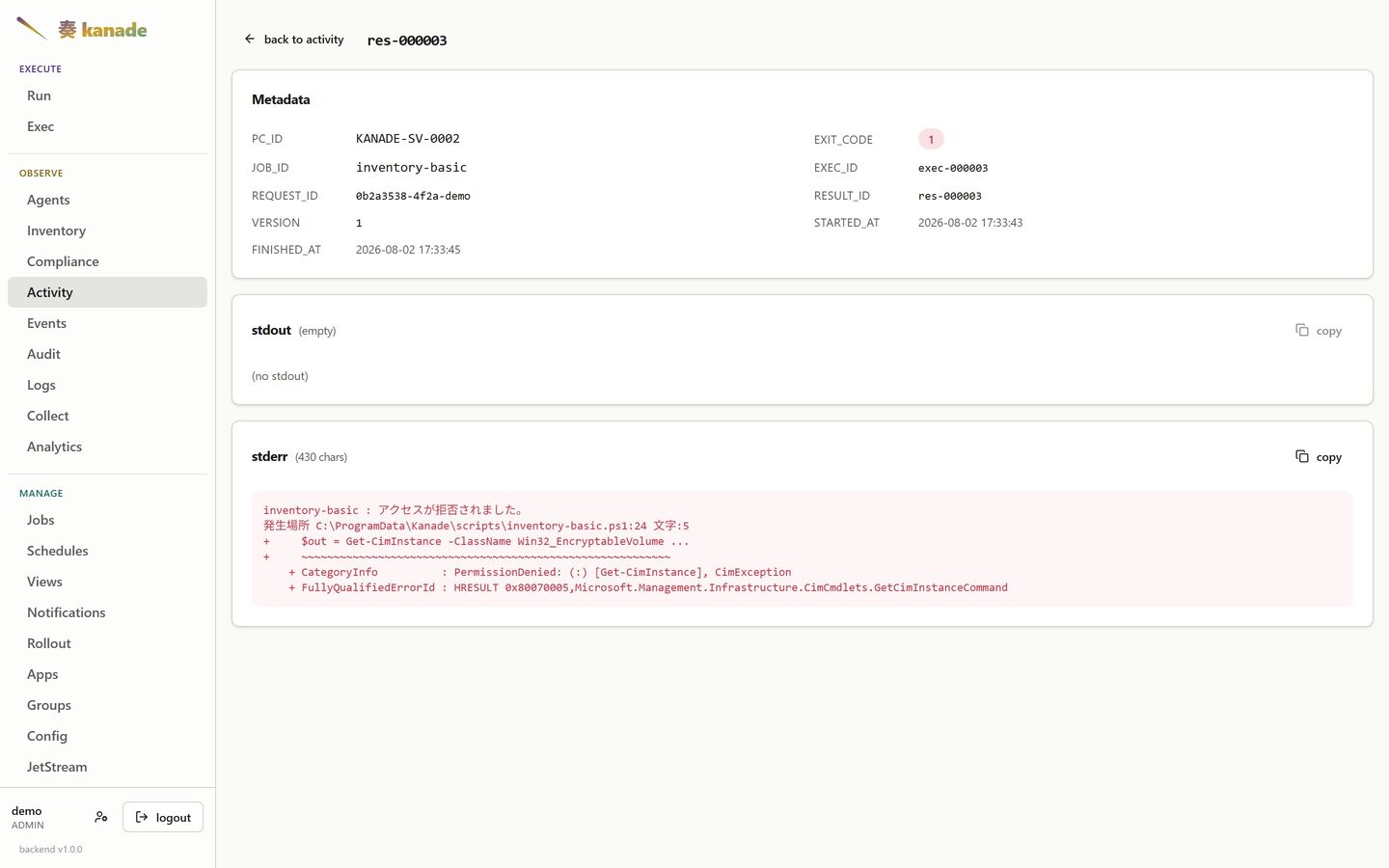
Every dispatch keeps its own result: the exit code, the ids that tie it back to the job and the request, and the output exactly as the host produced it. A failure is worth more than a red badge — this one carries the PowerShell error that caused it.
Audit
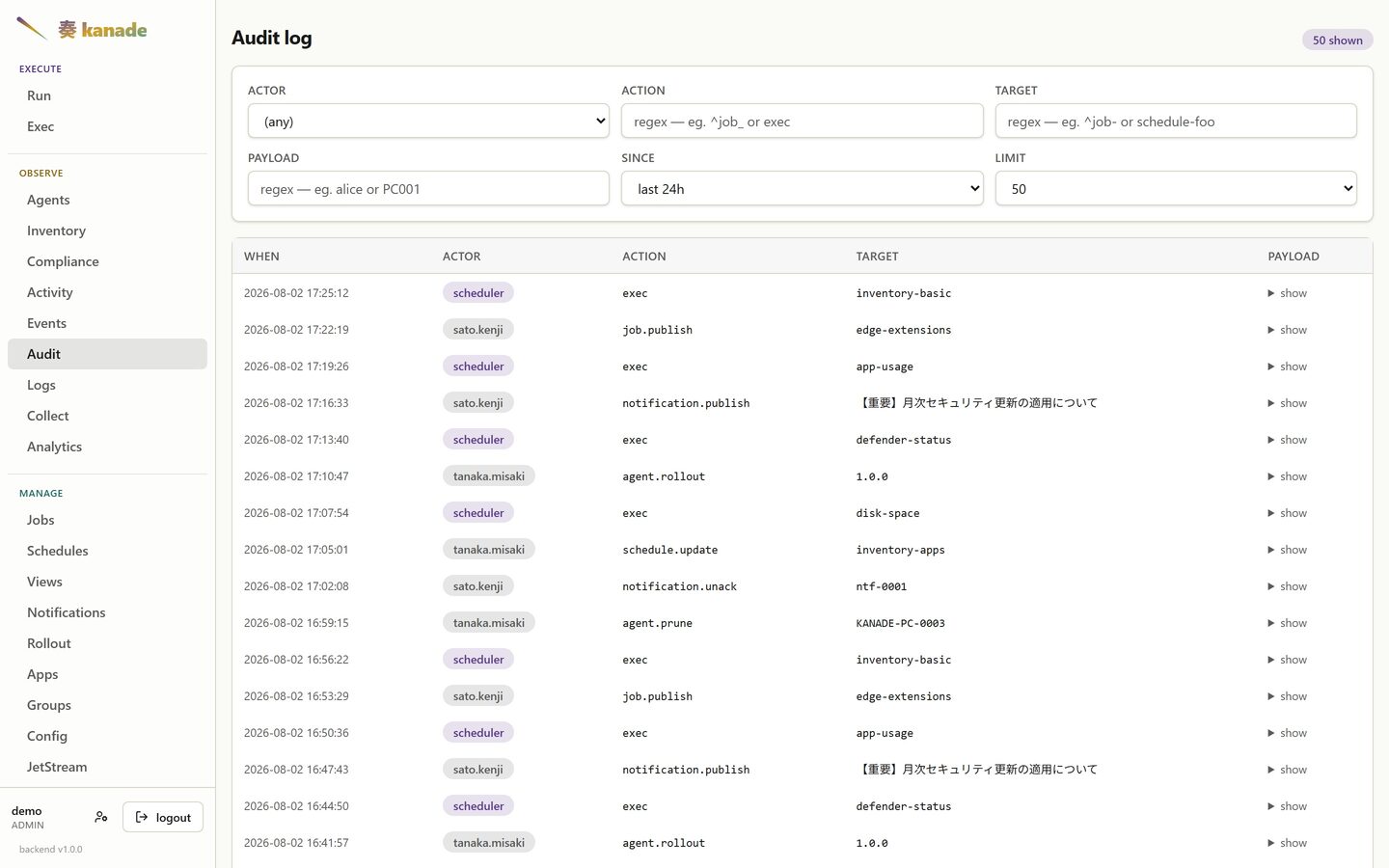
Every dispatch and every operator action, with the payload behind each one. Filterable by actor, action, target, and a text search into the payload itself.
Accounts
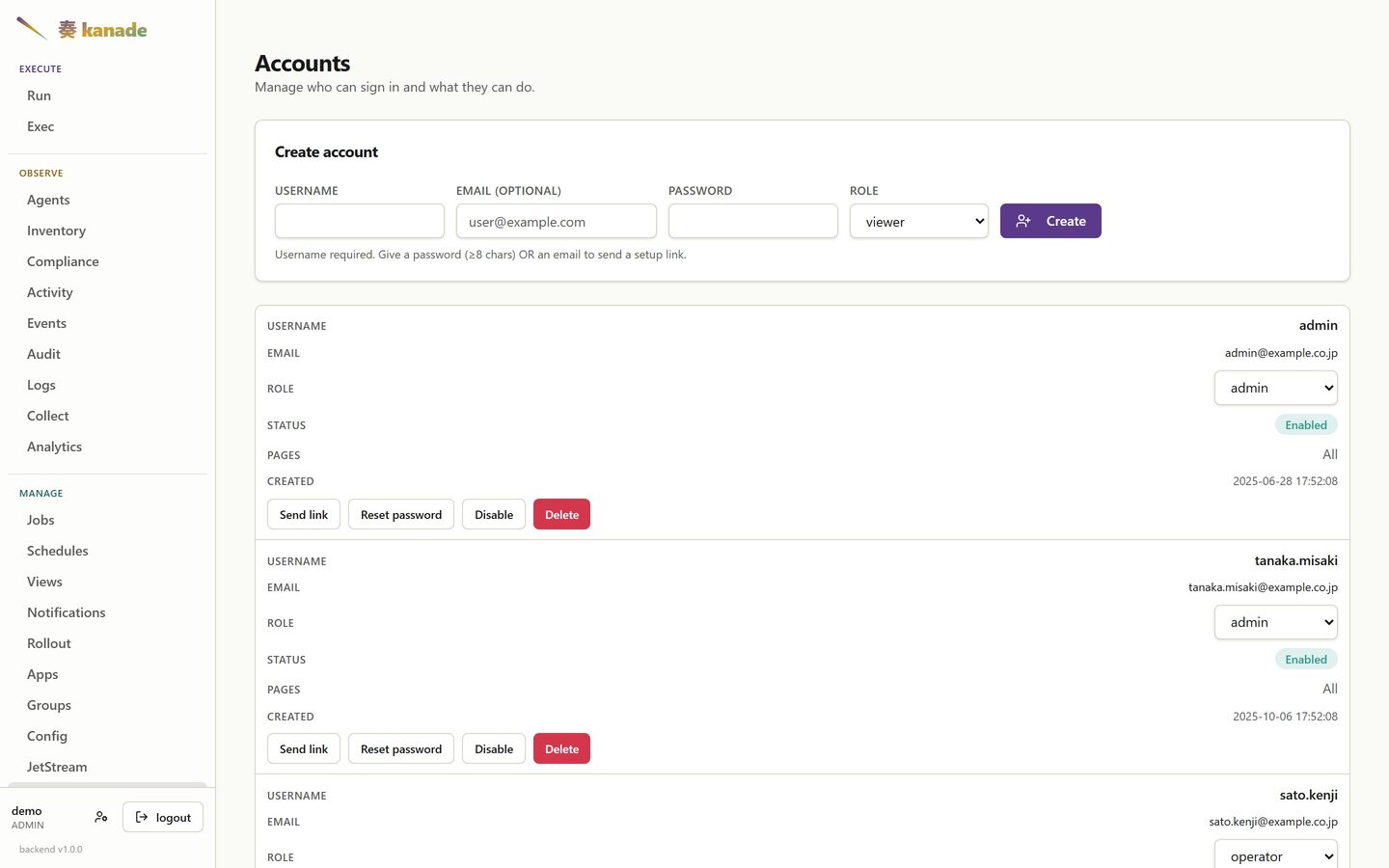
Operator accounts and their page access. Three states are visible at once here, because they are easy to confuse: unrestricted, a per-account allow-list, and a shared permission group — where the group governs and the account's own list, if any, no longer applies.
Your own account
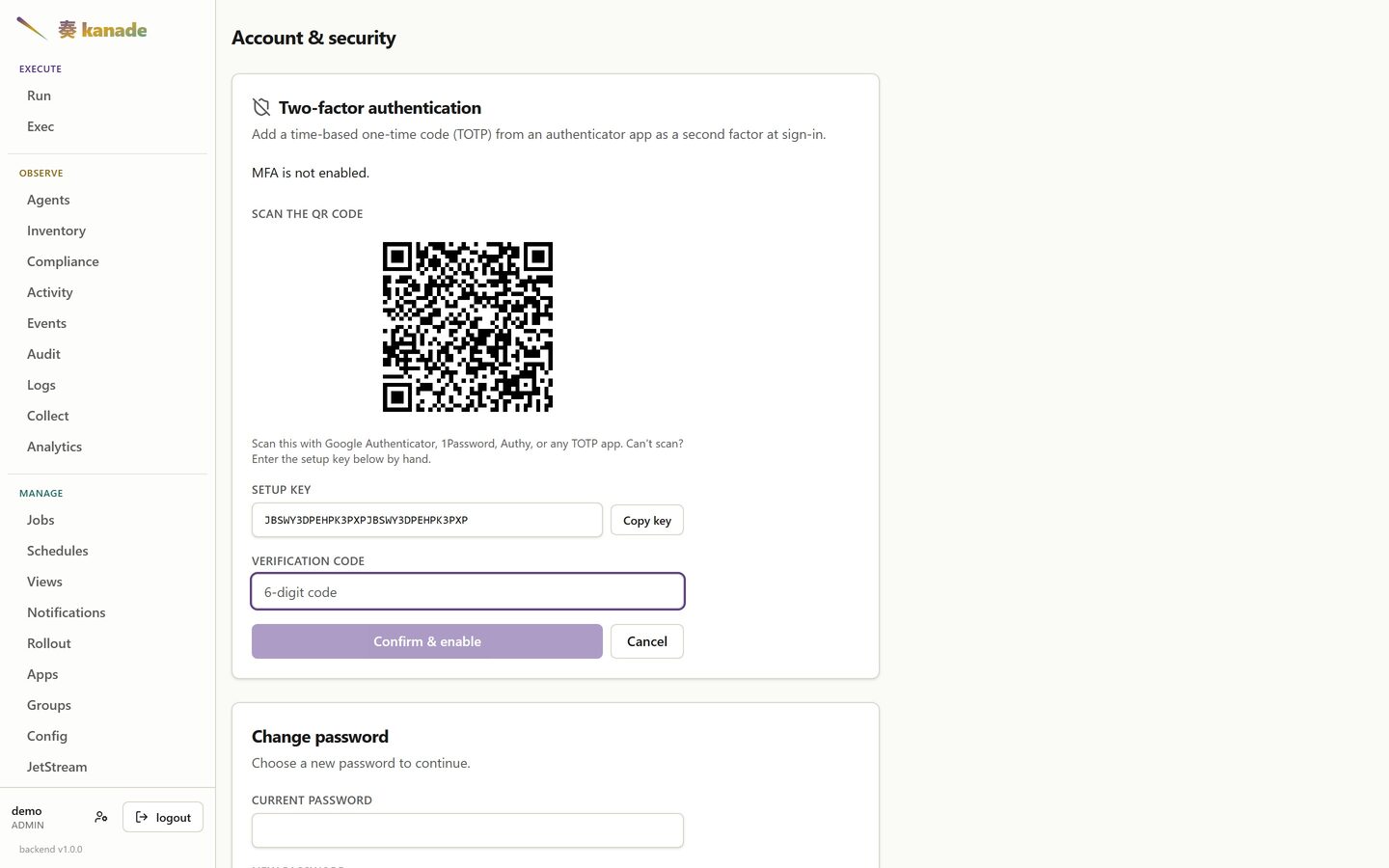
Two-factor auth and the password sit on one self-service page, so an operator sets both up without an administrator in the loop. Enrolment is ordinary TOTP — scan the code with any authenticator, or type the setup key in by hand. The candidate secret is only stored once a live code confirms it, so an abandoned enrolment leaves the account exactly as it was.
JetStream
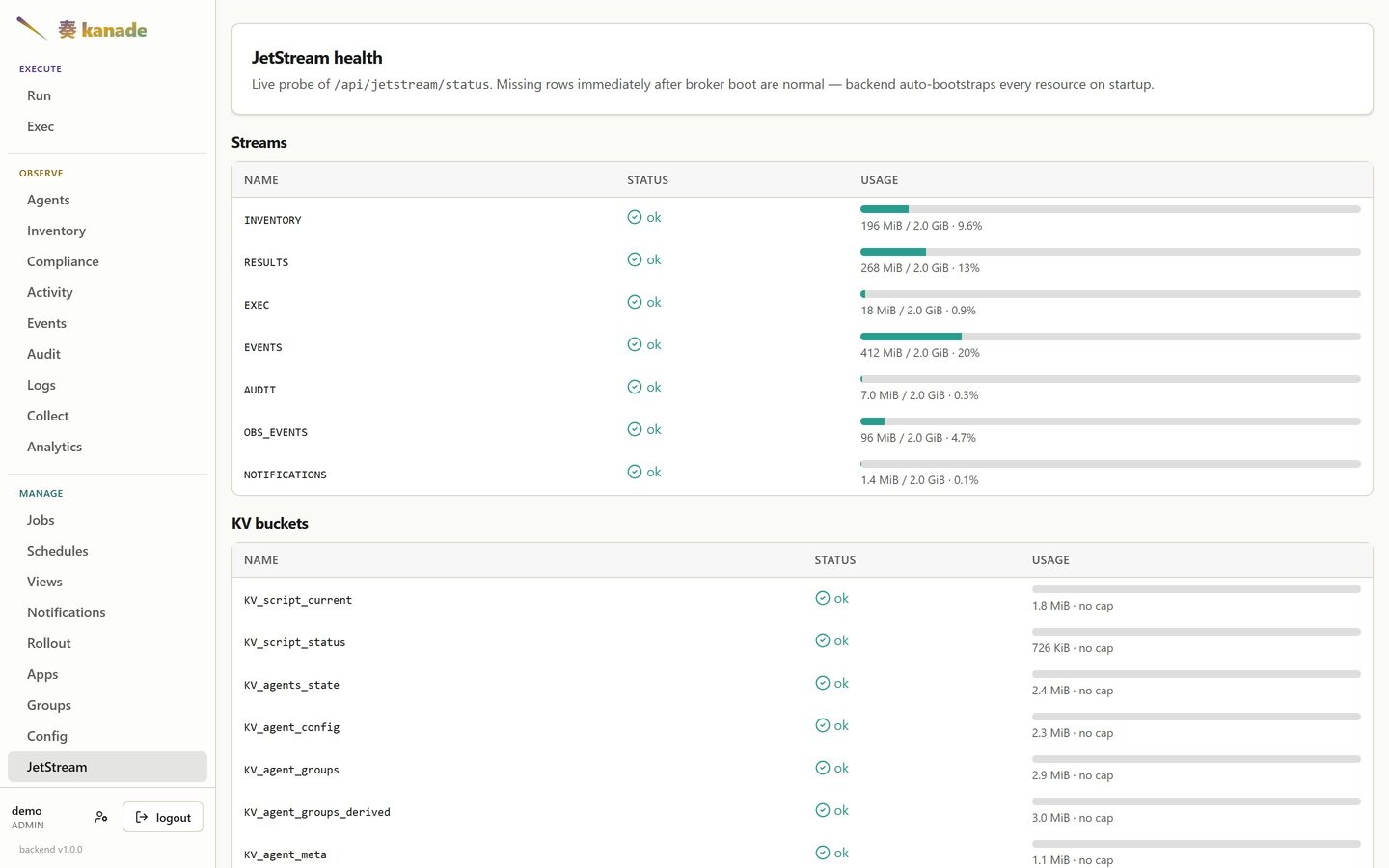
The broker's own health: every stream, KV bucket and object store the backend bootstraps, with usage against its limit.
Activity の履歴検索 API
GET /api/results は従来どおり結果の JSON 配列を返します(#1666)。
pc_id、job_id、exec_id、stdout、stderr は正規表現です。
アンカーのない PC001 は PC0010 にも一致します。識別子の完全一致を
指定する場合は ^PC001$ を使い、識別子中の正規表現メタ文字をエスケープ
してください。安全に完全一致と判定できる識別子のパターンだけが SQL の
等価条件へ変換されます。出力の正規表現は出力全体に適用されます。
since と until は RFC 3339 形式で指定する started_at の包含下限・上限です。
省略した側には時刻制限がありません。since が until より後、年が
0〜9999 の範囲外、不正な日時、不正なカーソルは HTTP 400 になります。
limit は返却件数で、既定値は 50、指定可能範囲は 1〜1000 です。
一般の正規表現検索は1リクエストにつき最大10,000行、stdout または
stderr の検索では最大1,000行を調べます。この上限は保持履歴の検索可能範囲
を意味しません。次のレスポンスヘッダーで継続の要否を判定します。
| ヘッダー | 意味 |
|---|---|
X-Results-Scanned | 今回調べた候補行数 |
X-Results-Stop-Reason | limit_reached: 返却件数に到達、scan_limit_reached: 走査上限に到達、end_of_range: 指定範囲を走査し終えた |
X-Results-Next-Cursor | 古い履歴が残る場合に返す継続トークン |
配列が空でも scan_limit_reached なら、まだ一致が残っている可能性があります。
次のリクエストは検索条件と時刻境界を保ち、cursor にトークンを渡します。
カーソルは検索条件に紐づくため、条件を変える場合は破棄してください。
順序は started_at DESC, result_id DESC で、同時刻の行も継続できます。
end_of_range が示す完了は指定範囲に対するもので、保持履歴全体とは限りません。
Activity の「Search older history」で継続し、「Previous window」で戻れます。 「Back to newest」は検索を最初からやり直します。期間プリセットの下限は ページ間で固定され、フィルター変更や検索のやり直しで再設定されます。
Dark theme
The console follows the operating system by default, and can be pinned to light or dark per browser.
 |  |
 |  |
On a phone
Below 1024px a data table stops being a table: each row becomes a card and every value carries its column name. No horizontal scrolling, no pinch-zoom to read a cell.
 |  |  |
The Client App
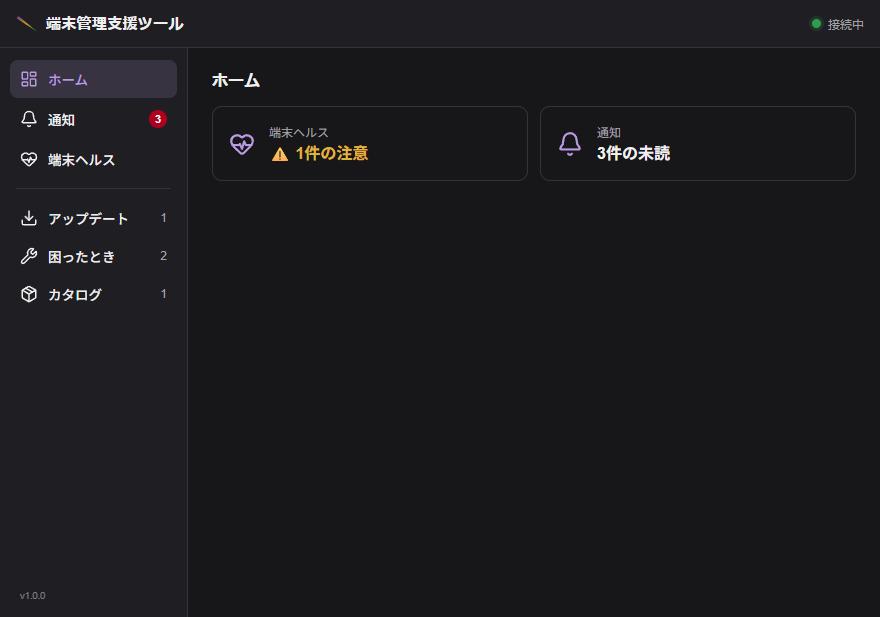
The half that lands on the end user's desk. It is a small tray application on the PC itself — the health tab they check, the jobs they can run without raising a ticket, and the notice they have to confirm. It talks to the agent over a named pipe on the same machine; it never reaches the backend directly.
These are shown at 880×560, the app's own window size, and in Japanese only: the Client App has no i18n layer — its strings are written into the source — so an English edition of these shots does not exist to capture.
Opening on the two things the user is being asked to look at:
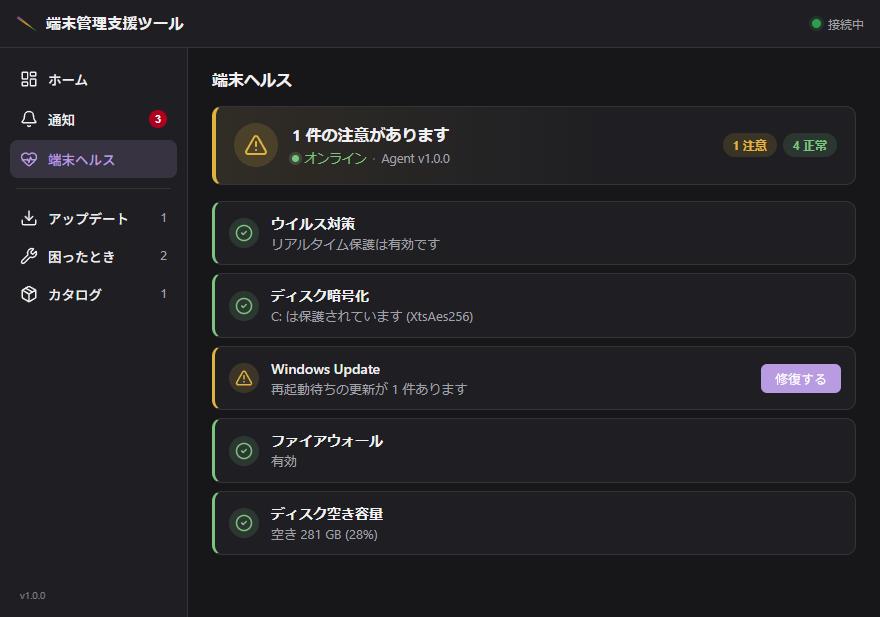
Device health
The same checks the operator sees on the Compliance page, from the other side. A warning carries the operator's own explanation and the remedy, so the first move is not "open a ticket".
Notices
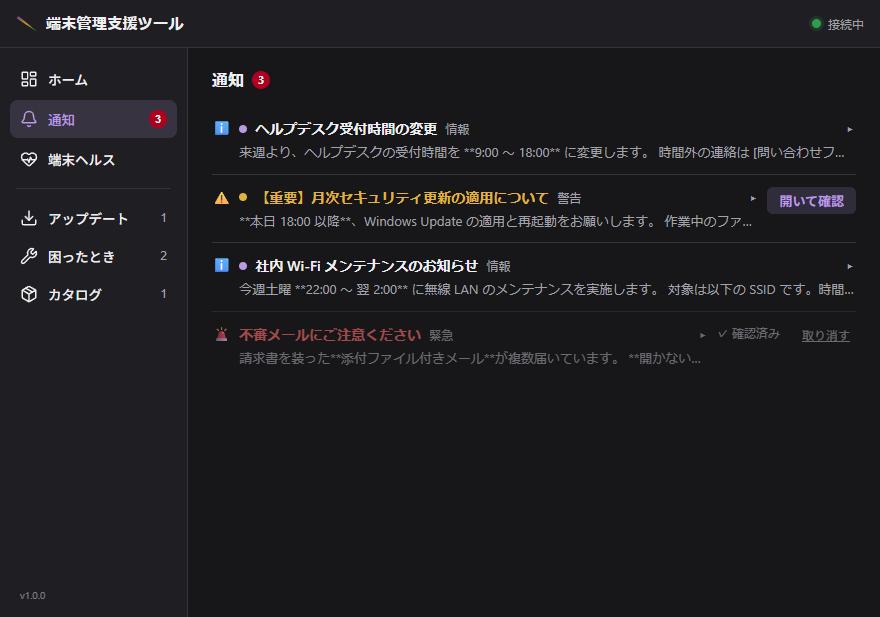
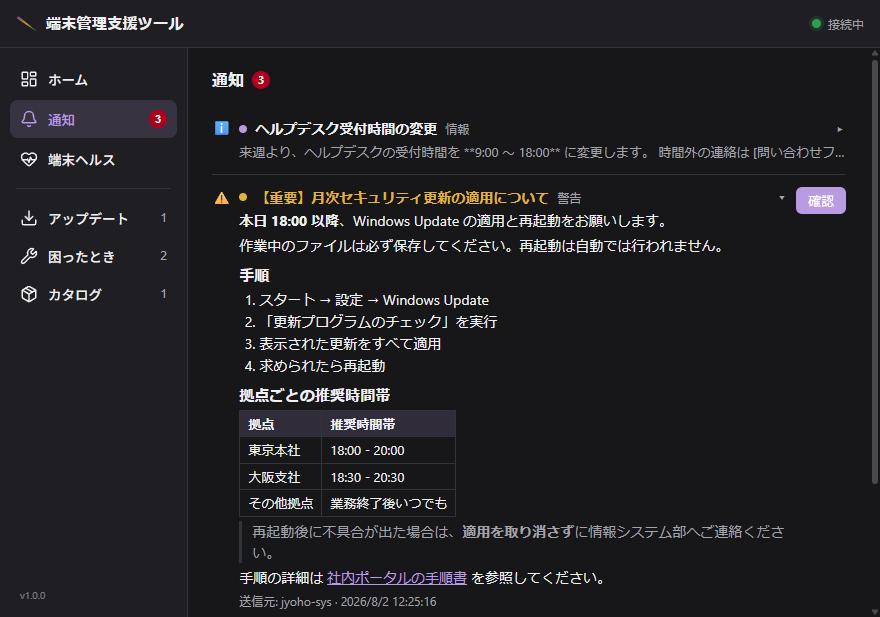
Sent from the Notifications page, tracked back to who confirmed. Expanding one renders the Markdown the operator wrote — headings, a numbered procedure, a table, a quote, a link:
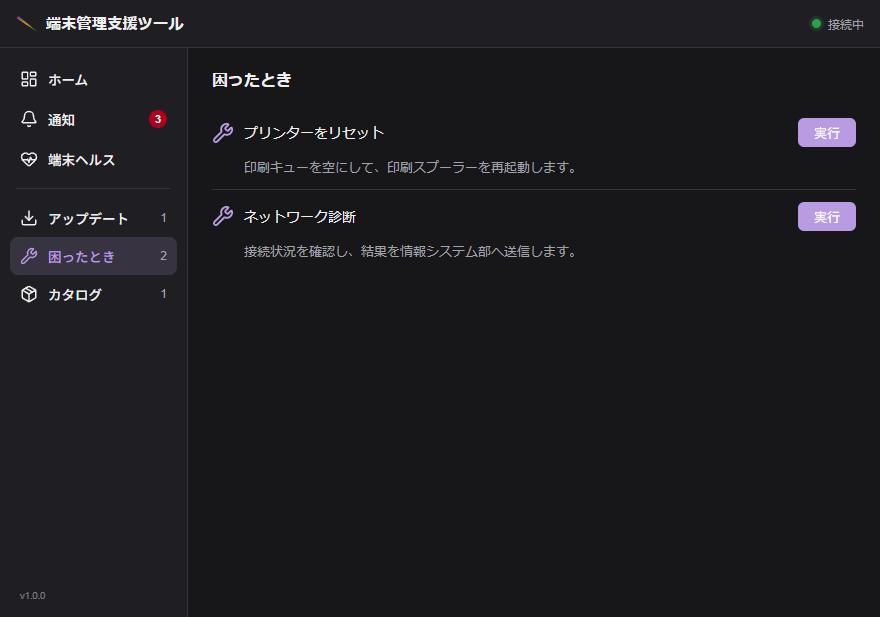
Self-service
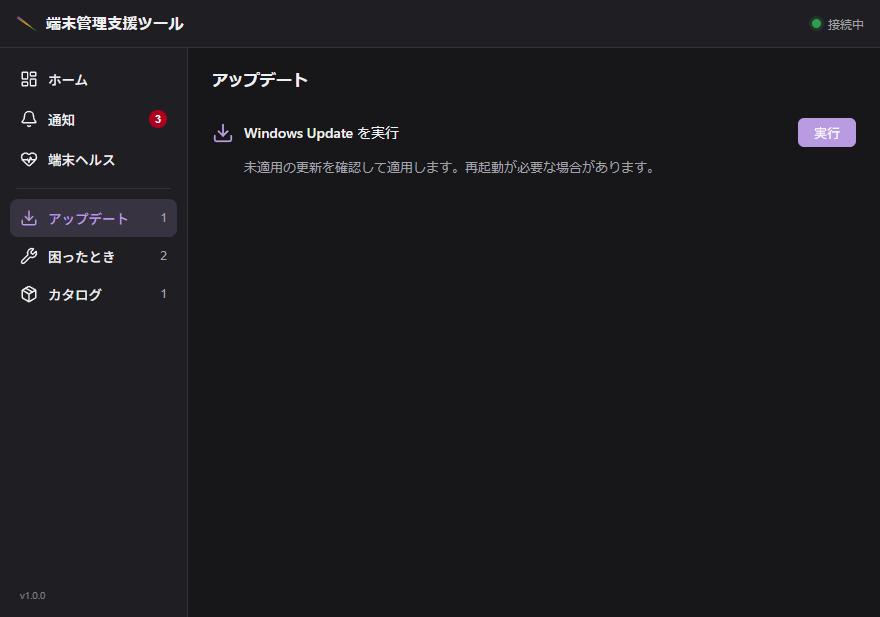
Jobs an operator has published to the user, grouped by category. Each is an ordinary manifest; what makes it appear here is the operator deciding it should.
 |  |
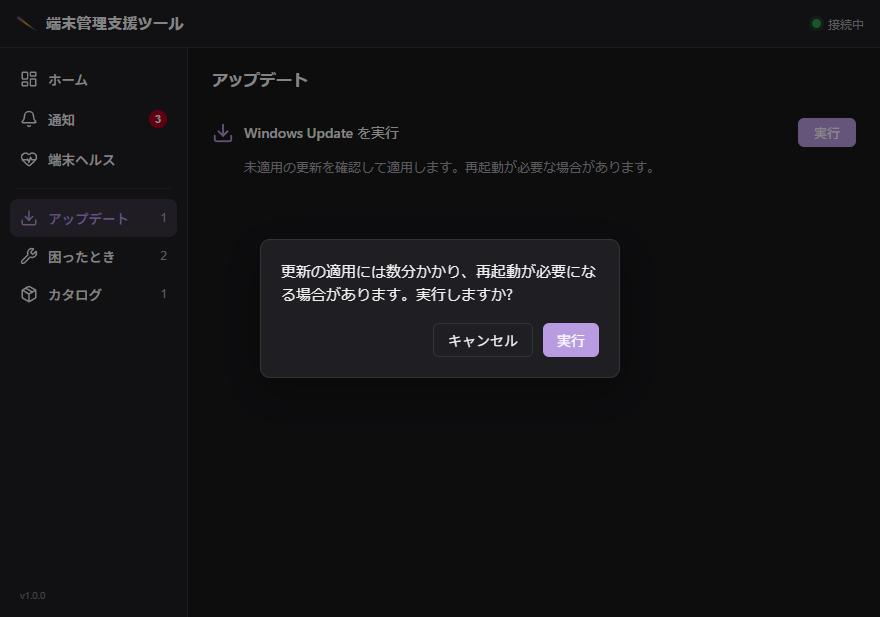
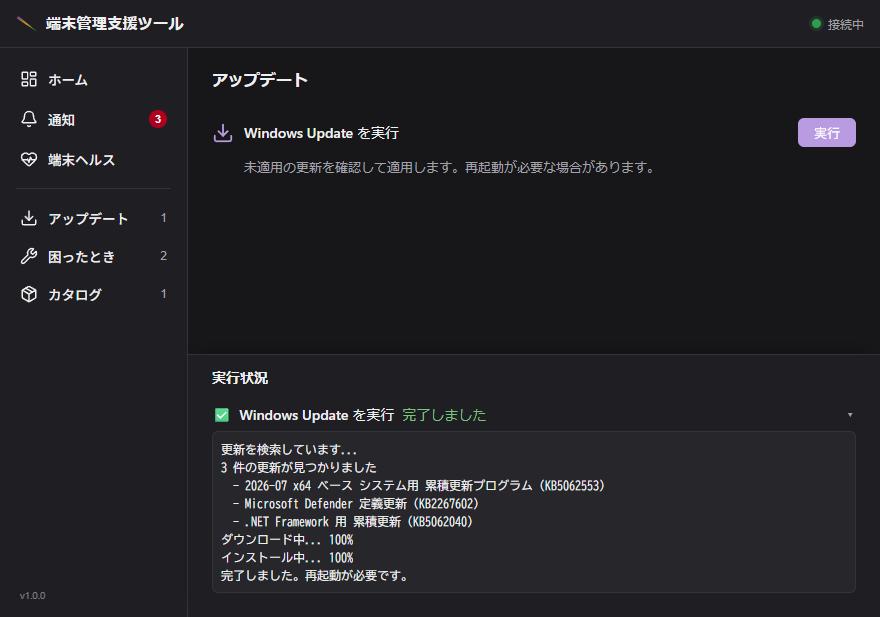
A job can ask before it runs — confirm: in the manifest, with the
operator's own wording — and the run streams its output as it goes, rather
than appearing complete after a silence:
 |  |
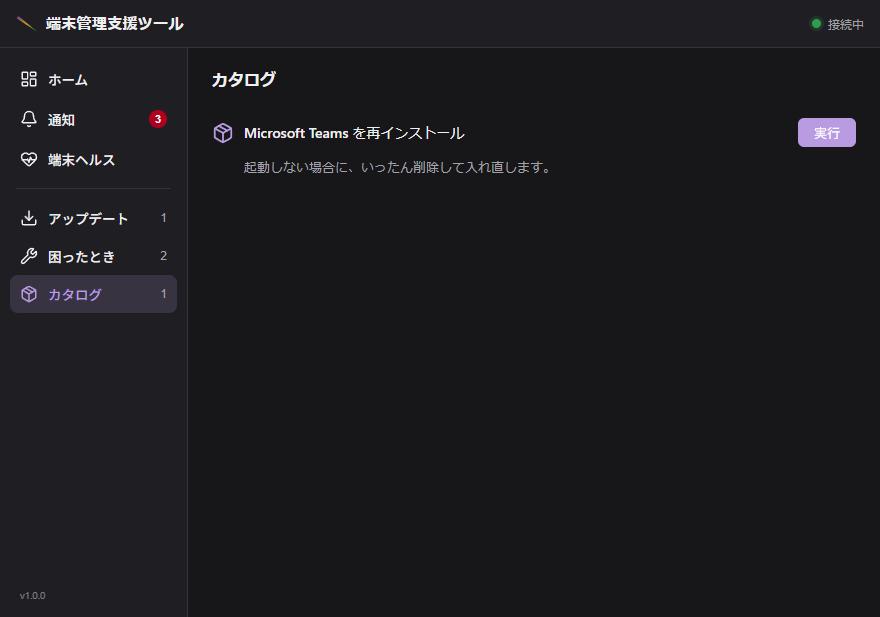
The catalog is the same mechanism pointed at installs:
Running it yourself
cargo make demo         # the operator console
cargo make demo-client  # the Client App
Then open http://localhost:5173 and sign in with any username and password.
Nothing else needs to be running. See
crates/kanade-backend/web/demo/README.md for what the mock covers and how to
add to it.
System Architecture
kanade is designed to manage Windows, Linux and Apple Silicon macOS endpoints asynchronously.
Available inventory, session and desktop features differ by platform.
Component Topology
The system consists of five main components, coordinated through an event-driven pub/sub structure:
graph TD
    subgraph Operator Session
        CLI[kanade CLI]
        SPA[React SPA]
    end

    subgraph Server Infrastructure
        Backend[kanade-backend]
        NATS[NATS Broker / JetStream]
    end

    subgraph Managed Endpoints
        Agent1[kanade-agent PC-1]
        Agent2[kanade-agent PC-2]
        Client[kanade-client Tauri App]
    end

    CLI -->|Command / Query API| Backend
    SPA -->|REST / WebSockets| Backend
    Backend <-->|State/PubSub| NATS
    Agent1 <-->|NATS Connection| NATS
    Agent2 <-->|NATS Connection| NATS
    Client <-->|KLP local IPC| Agent1
1. kanade-agent
A resident executor: Windows service, Linux systemd service or macOS launchd daemon.
- Role: Core executor.
- Communication: Establishes an outbound-only NATS connection. It does not open any inbound ports, making it firewall-friendly.
- Capabilities: Executes jobs, reports inventory and performance data, and performs self-update. Shells include Windows PowerShell, PowerShell 7 (
pwsh) andsh; install the selected host on the target. Windows-specific sensors and jobs do not become portable automatically.
2. kanade-backend
The central HTTP API and projection server.
- Role: Coordinates commands, processes incoming telemetry, and hosts the operator Web interface.
- State management: Persists events, activity logs, and status records in a localized SQLite database.
- Projector pattern: Subscribes to the NATS command-response stream, parses incoming payloads, and projects them into state tables in real-time.
3. NATS Broker (with JetStream)
The message transport layer of the entire fleet.
- Role: Lightweight, high-throughput message broker.
- JetStream: Retains command streams, job registrations, and file storage (using NATS Object Store buckets for distributing packages and agent scripts).
- Isolation: Decouples the backend from the agents. If the backend is offline or restarting, agents continue execution and cache outbox records, pushing them once connection resumes.
4. kanade-client
An optional Tauri desktop application running in the logged-in user's desktop session on endpoints.
- Role: Provides end-user interaction (e.g., prompt dialogs, notifications, or a user-facing dashboard).
- Communication: Shares state with the local
kanade-agentvia secured local IPC mechanisms.
5. kanade CLI
The primary command-line tool for operators.
- Role: Packages and publishes software updates, submits and executes job manifests, and queries live fleet inventory from the command-line.
Security & Reliability Design
Outbound-only Connections
Agents initiate outbound NATS connections (including WebSocket deployments). Package installation jobs may also download artifacts through the backend HTTP API. No inbound network listener is needed on managed endpoints; local KLP IPC is separate. Broker authentication, permissions and command-signing policy still determine who can issue commands.
Agent Job Identity
PowerShell scripts use private per-execution staging directories, under
%ProgramData%\Kanade\agent-scripts on Windows, or the platform-specific
macOS staging root / Unix temporary directory. Job manifests select
run_as: system, user or system_gui; identity support differs by OS.
These are process identity and staging protections, not a sandbox for untrusted
scripts: production system jobs run as LocalSystem / root. See the
macOS identity rules.
Operations overview
Day-2 operations in kanade fall into two flows:
-
Direct install — drop binaries + config on a fresh host and register the Windows service. Used to bootstrap the first agent, the initial backend, and the NATS server. Scripts:
scripts/deploy/agent.ps1,scripts/deploy/backend.ps1,scripts/deploy/nats.ps1. Run manually on the target host. -
Agent-mediated update — once an agent is running, the agent itself can install / update other components on its own host without ssh / RDP. The operator publishes binaries + script bodies to the broker, then fires a job; the agent fetches, verifies, swaps, and restarts services. This is the bulk of day-2 operations.
The agent-mediated flow has the same shape regardless of what you're updating:
operator host ─► kanade CLI ─► backend HTTP API ─► NATS ─► agent
                    │                              │
                    ├── publish binary ────────────► fetches from
                    │   to OBJECT_APP_PACKAGES        OBJECT_APP_PACKAGES
                    ├── publish script ────────────► fetches from
                    │   to OBJECT_SCRIPTS             OBJECT_SCRIPTS
                    ├── register / update job ─────► reads job manifest
                    │                                 from `jobs` KV
                    └── exec job ──────────────────► PowerShell child
                                                      runs the script
The diagram shows the Windows installer jobs. Linux has bundle/setup scripts and cross-platform agent rollout; see Linux deployment and macOS agent deployment.
Component-specific guides:
- kanade-backend — the HTTP / projector binary
- kanade-client — the Tauri end-user app
- NATS server — the broker itself (yes, you can update the broker over the broker)
- kanade-agent itself — the agent self-update path (different from the other three; it uses a dedicated rollout bucket, not the generic OBJECT_APP_PACKAGES + script pair)
Enabling passkey sign-in
Use Operator Settings → Server Settings → Passkeys to configure and enable WebAuthn. This is the only supported configuration path; passkeys are disabled by default. Enter the externally trusted RP ID and HTTPS origins explicitly, save, and check the effective state. Updates apply without a restart and invalidate pending ceremonies across backend instances. See configuration reference for validation rules, credential management and multi-instance routing requirements. Existing password/TOTP login and recovery continue to work.
Installation and Deployment
The cross-platform kanade deploy design and script retirement gates are in SPEC §2.13. Typed schema/validation and plan persistence are implemented, but production typed dispatch and the deploy CLI are unavailable; keep using the current procedures below during migration. It targets enrolled agents only and leaves the Agent Installation screen one-liners unchanged.
This section details how to bootstrap kanade components as native Windows services in production or staging environments.
Deployment Model
Production hosts and target endpoints run kanade components as background Windows services, providing automatic startup and configured service-manager recovery.
| Service Name | Triple / Binary | Config Source | Typical Target |
|---|---|---|---|
| KanadeNats | nats-server.exe | Config file with token substitution / ACLs | Central server |
| KanadeBackend | kanade-backend.exe | Hardened Registry / Config file | Central server |
| KanadeAgent | kanade-agent.exe | Config file / hardened Registry / local state DB | Managed endpoints |
1. Prerequisites
- Host OS: Windows 10/11 or Windows Server 2016+.
- gsudo: Required to perform elevated installations from standard user shells (or run commands from an Administrator-level PowerShell prompt).
- Network Routing: Managed endpoints must be able to reach the NATS server port (default
4222) over TCP.
2. Setting Up the NATS Server (Broker)
The NATS server acts as the messaging core.
- Stage the deployment bundle using
scripts/build-release.ps1 -Roles nats. - Deploy the service with elevation:
# Elevated PowerShell prompt
& "dist\nats\deploy-nats.ps1" -NatsToken "your-secure-nats-token" -Recreate
This installs the KanadeNats service, configures it to run under the local system account, sets up JetStream data directories, and substitutes the token into the installed NATS configuration file, and restricts that file to SYSTEM and Administrators.
Optional: per-role users instead of the shared token
By default the broker runs on the single shared token above. To run the three
role users (agent, backend, breakglass) instead, deliberately:
# Default cost 8 requires a long random password (32 random alphanumeric characters recommended).
# Hashes only, minted with scripts/ops/nats-password-hash.ps1 (or .sh); never plaintext.
$env:KANADE_NATS_AGENT_PASSWORD_HASH      = '<hash>'
$env:KANADE_NATS_BACKEND_PASSWORD_HASH    = '<hash>'
$env:KANADE_NATS_BREAKGLASS_PASSWORD_HASH = '<hash>'
& "dist\nats\deploy-nats.ps1" -UseNatsUsers      # switch
& "dist\nats\deploy-nats.ps1" -UseNatsToken -NatsToken "your-secure-nats-token"   # revert
-UseNatsUsers replaces the authorization block of the installed config with
an include of nats-server.users.conf (the template with the hashes
substituted) and gives both files the SYSTEM + Administrators ACL;
-UseNatsToken restores the shipped token block (hand edits inside it are not
restored) and removes the users file. The service is stopped and started by
the script as always (-NoStart defers the start). On Linux the equivalent is
KANADE_NATS_AUTH_MODE=users|token for setup.sh, recorded so re-runs keep it,
with a manual systemctl restart nats-server to apply it (see
deploy/linux/README.md).
For the recommended bcrypt cost 8 and broker burst measurements, see Choosing the bcrypt cost.
The switch is atomic: a config cannot hold both a token and users, and a client presenting a token is rejected once users exist. Every agent, backend and CLI host must already hold a user pair before the broker flips; follow the separately documented readiness procedure first.
Expected authentication mode and connection findings
The backend watches how every connection to the broker authenticated and raises a warning when that is not what you intended, so that a switch to per-role NATS users that failed or silently reverted, or a broker that authenticates nobody, does not go unnoticed. The broker's own report is the source (its monitoring endpoint, polled every minute), not anything an agent says about itself.
Setting. Settings → Server → Expected NATS authentication (the
nats_auth_mode server setting) is either token (the default, today's
shared token) or users (per-role users). It is an expectation only: it
changes nothing about how any process connects, it just defines what counts as
unexpected. Set it to users when you switch the broker to the users block,
and back to token if you switch back.
Findings. Each connection is judged by the mode you expect, the role it
announces in its connection name (kanade-<role>[/identity]) and the user the
broker reports it authenticated as:
| finding | when | severity |
|---|---|---|
broker_open | positive broker evidence of access without an authenticated identity (no-auth), in either mode | critical |
token_reverted | users expected, but the connection used the shared token | critical |
role_user_mismatch | users expected, but the user is not the announced role's (agent, backend, breakglass for the CLI), e.g. the backend user on an agent connection | warning |
credential_unnameable | users expected, but the credential could not be named | info |
Under token, the shared token is expected and only broker_open is
reported. The announced role is chosen by the client, so a mismatch is
evidence of a misconfigured or misused host, while a match proves nothing: it
is only the connection's claim, compared against the broker's word.
Findings are grouped by kind and announced role, so a whole fleet reverting at
once is a handful of entries, each with a connection count and at most five
registered host names. A finding is raised when it first appears, shows as a
banner on the Dashboard, and is marked resolved when it is gone (a later
recurrence is raised again). While the backend's own broker connection
cannot prove the mode, user names read as unknown, so expect
credential_unnameable entries until it reconnects.
Acceptance evidence and uncertainty. A TCP connection is already visible in
/connz?auth=1 after INFO, before CONNECT or successful authentication. A
server-issued cid, an empty/missing authorized_user, a client name, language,
version, RTT, or elapsed time alone does not prove access without authentication.
The projector brackets its paged connz walk with /varz, checking server id,
startup/configuration timestamps and response/page metadata. A restart, reload,
identity change, malformed/missing response or timeout invalidates the poll.
Pages are sorted by ascending CID and overlap at the preceding boundary CID.
New connections append and do not by themselves prevent resolution; a missing
boundary, duplicate/reordered CID or incomplete walk holds resolutions, while
usable positive observations can still raise findings. The cumulative
total_connections counter is not a completeness condition. Offset pagination
is not an atomic snapshot: the boundary checks detect skipped prefixes, not
every possible race or a change immediately after the final response.
With no reported identity on TCP, application message traffic (in/out messages)
or a live subscription proves the client was allowed to use the protocol.
Positive traffic must also be consistent with broker policy: explicit
auth_required: true plus a missing identity stays unproven. Counters can predate
a second CONNECT, whose options are overwritten before re-authentication.
All three
counters and the client kind/transport must be present; missing is not zero.
An explicit TCP auth_required: false also proves that listener is open. The
normally omitted false field is conservatively unknown, not inferred false:
a silent open connection can remain unproven until application activity is seen.
The backend normally has subscriptions, so an active open broker remains visible
without waiting for a grace period. An idle authentication-required TCP connection
within the broker's own auth_timeout is auth-pending; after that budget, or
without enough monitoring evidence, it is auth-unproven. Expiry never proves
acceptance. These are different from unknown, which still means a reported
credential cannot safely be named and retains credential_unnameable handling.
Pending/unproven connections do not replace an agent's last observed credential.
TCP auth policy and timeouts are never applied to WebSocket connections. WS can
have separate authorization, credentials from cookies, or no_auth_user.
The current monitoring fields do not expose its effective authorization policy.
Without a reported identity, even positive traffic remains
auth-unproven with reason listener_auth_unproven: counters may predate a
second CONNECT whose replacement credentials will be rejected. This also limits
detection of truly open WS listeners; TCP acceptance evidence remains available.
A reported identity takes precedence over activity. Cookie/token auth retains
redaction. WS user values stay unknown because a live TCP user login cannot
prove that another listener's value is a username rather than a secret.
no_auth_user assigns a broker identity, so this audit cannot distinguish that
fallback from a credentialed login as the same user: it is not proof of a
fully open broker. WS authentication without an identity remains unproven.
MQTT/leaf/unknown transports without a reported identity are also unproven. This audit trusts the
configured monitoring endpoint to be the broker and to honor auth=1; it does
not test listener reachability or actively probe production with empty credentials.
Any pending/unproven observation holds existing finding resolutions; it does not
block a new finding proven by another connection. Health reports
authentication_uncertain, with pending_connections and unproven_connections
counts (including partial-poll observations for incomplete). The optional
uncertainty_reasons map breaks those observations down using fixed, secret-free
EvidenceReason codes: pre_connect_pending, incomplete_monitoring,
listener_auth_unproven, invalid_connection_start, auth_policy_conflict, and
acceptance_unproven. Codes describe evidence limitations, not a proven cause.
The notice ledger's hold_resolve_kinds policy preserves existing notices while
allowing positive findings from other connections, including new critical alerts.
Counts and reason maps are null
when unavailable or stale. The aggregate metadata uses a JSON envelope in the
existing audit-state TEXT field; legacy plain statuses remain readable.
Connection evidence uses the existing retention ledger described below;
Observed.connection retains broker identifiers and timestamps alongside the
classified label. auth-pending/auth-unproven never contribute finding evidence.
External consumers should use the health API rather than interpret that internal
field.
The unnamed critical observed on 2026-10-18 from 02:24:58.636897559 UTC to 02:25:58.230333505 UTC after an OOM-triggered broker restart is a likely false positive. The pre-CONNECT window is reproducible on authentication-required NATS 2.14.3, but retained historical connection evidence cannot establish that this was the exact cause of that incident.
The evidence rules follow NATS 2.14.3's monitoring implementation and monitoring documentation. Its protocol parser gates application operations while awaiting authentication; its CONNECT handler sets metadata before checking authentication, and authentication implementation handles listener overrides and fallback identities.
Regression checks use fixtures, local HTTP mocks and disposable brokers only:
cargo test --locked -p kanade-backend nats_auth
cargo test --locked -p kanade-backend nats_conns
cargo test --locked -p kanade-backend live_connz -- --ignored
cargo make check
The live tests need nats-server on PATH and permission to bind loopback
sockets. They exercise INFO-before-CONNECT, rejected credentialless CONNECT,
anonymous authenticated token/user connections, reconnects, an open broker,
WS token overrides and WS no_auth_user. Run against the supported broker
version when upgrading; fixtures do not substitute for checking changed semantics.
Grace after a switch. When you change the expected mode, new findings are held back for 5 minutes. Switching re-authenticates every client, and each reconnects with backoff while the poll only looks once a minute, so for a few polls the broker's view is a mix of old and new; the window keeps those stragglers from being reported against the mode you just chose. Re-saving the same mode does not start it again, and findings already open still update and resolve during it. The Dashboard says when the window is open.
Reading it from outside. GET /api/health/fleet carries a nats_auth
block: expected_mode, grace_until, poll_status, open_total (the
connections covered) and findings[] (kind, subject, severity, count,
sample_hosts, first_seen_at, occurrence_id). It does not change the response's
status or HTTP code, so an existing monitor keeps behaving as before; a
monitor that should alert on this must read nats_auth.findings. A
poll_status other than ok means the audit could not judge the whole broker
(authentication_uncertain, incomplete, endpoint_unreadable,
settings_unreadable, state_unreadable, stale, or pending before its first
poll), and an empty list is then not a clean result.
What is never shown. The reported value of a connection may be a secret on
some broker builds, so findings carry fixed vocabularies (kind, severity,
the role bucket agent / backend / cli / unnamed / other), counts,
registered host samples and an occurrence reference. Admin-only connection
evidence adds broker-issued identifiers and parsed timestamps, as described
below. Neither the credential, nor the reported user name, nor the raw
connection name is copied into notice evidence.
Retained NATS authentication evidence
Each new occurrence has its own numeric occurrence_id in the authenticated
fleet health finding. The aggregate backend_notices row remains compatible;
reopening it does not overwrite earlier occurrences. Dashboard's admin-only
NATS authentication evidence and resolved history details and
GET /api/notices/nats-auth expose the latest 100 occurrences, including resolved
ones. Pass ?before=<oldest-id> to page backwards. Viewers and operators cannot
read this endpoint. Existing service-token and auth-disabled administrator
semantics still apply. Identifiers are selectable and copyable for log searches.
A host claim is saved only for an agent role whose exact pc_id is registered; registration does not authenticate the claim. Stored host text removes control characters and is limited to 64 Unicode characters. Other sample text is bounded by typed timestamps, fixed role/credential vocabularies, decimal u64 cids and ASCII alphanumeric server IDs of at most 64 bytes. Invalid identifiers are rejected rather than truncated. Older samples have no host field; it is not backfilled. The Dashboard separates broker identifiers and credential classes from untrusted client role/host claims.
A sample records the broker-issued decimal cid, server_id and broker
startup timestamp (/varz.start), backend first/last observation times (page
fetch completion, before settings/database work), broker page observation time, and connection start/last activity timestamps when supplied.
Occurrence timestamps describe notice processing; individual sample timestamps
describe page acquisition. A cid alone, or server_id alone, must not be treated
as a restart identity.
The collector reads /varz before and after the paginated /connz walk and
checks each page's server_id, timestamp and duplicate cids, within the existing
20-second timeout. Missing identity or an inconsistent/restarted broker rejects
the snapshot, reports an unreadable poll and leaves open findings unresolved.
A paging cap reports an incomplete poll and likewise cannot resolve findings.
This is a best-effort walk of live connections, not an atomic broker snapshot.
Evidence includes only a fixed credential class (user, shared-token,
no-auth, unknown), a fixed claimed_role bucket and an optional bounded
registered host claim. Role and host are untrusted client claims, unlike
broker-issued connection identifiers. Aggregate notifications also retain
registered host samples. Raw
authorized_user, tokens, passwords, connection names, arbitrary client metadata
and unrestricted monitoring responses are never copied into connection evidence.
Peer addresses are deliberately omitted: proxies and loopback commonly identify
an intermediary rather than the originating client. The admin boundary limits
exposure of retained connection correlation data.
Per occurrence, at most the first 10 sampled identities and 10 most recently
observed other identities are retained, deduplicated by server_id/start/cid,
within a 32 KiB JSON limit. Each sample and the latest occurrence observation
record whether their poll was complete; partial polls may undercount connections. Broker IDs are limited to 64 alphanumeric bytes;
other context is parsed timestamps or fixed vocabulary. sampled_out indicates
sample/size omissions. Evidence updates on each successful poll even if group
counts/host samples have not changed. Ledger changes, occurrence creation,
resolution and evidence updates commit in one SQLite transaction.
Samples expire 30 days after their last observation, including samples in open findings. Resolved occurrences expire 30 days after resolution and are also capped at the newest 1000. Cleanup runs when the projector starts and every poll (including failed polls); an offline backend performs cleanup when restarted. There are only the classifier's fixed kind/role buckets of open occurrences. SQLite backups must use the operator's corresponding retention/access policy; logical expiry does not securely erase old database pages or backups.
Old notices have no recoverable connection evidence; the UI labels absent or
expired evidence accordingly. The identifiers lost in the 2026-10-18 incident
cannot be reconstructed by this migration. Last observed is not a disconnect
time. Connections that open and close between minute polls can be missed, and
wiping the projection database loses these snapshots permanently. Retained
evidence uses the same authentication classification as aggregate
findings through Observed and the shared evaluate_observed adapter. Pending
and unproven connections do not contribute finding samples or resolve existing
occurrences. The additive evidence migration is named
20261018000000_nats_auth_evidence.sql.
3. Deploying the Backend API & SPA
The backend manages operator connections and processes event logs.
- Stage the backend binaries and React SPA bundle using
scripts/build-release.ps1 -Roles backend. - Deploy the service:
# Elevated PowerShell prompt
& "dist\backend\deploy-backend.ps1" `
    -NatsToken "your-secure-nats-token" `
    -StaticToken "your-operator-spa-bearer-token" `
    -ForceConfig -Recreate
-NatsToken: Connects the backend to the local NATS server securely.-StaticToken: Defines the API bearer token required for operator CLI/SPA logins.
The deployment script registers the KanadeBackend Windows service, sets the appropriate ACLs, and verifies the endpoint.
4. Installing the Agent on Target Endpoints
Install the agent on every endpoint PC that you want to manage.
- Stage the agent bundle using
scripts/build-release.ps1 -Roles agent. - Copy the contents of the
dist/agentfolder to the target PC. - On the target PC, run the installer:
# Elevated PowerShell prompt
& ".\deploy-agent.ps1" -NatsToken "your-secure-nats-token" -ForceConfig -Recreate
The script:
- Places
kanade-agent.exeinto its destination directory. - Secures the configuration and NATS token in the Windows registry path (
HKLM:\SOFTWARE\Kanade\agent). - Registers and starts the KanadeAgent service.
Agent-role NATS user in generated installers
deploy-agent.ps1 also accepts -NatsUser / -NatsPassword (the shell
scripts take KANADE_NATS_USER / KANADE_NATS_PASSWORD), both or neither.
The installers the backend generates (Windows ZIP, Linux / macOS tarball)
embed such a pair when the server settings' agent_install section holds
both a user and a password, next to the token, so machines installed from now
on already carry the credential the broker may later require.
- The pair is the agent role's credential and is shared by all agents by design. The backend's own credential and the break-glass credential must never be entered in these settings.
- It is write-only, like the token: the API returns only
nats_user_set/nats_password_set, and a settings update that omits both keeps the stored pair. A settings update that sets only one of the two is rejected, so replacing the password means sending the user again. - A generated
README.txtstates whether a user pair is included, without revealing it; with no paragraph about it, none was embedded and the installer is exactly what it was before this setting existed.
Once the service is active, the agent establishes an outbound NATS connection, subscribes to command streams, and reports its online heartbeat back to the fleet backend.
Switching the broker to role-level users
This is the operating procedure for moving the NATS broker from the single
shared token to the three role users (agent, backend, breakglass), with
the revert, and for checking readiness before and fallout after.
Nothing here is run by any automation. No installer, scheduled job, backend task or agent performs this procedure or any step of it. The broker is switched only by a person running the deployment script on the broker host, and the checks below are run by that person. The expected-mode setting in the backend only changes what is reported as unexpected; it changes how no process connects.
Why it needs a procedure
A broker configuration cannot hold both a token and users. The moment it is reloaded with users, a client that presents only the token is refused. A host that is not ready is therefore locked out at that instant, and because a locked-out host also disappears from the broker's connection list and stops heartbeating, it looks exactly like a powered-off one. Two consequences:
- readiness has to be established beforehand, from outside the broker;
- the damage has to be measured afterwards by comparison with what was alive before.
Both are done with scripts/ops/nats-switch-check.ps1, which talks only to
the backend HTTP API with an API token. It never connects to the broker and
never prints a credential.
Choosing the bcrypt cost
Use cost 8 with a long random password, preferably 32 randomly generated
alphanumeric characters, for each role. The hash helpers default to 8 and
still accept an explicit cost. A higher cost adds no practical protection
against guessing a 32-character random password, but consumes broker CPU on
every authentication and can turn a reconnect storm into minutes of downtime.
This recommendation depends on randomness: a memorable or reused password is
not a substitute. Below cost 10, the helpers warn for fewer than 24 characters,
letters only, digits only, or a case-insensitive run of password, qwerty,
letmein, welcome, admin, or kanade. This heuristic does not prove
randomness; no warning is not a strength guarantee. Warnings do not refuse the
input, and the nats CLI's existing minimum-length refusal remains in force.
These measurements came from crates/kanade-shared/tests/nats_auth_burst.rs
against a real nats-server 2.14.3, using the role-level users configuration
and the real kanade_shared::nats_client connect path. The host had an
AMD EPYC 7551 shared vCPU allocation, 2 vCPU and approximately 1 GB RAM.
The burst had N = 50 clients connecting simultaneously, at broker startup
and again after broker restart. Absolute times belong to that machine;
re-measure on the real production broker host with the fleet's load.
| bcrypt cost | One verification, one thread | 50-client startup / restart burst |
|---|---|---|
| 8 | ~25 ms | All 50 authenticated; median 4–5 s, maximum 7.5 s, with authorization timeout 10 s and 30 s |
| 9 | ~95 ms | All 50 authenticated, but median 66–88 s with authorization timeout 30 s; with the shipped 2 s, median 60–78 s and approximately 500–600 Authentication Timeout answers |
| 10 | ~190 ms | Practically none authenticated within 90–120 s (0–2 of 50), with the shipped 2 s and with 10 s and 30 s |
| 11 | ~375 ms | None or almost none authenticated (0–1 of 50), with the shipped 2 s |
| 12 | ~720 ms | Burst not measured |
A user-credential connect makes the broker perform two bcrypt
verifications: the client's credential probe and the real connection.
Retries repeat that work. authorization { timeout } is accepted in both
token and users configurations; the default 2 s was verified to be enforced.
Raising it did not rescue cost 9/10, so the limit is not only the broker's
authorization timeout. Client-side probe/connect timeouts are a suspected
amplifier, still requiring separate investigation. The cost 8 results above
are not a guarantee for the shipped 2 s timeout or for 200 clients.
The probe logs state changes using fixed codes: nats_probe_accepted,
nats_probe_rejected (broker authorization violation only), and
nats_probe_inconclusive (including TLS, proxy, timeout and reachability
failures). Inconclusive attempts do not count as credential refusals. These
diagnostics contain no destination or broker error text, and acceptance alone
does not establish a WebSocket connection's authenticated username.
A collapse looks like Authentication Timeout in both client and broker logs,
clients repeatedly retrying, and heartbeats absent for minutes after a broker
restart. Do not interpret that as a successful switch merely because the
broker process is running.
To measure on the real broker host, make nats-server available in PATH and
run the same ignored test in release mode:
KANADE_AUTH_BURST_N=200 KANADE_AUTH_BURST_COSTS=8,9,10 cargo test -p kanade-shared --release --test nats_auth_burst -- --ignored --nocapture
Compare startup and restart results with the fleet's reconnect timeouts and recovery deadlines before switching production.
Prerequisites
- Client versions. User credentials arrived in 0.61.0 (the release
whose client library presents a configured user and falls back to the
token). Agents, the backend and the break-glass CLI all need at least that.
The script's
-MinAgentVersiondefaults to0.61.0. The shipped users configuration additionally assumes two later fixes: a connection-liveness probe that does not publish to_INBOX, and an agent that never overwrites object-store objects (so it needs no stream purge right). They are not in tag0.62.1; use the first release that contains them and pass it as-MinAgentVersion. With an older agent behind the current users file, a host can connect but then hit permission violations. - Credentials are distributed. Every agent holds the agent role's user
pair, delivered by the credential distribution jobs (or by the generated
installer carrying the pair). The check job that reports whether the pair
is present must have run on every host.
- The check job is not part of this repository, so the script has no
default for
-CheckName. The contract it expects: the check reports only whether both user and password are present (never a value), registers fleet-wide, and reportsokonly when both are. If the name is wrong or the check is not fleet-wide, every host simply showsno-check-result. Readinessmust list nothing (step 1 below).
- The check job is not part of this repository, so the script has no
default for
- Backend and break-glass hosts are provisioned by their own deployment
scripts (
deploy-backend.ps1/ the backend setup script with-NatsUser/-NatsPassword; the break-glass credential by hand on the operator machines). These are not distributed to agents and are not covered by the script: use the manual checklist below. - A tested way to reach the broker host that does not depend on the broker, the backend or the fleet: console, RDP/SSH from a management network, whatever you have. Test it before; the revert needs it.
- The old configuration is kept. Know where the token and the previous
installed
nats-server.confare. The deployment script's revert restores the shipped token block only; hand edits made inside that block are not restored. - The broker service restarts itself (Windows service recovery,
Restart=on-failureon Linux), and so do the agents (below). - An API token for the backend, in
KANADE_API_TOKEN(or-Token), and the backend URL inKANADE_BACKEND_URL(or-BackendUrl). Prefer anhttps://URL: the token travels in the request header. - The deployment switch is available in the release you deploy from. The switch and the revert are made by an opt-in mode of the broker deployment scripts (Windows and Linux paths), which is separate work from this page. Before relying on this procedure, confirm in that release's deployment documentation and scripts that a users mode and a way back to the token both exist, record the release or artifact you will run them from, and read their exact usage. If either is missing, stop: there is no supported switch or emergency revert to follow.
Manual checklist: backend and break-glass
Tick every line before the switch; the script cannot see these.
- The backend host holds the backend user pair and runs a 0.61.0+ backend (check the version it reports and its log for a user connection).
- The backend's own credential is not the agent pair and is not in the installer settings.
- The break-glass CLI on each operator machine is 0.61.0+, holds the break-glass pair, and has been exercised once against a broker running the users configuration (a rehearsal broker is fine).
- You know which of these hosts is also an agent host. If the backend host runs an agent, a backend lock-out also shows as that agent vanishing.
The order
All commands are run from a checkout of the repository on a machine that can
reach the backend. Use pwsh (PowerShell 7) where you can: it lets the
script take the backend's own clock from the response Date header. On
Windows PowerShell 5.1 it falls back to the local clock and says so; keep the
clock correct.
1. Readiness
./scripts/ops/nats-switch-check.ps1 -Mode Readiness -CheckName <credential-check> `
    -MinAgentVersion 0.61.0   # or the first release with the two later fixes
It lists every registered agent that is not ready, with the reason, and exits 1 if there is any. A host is ready only if all hold:
| reason | meaning |
|---|---|
agent-version-too-old(..) / agent-version-unknown | the agent is older than the minimum, or reports no parseable version |
no-recent-heartbeat | not online now and not seen within -RecentWithinHours (default 24) |
no-check-result | the check job has never reported for this host |
check-not-ok(<status>) | the check reported something other than ok |
check-stale | the check's last result is older than the backend's staleness window |
check-older-than-CheckedSince | with -CheckedSince <UTC date>, an ok from before the distribution does not count |
Continue only when it prints "every registered agent is ready". Exit code 2 means the backend could not be read and nothing was determined.
What it cannot know: an ok is the agent's own report that a pair is
present, not proof that the values are correct or that the broker will accept
them; hosts that never registered are invisible; the backend and break-glass
are not covered.
The backend API has no per-host "online" field, so the script uses
last_heartbeat against the backend's own two-minute alive threshold, and
joins /api/agents with /api/checks by pc_id.
2. Snapshot
./scripts/ops/nats-switch-check.ps1 -Mode Snapshot -SnapshotPath before.json
Records the hosts alive now (hostname, agent version, last heartbeat,
authenticated NATS user as the backend reports it). Hosts already offline are
deliberately left out so they are never counted as lock-outs. It will not
overwrite an existing file without -Force.
3. Switch
On the broker host, with the broker deployment's opt-in users mode (prerequisite 8). Use exactly the options its own documentation gives for your release; this page does not repeat them, because they belong to the deployment scripts and can differ between releases. Applying the mode must reload or restart the broker; note whether your path does that itself or leaves it to you.
Write down the UTC time at which the broker applied the new configuration;
Compare needs it as -SwitchedAt. Then set Settings → Server → Expected
NATS authentication to users so the backend reports anything unexpected.
Its findings are held back for five minutes after that change, which does not
affect the script.
4. Compare, after the fleet has had time to reconnect
./scripts/ops/nats-switch-check.ps1 -Mode Compare -SnapshotPath before.json `
    -SwitchedAt 2026-01-01T09:00:00Z -WaitSeconds <see below> -MaxDisappeared 0
A locked-out host still looks alive for up to two minutes after its last
heartbeat, so the script refuses to judge sooner than that plus one heartbeat
interval (-HeartbeatSeconds, default 60; set it to your fleet's configured
interval) and exits 3 "too early". -WaitSeconds makes it wait before
reading. Run it again after waiting rather than reading a partial answer.
How long to wait is the larger of two numbers, both counted from the switch time you wrote down:
- the script's own floor: 120 s plus the fleet's heartbeat interval; and
- four times the worst reconnect time measured for your clients (below), plus the fleet's heartbeat interval.
The second term used to be a guess. An agent that has lost its connection does not heartbeat again until it has reconnected, and on a reconnect the client's credential selection first probes the broker with each credential it holds and then connects for real, so a reconnect is several round trips with their own timeouts and the client's reconnect backoff in between, not one. On a slow or busy machine that can add up to tens of seconds. Comparing sooner than that reads agents that are still reconnecting as disappeared.
How the reconnect time was measured
The conformance suite (nats_role_conformance, run by the Integration
workflow on Ubuntu, Windows and macOS) times it on every run. It restarts the
broker, or on Linux and macOS reloads it from the token to the users block with
every live connection cut through a proxy, under a running real backend and
agent, and counts from the instant before the restart or reload until each of
these has worked again, all measured side by side from that same instant:
- the agent's next heartbeat, seen by an observer connected straight to the broker;
- the backend's ping of the agent returning 200;
- a break-glass
kanade runcompleting; - a fresh call made with the agent role and with the backend role through the
real
connecthelper (so the helper's probe is inside the number).
Conditions of that measurement, which are not your fleet's: a loopback broker
on a hosted CI runner, three test processes running in parallel on the
machine, the agent heartbeating every second (so the heartbeat adds about one
second, not your interval), and the broker version the workflow pins
(NATS_SERVER_VERSION). A real fleet has network latency, a busy broker,
many clients reconnecting at once and a longer heartbeat interval; those make
it slower, not faster. The CI figure is therefore a lower bound on what to
expect and not a recovery guarantee. The right number for your fleet comes
from rehearsing on a few hosts: note when each host's first heartbeat arrives
after a switch of a test broker or one site, and take the worst.
The distribution per operating system (count, minimum, median, 95th
percentile, maximum, and how many waits hit their bound) is written to the
Integration workflow's step summary, and a manual run of the workflow can
repeat the suite (conformance_repeat) to collect more samples. Read the
reconnect rows and use the worst one on your clients' operating system as
the figure above. If it is tens of seconds even on a loopback runner, plan the
wait in minutes, not in the two or three the old example implied.
It prints:
- Disappeared: alive in the snapshot, not alive now. These are the lock-out candidates.
- Heartbeated after the switch and alive now: indirect evidence of reconnection.
- New hosts: alive now and not in the snapshot.
- Live hosts by authenticated NATS user. Expected: every agent as
agent. Unexpected:shared-token(still on the old token),no-auth(the broker authenticated nobody),unknown, another role's user, or absent (never correlated, which is unknown and not "old credential"). Values last changed before the switch are noted, because the backend keeps the last value it saw.
The exit code is 1 when more hosts disappeared than -MaxDisappeared. If no
host from the snapshot is alive it says the backend itself is probably locked
out; revert first and look at the backend host.
If the backend cannot be reached it retries (-Retries, -RetryDelaySeconds)
telling you so, because it may be reconnecting to the broker. If it still
fails it exits 2 saying plainly that this is not an empty result.
5. Decide
- Disappeared count within what you accepted, and the user table shows only
agent: keep the switch and go to Afterwards. - A handful disappeared: decide per host with the next section while the rest of the fleet runs; reverting for a few hosts is usually wrong.
- Many disappeared, a non-
agentuser on live hosts, or the backend looks locked out: revert (below), re-runComparewith the same snapshot to confirm the fleet is back, and find out why before trying again.
Revert
On the broker host (through the way you tested in the prerequisites): use the same deployment path's token mode to restore the token configuration, then reload or restart the broker. Know the exact revert command before the switch (prerequisite 8) and keep it where you can reach it without the fleet. Hand edits made inside the shipped token block are not restored by it.
Set the expected authentication mode back to token. Confirm client recovery
and service-manager restart settings as described in the next section.
Confirm with:
./scripts/ops/nats-switch-check.ps1 -Mode Compare -SnapshotPath before.json `
    -SwitchedAt <time of the revert, UTC> -WaitSeconds <as in step 4> -MaxDisappeared 0
Recovery deadlines and the production switch gate
Do not switch production until the release containing the recovery watchdog
has passed a manual Integration dispatch with conformance_repeat=20 and
zero failures on Ubuntu, Windows and macOS. The previous release's promises
were not sufficient: a process could stay alive without heartbeats. The
injected-fault tests and the repeated conformance results must both pass.
The client recovery targets, counted from when the broker becomes reachable and accepts the newly provisioned credential, are:
- resume communication within 30 s (
RESUME_BOUND); or - exit non-zero within 195 s (
EXIT_BOUND) so supervision can restart it.
These recovery bounds assume the broker can authenticate the fleet's reconnects within the clients' own timeouts. A high bcrypt cost can break that assumption; see Choosing the bcrypt cost.
These timers are defined in crates/kanade-shared/src/nats_client.rs and all
derive from the protocol PING interval, set explicitly to 60 s (async-nats'
default). A reconnect attempt allows the 4 s backoff, 3 s probe plus 1 s
guard, and 5 s handshake; 30 s allows two attempts plus slack. An
inconclusive probe skips the attempt instead of guessing from the previous
broker mode.
The watchdog observes each connection's own receive progress. Idle clients send a protocol PING every 60 s and the broker's PONG is the progress, so liveness costs no traffic beyond the library's default and needs no subject permission or application message. A flush alone proves only a local write. Every 5 s the watchdog runs a purely local check (counters and a queued flush); it makes no network connection while receive progress is recent. Only after 180 s (three ping intervals, two full intervals of margin) without receive progress does it open a fresh credential witness. If the witness connects or is explicitly refused while the original connection still has no progress, the process logs the failure and exits. The exit budget adds the 5 s check interval, 5 s flush timeout and 5 s witness timeout to the 180 s stall threshold: 195 s, inside the 5-minute target. Supervision starts immediately after client creation, before subscriptions or resource bootstrap can block; fatal failure bypasses application shutdown so it cannot extend this deadline.
After a broker outage the watchdog first lets a client that is still in its reconnect backoff try again. A witness that cannot reach the broker never causes an exit and is repeated at most every 30 s; the first witness that reaches it again gives the client a further 30 s to resume, and any received progress clears the outage state, so a later genuine stall is judged against the normal 180 s threshold. The expected wait for a client that is merely reconnecting is therefore its reconnect backoff (up to 4 s) plus the handshake, well inside the 30 s resume bound; a silently stranded client costs up to 195 s before its restart.
A broker that is unavailable, or whose mode cannot be determined by the probe, is waited for indefinitely. The deadlines assume the client can reach and authenticate to the broker; they are not a network outage deadline. Repeated actual credential refusals still fail visibly. A single refusal is retried by the pinned connection library and does not trigger an immediate exit. Restart coverage applies on all three operating systems; signal-based reload coverage is provided by conformance on Linux and macOS only.
Service-manager delay is additional: Windows recovery actions wait 5 s, then
15 s, then up to 60 s; systemd uses RestartSec=5; launchd uses
ThrottleInterval=10. Thus the slowest configured restart after a watchdog
exit is 255 s from broker availability on Windows, 200 s on systemd, and 205 s
on launchd, before application startup and the next heartbeat. Start-rate
limits or disabled recovery can prevent a restart; check them before the
switch. The CLI is not a service: its caller must rerun it after non-zero exit.
Expected logs
During a restart, expect event: disconnected, IO errors and possibly
expected INFO, got nothing. A refused user probe during token mode is
expected. NATS credential selected names the selected shape (user or
token) without exposing credentials. An inconclusive probe logs
NATS credential probe inconclusive; deferring this attempt at debug level.
On recovery, expect event: connected and resumed heartbeats. If the
original client stalls while a witness reaches the broker, expect
NATS client made no receive progress while a fresh credential witness reached the broker; exiting for a supervised restart, followed by a non-zero process
exit and the service manager's restart. Persistent wrong credentials log
the NATS broker keeps refusing this role's credential; a terminated task
logs NATS connection task has terminated. A live, silent process after the
deadline is a defect requiring investigation, not an expected switch state.
Credential badges on WebSocket connections
The Agents table distinguishes a named identity from unknown (the
credential name is unproven), auth-pending (observed before authentication
acceptance within the broker deadline), and auth-unproven (acceptance itself
cannot be established). None of these uncertainty states is an authentication
failure, and none changes command-signing status. The acceptance sentinels
must never appear as green named-user badges.
A successful user/password handshake through the actual WSS reverse-proxy URL
establishes acceptance of that probe. It does not prove another connection's
identity or the complete listener policy. WebSocket token, no_auth_user and
cookie overrides are independent of the backend's TCP connection. The badge
therefore remains unproven when listener-specific identity evidence is absent;
do not reinstall an agent, rotate credentials or change broker settings just
to change that badge.
Even validating the effective configuration and matching its digest is
insufficient to treat arbitrary authorized_user values as authenticated
identities. On the tested broker, a users-authenticated WebSocket client can
also supply an ignored nkey CONNECT field. /connz reports that field in
preference to the username actually checked, including another configured
username (see the upstream
getRawAuthUser
and user/password validation). The real-broker WSS regression test authenticates as one user while
reporting another, then checks that SQLite, credential health and evidence
history retain only the safe unknown classification. Negative handshakes
are checked for broker authorization errors through the same TLS proxy; TLS
verification uses a disposable trusted certificate and is never disabled.
The WSS override regression also exercises anonymous no_auth_user, the
broker's user_cookie/pass_cookie and token_cookie paths, and broker
rejection of missing or incorrect cookies. The WSS lifecycle regression
changes a password with a real broker reload, rejects the old password,
checks the replacement connection id, and restarts the broker behind the
same proxy. Old broker identities and expired credential-health observations
remain unusable as identity evidence. These cases run in the existing
integration CI job alongside the other live_connz_ tests.
broker が生成する identity proof(v2)
WSS 接続の名前には broker が認証に成功した結果を使う。CONNECT の
nkey/name、旧 authorized_user、期待する認証モード、名前の allowlist、
probe の成否を認証結果の代用にはしない。producer は
tools/nats-identity/producer.patch と auth_identity.go にあり、
build.py の SHA-256 で固定した公式 nats-server 2.14.3 のソースに適用する。
公式 signed tag v2.14.3 の commit は
9b17a586be69c9ff36e4c84a421ca47da410b561、tag archive の SHA-256 は
dba5286035ce9017b897ea24a783551dc28b07ad50c78da5471ead2bcfab3e86。
tag と commit の archive 内の全ファイル内容が一致することも確認した。
2.14.1 用 patch は fuzz・offset なしで適用でき、producer 本体や契約は変更しない。
クライアントの wire protocol、認証判断、権限、JetStream、Caddy は変更しない。
v2 は認証結果と一緒に取得する情報の重複を除いた契約である。v1 の 接続ごとの server id/start、cid/start/transport のコピーを廃止し、 既存の監視応答の外側で共有する。情報の結び付けは次のとおり。
| 場所 | 結び付けと検証 |
|---|---|
| /varz | server_id、start、auth_identity_version=2、auth_identity_generation。同じ epoch が監視 walk の前後で一致すること |
| /connz の共通部分 | server_id と auth_identity_server_start が /varz の id/start に一致すること。時刻・ページ境界も既存の検査を通す |
| 各 connections 要素 | broker 発行の cid、start、type。認証結果と同じ既存の接続ロック内でコピーし、cid が非ゼロ、start が broker 開始以降・現在以前、type が nats/websocket であること |
| 各要素の auth_identity | version=2、generation、sequence、state、mechanism、source、任意の public_user。accepted の generation は /varz と一致し、sequence は非ゼロであること |
public_user は認証で検証されたサーバー側の username のみである。 構成内の全 secret との平文・bcrypt 衝突検査を通し、ASCII の英数字と ._- のみ、最大64文字、予約ラベル以外に制限する。User オブジェクト、 パスワード、token、JWT、鍵、CONNECT の任意の主張、peer address は この metadata に含めない。cookie 経由でも認証結果を使い、source=cookie で区別する。token は shared-token、anonymous/no_auth_user は no-auth、 NKey/JWT/TLS mapping/delegated/custom は auth-accepted-unnameable とし、 pending/validated、rejected、stale を名前に変換しない。
設定の検査は設定構築時だけ行う。今回の最適化は、同じ設定内の同一 secret を重複除去し、各bcryptハッシュを一度解析し、平文衝突を先に除外する。 ハッシュ比較の結果や secret をグローバルにキャッシュしない。 認証時には小さな結果を保存し、監視時には既存の接続ロックで値をコピーする。 固定のstate/mechanism/sourceは1 byteの型付き列挙値で保持し、監視時だけ 従来どおりの文字列に展開する。no_auth_userのstickyな由来も同じ状態に保持し、 CONNECTの再処理やreloadで消さない。公開するv2契約や認証判断は変更しない。 v2 は ConnInfo に値を直接保持するため、監視時の接続ごとの別ヒープ 割り当てを減らせる。PUB/SUB の通常配送経路には処理を追加しない。 設定・認証・監視が無費用になるわけではない。
観測時刻と broker 時計との差は60秒以内に制限する。名前と90秒の期限は
同じ選択済み接続に由来し、失効処理とともに同じトランザクションで保存する。
期限はconnection.observed_atから計算し、書込ロック取得後にも再判定する。
監査やDB保存が遅れても、保存時刻から新たに90秒へ延命しない。
Agents API は読取時にも期限を検査し、期限切れなら名前をunknownへ置換して
nats_user_sinceにもその失効時刻を返す。poll 失敗時には名前を失効させる。
認証待ちの新しい cid が併存しても、選択した認証済み接続の期限が欠けない。
nats_authのpoll_statusとpending/unproven件数は、poll記録そのものの鮮度で
判断する。単一agentの期限切れで、別の新しいpollの分類や件数を消さない。
配布・更新・rollback
これは上流 NATS に含まれる機能ではなく、固定ソースへの fork patch である。 operator がビルド・配布・更新保守するか、上流への採用が必要である。 新しい Kanade と producer を同じ v2 契約で配布する。v1 は未サポート扱いで、 互換 shim で名前を回復しない。未改造・旧版・不明版・metadata 欠落・不整合は unknown/auth-unproven に留める。producer を未改造版に戻せば次のpollで 名前が失効する。既存バイナリの置換には broker の再起動が必要で、すべての 接続が再接続する。新 epoch は再認証まで未証明である。reload でも generation を更新し、古い認証結果を再利用しない。権限や認証方式を緩めて 表示を緑にする運用はしない。
検証は Python 3.11 以上(native package fixture の tomllib)、Go 1.27.2 (.tool-versions と integration.yml)、Bun、Python TLS proxy、OpenSSL が必要。 グローバル設定を変更せず、対応する Python を子プロセスにも選ぶこと (docs/local-verification.md を参照)。python3 tools/nats-identity/verify.py は 固定ソースから producer をビルドし、Go race テスト、実 broker の WSS/TCP と producer 由来の Agents browser テストを実行する。 2件のpositiveテストと必須browserテストの実行を検査し、空振りは成功にしない。 本作業で本番の設定変更、再起動、配布、採用判断は行っていない。
過去の NATS 2.14.1 初回測定(最適化前、保持した結果)
初回は revision d0d12836 の結果を measurements-initial.json に内容を変えず 保持した。Go 1.27.2、Darwin arm64、8 CPU の同一ホストで各負荷5サンプル。 default は GOMAXPROCS=4/GOMEMLIMIT=off、constrained は GOMAXPROCS=1/GOMEMLIMIT=768MiB。中央値は以下のとおり。初回は variantごとに5回まとめて実行しており、後述の交互順序とは異なる。
| profile | 負荷 | baseline ms/op | patched ms/op | 時間差 | B/op(baseline → patched) | allocs/op(baseline → patched) |
|---|---|---|---|---|---|---|
| default | TCP・平文password churn | 0.482 | 0.637 | +32.08% | 62888 → 64182 | 179 → 179 |
| default | connz・128接続 | 0.505 | 0.787 | +55.74% | 132171 → 204187 | 395 → 525 |
| default | 監視付き64B request/reply | 0.181 | 0.195 | +7.89% | 1318 → 1336 | 21 → 21 |
| default | cold config・同一bcryptハッシュ×3 | 0.328 | 412.581 | +125816.99% | 129349 → 182872 | 445 → 856 |
| constrained | TCP・平文password churn | 0.532 | 0.488 | -8.25% | 62946 → 64220 | 180 → 180 |
| constrained | connz・128接続 | 0.542 | 0.836 | +54.30% | 131930 → 204016 | 394 → 523 |
| constrained | 監視付き64B request/reply | 0.171 | 0.174 | +1.74% | 1318 → 1325 | 21 → 21 |
| constrained | cold config・同一bcryptハッシュ×3 | 0.343 | 415.702 | +121045.97% | 129354 → 182816 | 445 → 854 |
特にdefaultのTCP churnは 482047 → 636671 ns/op(+32.08%)。 5サンプルの範囲もbaseline 468165–538897、patched 580087–712285 ns/opで 重ならない。これをnoiseとは扱わない。constrainedの中央値 531838 → 487958 ns/op(−8.25%)とは別の結果である。 defaultのconnz応答は46503 → 91203 byte、約96%増だった。 3ユーザーのconfig構築は327661 → 412580854 ns/opであり、 初回の大きな設定費用を省略しない。このfixtureは3人が同一の cost-8 bcryptハッシュを共有していた。WSS接続費用や独立ハッシュの費用は この初回測定からは分からない。client_bytesはResetTimerより前に報告したため 初回出力には残っておらず、初回のchurn B/opを保持メモリと解釈してはいけない。
過去の NATS 2.14.1 最適化後の比較
measurements-2.14.1.json は当時の measurements.json を変更せず保持したもので、 以下はすべて 2.14.1 の過去測定である。同ファイルは各profile/variant/6負荷を5回ずつ記録し、生のGo出力、 各sample、中央値、差分、固定ソース・patch・producer・benchmarkのSHA-256、 初回結果のSHA-256を含む。measure.py は計測前に現在のソースから両variantを 再構築する。同一benchmarkコード、NATS 2.14.1/Go 1.27.2、500ms、 count=1を使い、第1/3/5回をbaseline→patched、第2/4回を逆順にした。 元の4負荷、client_bytesの計時後報告、独立ハッシュのcold config、 WSS負荷を含む全20プロセス・120 workload sampleが成功した。
Darwinでは各プロセスの前に、sysctlで読み取ったTCP MSLの2倍+1秒 (今回は31秒)を計時外で待つ。連続churnによる送信元ポート枯渇を 未改造baselineでも再現したためで、49152–65535の範囲で16,247回目の接続が EADDRNOTAVAIL(errno 49)になった。待機なしの不完全な比較は採用していない。 OS設定は変更せず、失敗したsampleの自動再試行や除外もしない。 失敗時にはGoの出力を保存できる形で表示し、比較全体を失敗にする。 初回とは実行順序・待機・ホスト状態が異なるため、異なる回の絶対時間差を すべてコードの高速化に帰属させない。
| profile | 負荷 | baseline ms/op | patched ms/op | 時間差 | B/op(baseline → patched) | allocs/op(baseline → patched) |
|---|---|---|---|---|---|---|
| default | TCP・平文password churn | 0.177 | 0.175 | -1.31% | 62905 → 62974 | 180 → 180 |
| default | connz・128接続 | 0.170 | 0.212 | +24.71% | 131843 → 156609 | 393 → 395 |
| default | 監視付き64B request/reply | 0.060 | 0.060 | +0.22% | 1271 → 1276 | 21 → 21 |
| default | cold config・同一bcryptハッシュ×3 | 0.112 | 49.139 | +43641.32% | 129334 → 149494 | 445 → 753 |
| default | cold config・独立salt/異なるpassword×3 | 0.112 | 146.924 | +131642.14% | 129334 → 181348 | 445 → 830 |
| default | WSS・bcrypt cost 8 churn | 17.511 | 17.461 | -0.28% | 216584 → 216469 | 1132 → 1132 |
| constrained | TCP・平文password churn | 0.183 | 0.180 | -1.42% | 62920 → 62981 | 180 → 180 |
| constrained | connz・128接続 | 0.180 | 0.222 | +23.46% | 131683 → 156369 | 393 → 394 |
| constrained | 監視付き64B request/reply | 0.052 | 0.052 | +0.79% | 1267 → 1269 | 21 → 21 |
| constrained | cold config・同一bcryptハッシュ×3 | 0.120 | 49.112 | +40781.31% | 129332 → 149452 | 445 → 753 |
| constrained | cold config・独立salt/異なるpassword×3 | 0.121 | 147.226 | +121555.31% | 129331 → 181376 | 445 → 829 |
| constrained | WSS・bcrypt cost 8 churn | 17.495 | 17.477 | -0.10% | 212124 → 212153 | 1131 → 1131 |
同一ハッシュのconfig構築は今回約49 msだが、重複比較9回を3回に減らせた ケースである。独立salt・異なるpasswordの3ハッシュでは3候補×3ハッシュの 衝突検査が必要で、約147 msが残る。baselineの約0.11–0.12 msとは依然として 大きな差がある。初回の約413/416 msとの時間差には手法・ホスト状態の差もある。 検査の省略、bcrypt costの引き下げ、warm cache hitへの置換はしていない。 credential生成は計時外だが、NewServerとpolicyは毎op冷状態で構築する。 64ユーザー超、cost 12超、distinct secret 256超、重み付き比較仕事量4096超では 名前を出さない安全側の上限も維持している。
今回のTCP churnはdefault -1.31%、constrained -1.42%でsample範囲は重なる。 defaultはbaseline 0.173015–0.178042、patched 0.172427–0.175990 msだった。 ただし初回の非重複範囲と+32.08%をnoiseとして取り消すものではない。 型・保持メモリ・計測条件も変わっているため、今回の差だけで全環境での 接続費用を保証しない。認証snapshotの保存や同期そのものは残る。
connz生成・JSON化はdefaultでbaseline比時間+24.71%、B/op +18.78%、 応答46393 → 65144 byte(約40.4%、1接続あたり約147 byte増)。 constrainedでは時間+23.46%、応答46394 → 65140 byteだった。 初回patchedの応答約91 KBより小さく、defaultのallocs/opは525から395へ減ったが、 これはbroker内の生成・JSON化の比較であり、HTTPや監視ネットワークは含まない。 response_bytesは各sample末尾のserialized応答長の5回の中央値である。 v2の共有フィールドと値コピーで冗長性は減るが、監視費用は残る。 auth=1の比較であり、auth=0でもConnInfoの値fieldのため構造体は拡大する。 auth=0の時間・allocationは今回測定していない。
保持メモリは両profileでclient構造体6872 → 6904 byte、増分32 byte。 identity_state_bytesも32 byteで、64-bitのgeneration/sequence、安全な名前セルへの ポインタ、3つの1-byte列挙値とstickyな由来を保持する。名前セルは設定内の 安全な公開名ごとに1つ作り、既存のimmutableな文字列を参照する。 接続ごと・認証ごとの文字列コピーや名前セルの確保、secret構造体のコピーはない。 セルはprivateなUserオブジェクトの内部ポインタではない。 churnのB/op差はdefault +69 byte、constrained +61 byteであり、 構造体だけの増分とは区別する。client_bytesはstack、socket、TLS、 allocatorやRSS全体の測定ではなく、32 byteからRSS増分を断定しない。 名前はproducer・consumerとも最大64 byteで、接続が参照する公開名の寿命は 延び得るが、新たなidentity履歴やsecret-bearingなグローバルキャッシュは作らない。 監視用ConnInfoのv2値fieldは64-bit型定義からの計算では88 byte。 既定10000件のclosed ringもこの空fieldを持つため、fieldだけで880000 byte相当が 増える。閉じた接続の新metadataは保存しないが、この容量のtradeoffは残る。
監視付きrequest/replyは10msごとにconnzを生成し、64 byteを1往復ずつ送る。 今回の中央値からの逐次処理率はdefault約16641 → 16606 req/s、 constrained約19262 → 19111 req/s。allocs/opはすべて21のままである。 PUB/SUBの通常配送経路には処理を追加していないが、この逐次負荷を 並列PUB/SUBの最大throughputやtail latencyの保証にはしない。
追加WSS負荷は、一時的なP-256証明書を検証する新しいTLS/WebSocket接続で、 cost-8 bcryptユーザー1人のCONNECTとflushを毎op実行する。 証明書・hash生成は計時外、接続・TLS・bcrypt認証は計時内である。 TLSはbrokerで直接終端し、Caddyや遠隔ネットワークを再現していない。 defaultは約17.51 → 17.46 ms、constrained約17.49 → 17.48 msで範囲は重なる。 producerで高速化できたとの結論や、初回TCP churnの回帰の相殺には使わない。 実TLS proxyを経由するpositive/negative試験は別途verifyで維持している。
単一Darwinホストのmicrobenchmarkであり、GOMEMLIMITはGoのsoft heap limitに すぎない。1 GiB Linux VM・swapなしでの試験ではない。長期RSS、 接続storm、JetStream負荷、p95/p99、本番Caddyや本番のbcrypt costは未評価である。 全sampleと初回結果を保持し、失敗を隠すための再試行やsampleの選別はしない。 設定時の約147 msと監視の残存増分は運用上のtradeoffで、本番採用の許可ではない。 採用・配布・本番での再起動は、所有者の別判断が必要である。
NATS 2.14.3 互換性と最終ソースの再測定
本番より古い 2.14.1 に戻さないため、CI の broker pin と source build を 公式 2.14.3 に揃えた。producer.patch、auth_identity.go、Go テスト、 benchmark は変更していない。v2、認証判断、privacy guard、sticky no_auth_user、compact snapshot、reload/restart/rollback/expiry の契約を維持する。 archive は版別にキャッシュし、build 時に固定 SHA-256 を照合する。
この worktree で以下を実行した(mise exec は子プロセスにも指定版を渡す)。
mise exec -- python3 tools/nats-identity/verify.py
mise exec -- python3 -m unittest discover -s tools/nats-identity -p test_measure.py
mise exec -- python3 -m unittest discover -s scripts/ci -p test_magi_e2e.py
mise exec -- python3 tools/nats-identity/measure.py
verify は実 broker の go test -race -v ./server -run '^TestAuthIdentity' -count=1
で top-level 6件と sticky no_auth_user の2 subtest を成功させた。
続く cargo test --locked -p kanade-backend --bin kanade-backend live_identity_producer_ -- --ignored は 2 passed、0 failed、0 ignored。
KANADE_IDENTITY_BROWSER=1 を必須にし、実 producer から SQLite と本物の
Agents API に到達する browser テストの 1 passed も内部で検査した。
測定の欠落・重複・空iteration・必須metricとPASSの欠落を拒否する3テスト、
CI pin/tool準備と空振りcount検査の15テストも成功した。
count検査のnegative fixtureが表示する ERROR は期待された出力である。
measurements.json は 2.14.3 の最終ソースから baseline/patched を再構築した 比較で、生のGo出力、全120 workload sample(20プロセス)、中央値、差分、 source commit/URL/archive・patch・producer・benchmark・build/measure driver・ producer test・両binaryのSHA-256、および過去2.14.1結果のSHA-256を含む。 Darwin arm64/8 CPU、Go 1.27.2、各profile/variant/6負荷を5回、 500ms/count=1、順序は第1/3/5回 baseline→patched、第2/4回は逆。 default は GOMAXPROCS=4/GOMEMLIMIT=off、constrained は 1/768MiB。 TCP MSLから算出した31秒を各プロセス前に計時外で待ち、失敗・再試行・ sample除外なしで全件成功した。元の診断出力と実行件数の検査は維持している。
| profile | 負荷 | baseline ms/op | patched ms/op | 時間差 | B/op(baseline → patched) | allocs/op(baseline → patched) |
|---|---|---|---|---|---|---|
| default | TCP・平文password churn | 0.209 | 0.240 | +15.01% | 62905 → 62965 | 180 → 179 |
| default | connz・128接続 | 0.213 | 0.332 | +55.84% | 131901 → 156643 | 393 → 395 |
| default | 監視付き64B request/reply | 0.077 | 0.093 | +21.83% | 1278 → 1290 | 21 → 21 |
| default | cold config・同一bcryptハッシュ×3 | 0.153 | 70.356 | +45993.27% | 129345 → 149492 | 445 → 753 |
| default | cold config・独立salt/異なるpassword×3 | 0.151 | 187.382 | +124252.58% | 129339 → 181128 | 445 → 830 |
| default | WSS・bcrypt cost 8 churn | 20.863 | 21.593 | +3.50% | 216717 → 217917 | 1134 → 1135 |
| constrained | TCP・平文password churn | 0.195 | 0.185 | -4.92% | 62920 → 62989 | 180 → 180 |
| constrained | connz・128接続 | 0.191 | 0.258 | +34.98% | 131692 → 156389 | 393 → 394 |
| constrained | 監視付き64B request/reply | 0.060 | 0.059 | -1.23% | 1270 → 1274 | 21 → 21 |
| constrained | cold config・同一bcryptハッシュ×3 | 0.142 | 51.782 | +36269.90% | 129341 → 149469 | 445 → 753 |
| constrained | cold config・独立salt/異なるpassword×3 | 0.131 | 147.297 | +112546.04% | 129335 → 181348 | 445 → 829 |
| constrained | WSS・bcrypt cost 8 churn | 18.027 | 17.625 | -2.23% | 212117 → 212173 | 1131 → 1131 |
default のTCP +15.01%と監視付きrequest/reply +21.83%、connzの default +55.84%/constrained +34.98%は、今回観測した回帰として報告する。 過去2.14.1の小さい中央値差を根拠に「影響なし」とはしない。 TCP は208658 → 239972 ns/op、範囲はbaseline 182608–347971、 patched 176228–315932。request/reply は76600 → 93322 ns/op、 範囲60375–143714/60084–106958で、どちらも範囲は重なる。 connz のdefault範囲も173597–414810/215387–430153 ns/opと広い。 単一ホストのこの比較だけから、上流2.14.3の変更が原因だとも、 重なる範囲を理由に回帰が存在しないとも断定しない。再測定による選別はしていない。 逐次request/replyの中央値からの処理率はdefault約13055 → 10716 req/s、 constrained約16748 → 16956 req/sで、p95/p99や最大throughputではない。
connzの応答長はdefault 46391 → 65143 byte(+40.42%)、
constrained 46391 → 65138 byte(+40.41%)。B/opは両profileとも約18.75%増。
client_bytesは両profileで6872 → 6904、identity_state_bytesは32である。
Go 1.27.2 の internal/runtime/gc/sizeclasses.go の6784/6912 byte境界と、
pointer-bearing objectの8 byte headerを使う runtime/msize.go の丸めでは、
6880/6912 byteの両方が6912 byte classに入り、clientのallocation classは跨がない。
これは型サイズとallocatorソースからの判定で、RSSの実測や全構造体の
allocation class検証ではない。ConnInfo値fieldの88 byte、既定closed ringの
field相当880000 byte、auth=0でも構造体が拡大するtradeoffも残る。
cold bcrypt configは約52–70 ms(同一hash)/147–187 ms(独立hash)であり、 検査省略、bcrypt cost低下、warm cacheへの置換では隠していない。 1 GiB Linux/swapなし、長期RSS、storm、JetStream混在負荷、p95/p99、 本番Caddyと本番bcrypt costは未評価である。機能互換性の成功は、 これらの性能・運用リスクの解消や配布・再起動の承認を意味しない。 本作業で本番変更・配布・publishは行っていない。
Telling a locked-out host from an offline one
From the backend alone you cannot (the script says so every time). Use evidence outside the broker:
- Was it alive just before? It is in the snapshot, with a last heartbeat seconds before the switch: consistent with either lock-out or power loss, but a host that had been dark for hours before is not a lock-out.
- What did the backend last record for it?
shared-tokenas its last NATS user means it was on the old token and never reported the new user. A missing user means never correlated, not "old credential". - Reach the machine without the broker: ping or power state from your management tooling, then the agent service state and its log. A lock-out shows a running (or restart-looping) agent and authorization errors in the log; a powered-off host shows nothing.
- Broker side, on the broker host: the server log shows authorization violations for refused connections.
Dotted pc_ids
A pc_id is the agent's [agent] id, and on Linux and macOS that is often an OS
hostname with dots (m1air.local, host.example.com). Each dot makes another
subject token, so the permission lists in the users configuration cannot use a
single * where the pc_id goes. A pc_id of up to 4 dot-separated labels
is supported (host.sub.example.com is the longest shape intended); the lists
spell out one pattern per label count wherever a wildcard cannot express "one
or more tokens".
A pc_id with 5 or more labels is refused up front, on the token configuration
too: the agent exits at startup with an error naming the limit, kanade run
and kanade agent logs fail before sending anything, and the backend API
answers 400. Under the users configuration such an agent would otherwise
connect and then lose every publish.
Before the switch, list the registered pc_ids and look for any with 5 or
more labels (that is, 4 or more dots). Give those hosts a shorter [agent] id
first; an existing deployment that has one will not start the agent after the
upgrade that adds this check.
How a lock-out looks if a host slips through (for example an agent built
before the limit existed): the agent connects as agent, so the backend shows
it with the new user, but nothing it publishes arrives. The host goes silent in
the SPA, and the broker log shows lines such as
Publish Violation - Subject "heartbeat.m1air.local"
(logged against the agent user), and likewise for host_perf., obs. and
the other subjects that carry the pc_id. Fix the id and restart the agent; it
needs no broker change.
Hosts that stay out
Use the same evidence path. A host that is powered off returns when someone
powers it on and needs nothing. A host that is running but refused has no
working user pair or an agent that predates user credentials: put the pair on
it (the deployment script with -NatsUser / -NatsPassword) or upgrade it,
and restart the agent service; it then connects as soon as the credential is
present. If you cannot fix it by hand soon, and the host matters, revert,
fix the stragglers, and run Readiness again; do not leave a fleet of
unreachable machines in place hoping they recover.
New machines during the window
A machine installed while the broker runs the users configuration needs the agent role's user pair at install time, or it cannot connect. Use an installer generated with the agent pair set in the backend's installer settings, and still carrying the token (a revert needs it). Such a host is not in the snapshot; it shows up under New hosts and in the user counts. A host installed with the token only is refused and is invisible to the backend, so it cannot be seen by any of this; after a successful switch, check that no installer in circulation lacks the pair.
Afterwards
- Confirm connections are all the expected role users: the user table from a
fresh
Compareshows onlyagentfor agents, and the backend's Expected NATS authentication findings are empty. - Only then plan the removal of the shared token from hosts and from the installer settings. That is a separate, later step: while the token is still stored, a revert still works. Do not remove it in the same window.
Rehearsal
Run the whole sequence once against a throwaway broker before the first real switch. Nothing in the rehearsal touches production.
- Throwaway broker. Start a separate
nats-serveron its own port and store directory (the development broker uses port 4223), first with the shared token, using a configuration copied from the shipped one. Prepare the users configuration from the shipped template with bcrypt hashes of throwaway passwords. - Backend pointed at that broker, with its own data directory and API
token, and a few agents with distinct ids, in these states:
- normal: user pair and token, current version;
- pair not distributed: the token only (on purpose);
- old version: the oldest agent you have;
- stopped: a registered agent that is not running.
- Readiness with a check job that reports for them (or, with none,
expect every host to be
no-check-result; rehearse the other reasons and the exit code anyway). Confirm it names the undistributed, old and stopped hosts and exits 1. Fix them (or accept them) until the list is empty or known. - Snapshot, then switch the throwaway broker with a reload signal (not a restart), noting the UTC time.
- Compare too early (expect exit 3), then after the wait. Confirm the
deliberately unprepared agent shows as disappeared, the normal ones show
as
agent, and-MaxDisappearedabove and below the real count gives exit 0 and 1. - Reproduce a lock-out and walk the "locked-out vs offline" section on it, including finding the authorization errors in the broker log.
- Pause the backend API briefly while running
Compare, to see the retry messages and the exit 2 when it stays down. - Revert to the token, restart the unprepared agent if its service
manager does not, and
Compareagainst the same snapshot to confirm the fleet is back.
The conformance test (nats_role_conformance, see the README) covers the
broker-side behaviour of this switch with live processes; the rehearsal
covers your hosts, tooling and access path, which is what goes wrong in
practice.
Agent-mediated updates
The existing Windows installer jobs update the backend, client and broker through an enrolled agent. Agent self-update also supports Linux and Apple Silicon macOS. Linux backend deployment uses the separate bundle/setup flow; macOS Client deployment integration is deferred. These flows still require working credentials, connectivity and a running agent; offline recovery may require direct host access.
This chapter has one page per component:
Common machinery used by all of them:
| Bucket / Stream | Purpose |
|---|---|
OBJECT_APP_PACKAGES | Generic binary storage (backend, client, NATS server, …). Keyed by <name>/<version>. |
OBJECT_SCRIPTS | PowerShell script bodies referenced by manifests via script_object. Keyed by <name>/<version>. |
OBJECT_AGENT_RELEASES | Agent binaries only. Separate from APP_PACKAGES because agent rollout has its own watcher / target_version flow. |
agent_config (KV) | Layered config — global / per-group / per-PC. target_version lives here. |
jobs (KV) | Job catalog. Each entry is a manifest the operator can exec. |
The CLI surface:
kanade app, kanade script and kanade agent (publish / rollout /
current / logs) talk to the
backend HTTP API, not to NATS: they need KANADE_AUTH_TOKEN (see
kanade login) for an account with the operator role, and no broker
token. Publishes and deletes are audited against that account by the
backend. Operators who previously relied on the NATS token alone must now
export KANADE_AUTH_TOKEN; without it the backend answers 401 / 403.
The NATS user pair in the server settings' agent_install section is the
agent role's credential, shared by all agents by design, and the backend-
generated installers embed it (alongside the token) only when both halves are
set. The backend's own credential and the break-glass credential never go in
those settings.
kanade agent publish is capped by the backend at 64 MB for the whole
upload (a normal agent binary is well under that). app publish additionally downloads the package back from the backend
and checks its digest before reporting success.
| Command | What it does |
|---|---|
kanade app publish <name> <file> [--version <version>] | Upload to OBJECT_APP_PACKAGES through the backend API. |
kanade script publish <name> <version> <file> | Upload to OBJECT_SCRIPTS through the backend API. |
kanade job create <yaml> | Upsert a job manifest into the jobs KV. |
kanade exec <job-id> --pcs <pc1>,<pc2> | Fire a registered job at a set of PCs. |
kanade agent publish <file> [--version <version>] | Upload an agent binary through the backend API (must be an official kanade-agent carrying release metadata; the version is read from it and --version, if given, must match — see Agent release admission). |
kanade agent rollout <version> --pc | --group | --global | Flip target_version on the chosen scope; agents pick it up via their self-update watcher. Goes through the backend API. |
kanade agent current | Print the global target_version (group / pc overlays are not shown; use kanade config get --group/--pc). |
kanade agent logs <pc_id> [--tail <n>] | Tail an online agent's log via the backend API. |
Updating kanade-backend
The backend lives on one (or more) of your managed hosts as a Windows service. Agent-mediated update means: an agent running on that host stops the service, swaps the binary, starts it back up — while the operator never logs into the host.
End-to-end flow
┌── operator host ──────────────────────────────────────────┐
│  1. build kanade-backend.exe                              │
│  2. kanade app publish kanade-backend <exe> --version <v>           │
│  3. edit deploy-backend.ps1 (set $AgentSource* knobs)     │
│  4. kanade script publish deploy-backend <v> <edited.ps1> │
│  5. kanade job create install-kanade-backend.yaml         │
│  6. kanade exec install-kanade-backend --pcs <host>       │
└────────────────────────────────────────────────────────────┘
                      │
                      ▼
┌── target host (running kanade-agent as LocalSystem) ──────┐
│  • agent receives the Command on commands.pc.<host>       │
│  • fetches deploy-backend.ps1 from OBJECT_SCRIPTS         │
│    sha-verifies it (`script_object` machinery, #214)      │
│  • stages it under                                        │
│    C:\ProgramData\Kanade\agent-scripts\<UUID>\            │
│    kanade-<UUID>.ps1                                      │
│  • runs `powershell -File <launcher>` (PR #230 fix)       │
│  • launcher invokes the user script via `& '...'`         │
│    so [CmdletBinding()] / param() headers parse           │
│  • script downloads kanade-backend.exe from               │
│    OBJECT_APP_PACKAGES (via /api/app-packages/…)          │
│    sha-verifies it (separate hash, on the exe itself)     │
│  • Stop-Service KanadeBackend                             │
│  • copy exe over C:\Program Files\Kanade\…                │
│  • Start-Service KanadeBackend                            │
│  • exit 0 — result published to NATS                      │
└────────────────────────────────────────────────────────────┘
The two sha checks are intentional: the script body's hash is
verified by the agent before execution (script integrity); the
binary's hash is verified by the script before the swap (binary
integrity, defined by the operator in
$AgentSourceSha256).
Step-by-step
1. Build kanade-backend
cargo build --release -p kanade-backend
Output: target/release/kanade-backend.exe.
2. Publish the binary
kanade app publish kanade-backend target/release/kanade-backend.exe --version 0.43.0
This uploads the binary to OBJECT_APP_PACKAGES/kanade-backend/0.43.0
and prints the sha-256 digest. Copy the digest — you'll need
its lowercase-hex form for the script.
3. Edit scripts/deploy/backend.ps1
Make a local copy. Set the four $Agent* knobs at the top:
$AgentSourceUrl       = 'http://kanade-backend.example.com:8080'
$AgentSourceVersion   = '0.43.0'
$AgentSourceSha256    = '<lowercase hex of kanade-backend.exe>'
$AgentSourceAuthToken = '<bearer for the backend HTTP API>'
Leave the rest of the script alone — those knobs are how the script knows it's running in "agent mode" (downloading from the backend) vs the manual-install mode (local folder of files).
The
$AgentSourceSha256is the hex form ofGet-FileHash kanade-backend.exe -Algorithm SHA256.If you only have the base64url form printed by
kanade app publish, decode it. The base64 from the CLI is URL-safe and may be unpadded, so the PowerShell snippet needs to re-pad beforeFromBase64Stringaccepts it:$b64 = '<paste the SHA-256= value here, without the SHA-256= prefix>' $b64 = $b64.Replace('-', '+').Replace('_', '/') if ($b64.Length % 4) { $b64 += '=' * (4 - $b64.Length % 4) } [BitConverter]::ToString([Convert]::FromBase64String($b64)).Replace('-', '').ToLowerInvariant()Or in Python:
python -c "import base64; print(base64.urlsafe_b64decode('<b64>' + '=' * (-len('<b64>') % 4)).hex())"
The
$AgentSourceAuthTokenis required as of the live test on 2026-05-26 — the backend's/api/app-packages/<name>/<ver>endpoint returns HTTP 401 without it. Leave empty only for no-auth lab setups.
4. Publish the edited script
kanade script publish deploy-backend 0.43.0 .\deploy-backend.edited.ps1
Upload goes to OBJECT_SCRIPTS/deploy-backend/0.43.0.
5. Register / update the job
configs/jobs/installers/install-kanade-backend.yaml in the repo is the template.
Edit version: + script_object: to point at the version you
just published, then upsert:
id: install-kanade-backend
version: 0.43.0
execute:
  shell: powershell
  script_object: deploy-backend/0.43.0
  timeout: 300s
  run_as: system
require_approval: true
kanade job create configs/jobs/installers/install-kanade-backend.yaml
run_as: systemis required:Stop-Service/Start-Service/sc.exeall need admin. The agent already runs as LocalSystem in production.
6. Fire it
kanade exec install-kanade-backend --pcs <backend-host>
The CLI returns an exec_id immediately. The actual install
happens asynchronously on the target.
7. Verify
Query the backend's results endpoint (or watch the SPA Activity view):
curl -H "Authorization: Bearer <token>" `
  "http://<backend>/api/results?limit=5"
Look for your exec_id with exit_code: 0 and a stdout that
ends with kanade-backend <new-version>.
What can go wrong
| Symptom | Cause | Fix |
|---|---|---|
[CmdletBinding()] / param() parse error in stderr | Agent older than 0.42.2 (running -Command mode) | Upgrade the agent first via kanade agent rollout (see agent self-update). |
Start-BitsTransfer : HTTP status 401 | $AgentSourceAuthToken empty but backend requires auth | Set it. |
Start-BitsTransfer : The transfer encountered an error / job state TransientError | BITS service not running, or target machine's WinHTTP can't reach $AgentSourceUrl | Get-Service BITS; check WinHTTP proxy with netsh winhttp show proxy (BITS uses WinHTTP, not IE/WinINet). |
sha256 mismatch — expected=<x> actual=<y> | Hash in script doesn't match the published binary | Re-publish or recompute the hash. The script aborts BEFORE the swap, so the existing install is intact. |
| Job runs but kanade-backend doesn't come back up | Service-failure / config drift on target | Read C:\ProgramData\Kanade\logs\backend.*.log on the target. kanade agent logs <pc> tails the agent log only; retrieve the backend log locally if the backend is down. |
Updating kanade-client
This page covers the Windows installer job. The macOS GUI/package build and its deferred deployment integration are documented in MACOS.md.
The Tauri desktop client is shipped to endpoints the same way as
the backend: binary in OBJECT_APP_PACKAGES, script in
OBJECT_SCRIPTS, job in jobs KV. The shape mirrors
backend updates — only the script content and
package name differ.
What's different from backend updates
| Aspect | kanade-backend | kanade-client |
|---|---|---|
| Service to (re)start | KanadeBackend (Windows service) | None — the client is launched by the user |
| Install location | %ProgramFiles%\Kanade\kanade-backend.exe | %ProgramFiles%\Kanade\kanade-client.exe |
| Script in repo | scripts/deploy/backend.ps1 | configs/jobs/installers/scripts/install-kanade-client.ps1 (lives in the manifest's script_file path) |
| Manifest file ref | script_object: deploy-backend/<v> | script_file: scripts/install-kanade-client.ps1 (relative to the manifest YAML; inlined at kanade job create) |
| Atomic swap pattern | Stop service → copy → start service | Stage to <exe>.new → Move-Item → drop <exe>.old |
| Inventory projection | None (the backend reports its own version) | inventory: block emits per-PC client version into the SPA Inventory page |
Both shapes —
script_object(referenced by hash from OBJECT_SCRIPTS, agent fetches on demand) andscript_file(script body inlined into the manifest atkanade job createtime) — are supported. The client manifest usesscript_filefor historical reasons; the backend manifest usesscript_objectbecause it was rewritten to test the Object Store path.
Step-by-step
1. Build kanade-client
cargo build --release -p kanade-client
Output: target/release/kanade-client.exe.
2. Publish the binary
kanade app publish kanade-client target/release/kanade-client.exe --version 0.42.0
3. Edit configs/jobs/installers/scripts/install-kanade-client.ps1
Set the three knobs at the top:
$BackendBase    = 'http://kanade-backend.example.com:8080'
$Version        = '0.42.0'
$ExpectedSha256 = '<lowercase hex of kanade-client.exe>'
Set
$ClientSourceAuthTokento the backend's bearer when auth is enabled — same token the agent uses against the rest of/api/*. Leave it blank for dev / smoke-test setups where the/api/app-packages/kanade-client/<v>route is unauthenticated. Mirrors the$AgentSourceAuthTokenknob in scripts/deploy/backend.ps1.
4. Register / update the job
configs/jobs/installers/install-kanade-client.yaml:
id: install-kanade-client
version: 0.42.0
execute:
  shell: powershell
  script_file: scripts/install-kanade-client.ps1   # body inlined at `job create` (relative to the manifest YAML)
  timeout: 180s
  run_as: system

require_approval: true

inventory:
  display:
    - { field: version, label: Version }
    - { field: path,    label: Install path }
  summary:
    - { field: version, label: Client version }
kanade job create configs/jobs/installers/install-kanade-client.yaml
The
inventory:block tells the projector that the script's stdout is a single JSON blob whoseversion/pathfields populate the SPA's Inventory page. Operators can spot stragglers from a fleet-wide table — no ssh needed.
5. Fire it
kanade exec install-kanade-client --pcs <host1>,<host2>
Or against a group:
kanade exec install-kanade-client --groups office
6. Verify in the SPA
Open the SPA Inventory page (or query /api/inventory?app=kanade-client)
and confirm the target hosts report the new version.
Updating NATS server
Updating the broker on a managed host is the most interesting case because the agent talks to the broker over the broker — stopping NATS means losing the agent's connection mid-job. The machinery handles this with two mechanisms working together:
- Reconnect. The agent's NATS client reconnects automatically on broker restart. No human intervention needed.
- Outbox. Job results produced while the broker is down are
queued under
%ProgramData%\Kanade\outbox\and replayed once the connection comes back. The result row reaches the backend as soon as the new NATS server is up.
So the flow looks the same as backend updates — the script Stops the service, swaps the binary, Starts it — and the agent transparently rides out the broker gap.
Caveats specific to NATS updates
| Concern | Reality |
|---|---|
| Will the result row be lost? | No — outbox persists it across the broker outage and drains on reconnect. |
| Can I update from the SPA? | Yes, same as any job — kanade exec install-kanade-nats --pcs <broker-host>. |
| What if NATS doesn't come back up? | The result will sit in the outbox indefinitely. Operators should monitor outbox/ on the broker host as a leading indicator. |
| What if the new NATS version is incompatible (JetStream upgrade etc.)? | Roll a single canary first (--pcs <one-broker>), watch outbox + backend health, then roll out fleet-wide. The 5-min cache TTL for SPA queries means you'll see the canary's state within a few minutes. |
Manual install (bootstrap)
For the very first install — when there's no agent on the broker host yet — use the direct workflow:
.\scripts\build-release.ps1 -Roles nats       # fetches nats-server.exe
                                              # from github.com/nats-io/nats-server/releases
.\scripts\deploy\nats.ps1 -NatsToken '<token>'
This installs nats-server.exe to %ProgramFiles%\Kanade\ and
nats-server.conf to %ProgramData%\Kanade\config\ (with ACL
hardened to SYSTEM + Administrators because the bearer token
lives in plaintext), registers the KanadeNats Windows service,
opens TCP 4222 (broker), and starts the service.
Monitoring (8222) is deliberately not opened, and the rule is
removed if an older deploy created one: the endpoint has no
authentication of its own, and every in-repo consumer reads it over
loopback. The shipped nats-server.conf binds it to 127.0.0.1
accordingly.
Agent-mediated update (steady state)
scripts/deploy/nats.ps1 ships the $AgentSource* knobs (#234), so the
broker can be upgraded through the fleet — no RDP to the broker host.
1. Build / fetch nats-server.exe
Either:
.\scripts\build-release.ps1 -Roles nats # fetches the binary
…or download it directly from github.com/nats-io/nats-server/releases.
2. Publish the binary
kanade app publish nats-server .\nats-server.exe --version 2.10.20
3. Edit deploy-nats.ps1
The pattern matches deploy/backend.ps1:
$AgentSourceUrl       = 'http://kanade-backend.example.com:8080'
$AgentSourceVersion   = '2.10.20'
$AgentSourceSha256    = '<lowercase hex of nats-server.exe>'
$AgentSourceAuthToken = '<bearer for the backend HTTP API>'
4. Publish + register + exec
kanade script publish deploy-nats 2.10.20 .\deploy-nats.edited.ps1
kanade job create configs/jobs/installers/install-kanade-nats.yaml
kanade exec install-kanade-nats --pcs <broker-host>
The job manifest ships at
configs/jobs/installers/install-kanade-nats.yaml:
id: install-kanade-nats
version: 2.10.20
execute:
  shell: powershell
  script_object: deploy-nats/2.10.20
  timeout: 300s
  run_as: system
require_approval: true
5. Verify
After the broker comes back, the outbox drains and you'll see the
result row in /api/results. Confirm the new NATS version via
the broker's monitoring endpoint — on the broker host, since
monitoring is bound to loopback and not opened in the firewall:
curl http://127.0.0.1:8222/varz | python -m json.tool | rg version
From anywhere else, ask the fleet instead of the port — the same agent-exec path that just performed the update:
kanade exec collect-broker-health --pcs <broker-host>
Why we don't need a separate "broker update" mechanism
Earlier designs considered a dedicated bootstrap channel (parallel NATS link the agent uses just for broker updates) to avoid the self-update-over-broker chicken-and-egg. The outbox + reconnect pair makes that unnecessary: the result is "merely delayed", not "lost". One transport, one mental model.
Updating kanade-agent itself
Agent self-update is the only component that doesn't use
OBJECT_APP_PACKAGES + a script_object job. It has dedicated
machinery because the agent has to swap its own running binary
without ssh — a tighter loop than the generic install jobs.
Mechanism
| Bucket / Key | Purpose |
|---|---|
OBJECT_AGENT_RELEASES | Agent binaries, keyed by <version> on Windows, <version>-linux-<arch> on Linux and <version>-macos-aarch64 on macOS. Separate from OBJECT_APP_PACKAGES so the rollout watcher only fires on agent updates. |
agent_config.<scope>.target_version | The version each scope (global / group / pc) should be on. Watched by the agent's self_update loop. |
Flow:
1. agent.self_update watches agent_config for target_version
2. If target_version != my agent_version:
   a. Pull the platform-specific agent_releases key to staging
   b. Sha-verify against the bucket's recorded digest
   c. Copy to <exe>.new, rename the old/new binary, exit(64); the service supervisor restarts it
   d. New binary boots, watcher arms again, loop closes
The rollout watcher has to survive a cold broker (e.g. agent and
broker boot at the same time after a host reboot). Pre-#226 a
permanent Err(_) => return; on the first get_object_store
call killed the watcher forever; the agent would never self-update
on that boot. Post-#226 the watcher retries with backoff until the
broker is reachable.
Step-by-step
1. Build the agent
cargo build --release -p kanade-agent
Output: target/release/kanade-agent.exe.
2. Publish
kanade agent publish target/release/kanade-agent.exe
The version comes from the release metadata embedded in the binary — no
--version flag is needed, and if you pass one it must match. The backend
refuses anything that is not an official kanade-agent carrying that
metadata (see Agent release admission). It then streams
the file to the backend API, so KANADE_AUTH_TOKEN (see kanade login)
for an account with the operator role is required; no NATS broker token
is involved, and the backend records the publish against that account.
The backend caps the whole upload at 64 MB. Linux ELF and macOS Mach-O
agents are published the same way.
3. Roll out
Pick a scope. Start with one canary host:
kanade agent rollout 0.42.2 --pc canary-01
Watch via ping:
kanade ping canary-01     # agent_version should flip to 0.42.2
                          # within a few seconds
If happy, widen:
kanade agent rollout 0.42.2 --group office --jitter 5m
# or fleet-wide
kanade agent rollout 0.42.2 --global --jitter 30m
--jitterspreads the actual swap moment across a window so a wide fan-out doesn't hammer the OS service manager on every host at once. Recommended for fleets ≥ 100 hosts.
4. Verify
kanade agent current
# → global.target_version = 0.42.2
Then a fleet-wide spot-check via the SPA Agents page (or
/api/agents): the agent_version column should converge to
the new version within jitter + ~30s heartbeat cadence.
What can go wrong
| Symptom | Cause | Fix |
|---|---|---|
kanade agent rollout says "version not in OBJECT_AGENT_RELEASES" | Typo or wrong scope | Re-check with kanade agent current and GET /api/agents/releases (authenticated HTTP API). |
kanade ping <host> still shows the old version after several minutes | Agent didn't self-update — either the watcher's dead (pre-#226 agent) or the host can't reach the broker | Check %ProgramData%\Kanade\logs\agent.*.log on the target. If self_update is silent (no "checking target_version" log lines), the agent is too old; bootstrap manually with deploy-agent.ps1. |
Agent flaps: starts, immediately exits with exit_code: 1 | The new binary is bad on this host (config drift, missing dep, etc.). SCM's failure-actions restart it, it crashes again — observable in Event Viewer as a Service Control Manager error cluster | Roll back: kanade agent rollout <prev-version> --pc <host>. This requires the agent to remain running long enough to process the target. If it cannot boot, repair locally using the previous binary; rollout cannot recover an agent that never reaches its watcher. |
Why a separate bucket / scope?
OBJECT_APP_PACKAGES is a generic blob store keyed by
<name>/<version>. The agent rollout pattern needs:
- A watcher that fires only on agent changes (cheap KV watch on one specific key, not a poll over a bucket of many names).
- A "current target" semantic per scope, not just "all known
versions" —
agent_config.<scope>.target_versionIS the answer to "what should I be running" without the agent enumerating. - Operator UX (
kanade agent publish/rollout) that's divergent enough fromkanade app publishto warrant its own subcommand tree.
So agents get OBJECT_AGENT_RELEASES + a layered config KV; the
other components share OBJECT_APP_PACKAGES + per-app jobs.
Agent release admission
POST /api/agents/publish (what kanade agent publish, both fleet-deploy
scripts and any direct HTTP caller use) only registers a file in the
agent_releases Object Store if the file proves it is the kanade-agent
binary. The backend decides; the CLI repeats the same check only to fail
fast. POST /api/app-packages/{name}/{version} and app_packages are
unaffected and still accept any file.
What is checked
Before anything is written to the Object Store, the backend parses the upload (it is never executed, so foreign-platform files are safe):
- OS / CPU from the executable itself: Windows PE x86_64 / aarch64,
Linux ELF x86_64 / aarch64, thin arm64 macOS Mach-O. File names are
ignored. The container must be a linked executable: PE executable (no
DLL), Mach-O
MH_EXECUTE, or ELFET_EXEC/ET_DYNwith a nonzero entry point forET_DYN(PIE). Intermediate objects (ET_REL,MH_OBJECT), shared libraries and core dumps are rejected even if they carry valid agent metadata. - A release-metadata section, found through the container's section
table:
.kanade(PE, ELF) or__DATA,__kanade(Mach-O). Missing, duplicated, truncated, wrongly framed, unknown-schema or non-JSON sections are rejected. Identifying bytes elsewhere in the file (appended or in other sections) do not count. - Product is exactly
kanade-agent. ThekanadeCLI, backend, client and any renamed copy of them are refused. - Platform in the metadata equals the platform of the container.
- Version: the embedded version is the release version and the key is
derived from it. A
versionform field /--versionis optional; if given (ignoring surrounding whitespace and one leadingv) it must equal the embedded version. On Windows a VERSIONINFO that contradicts the embedded version is refused too.
A refusal is HTTP 400 with the reason and what to do; nothing is stored, and an existing release under the same key is left byte-for-byte untouched.
This identifies the product the build system stamped; it is not a signature and does not authenticate a deliberately forged binary (publishing already requires an authenticated operator).
Legacy binaries
Agents built before this metadata existed (up to v0.80.0) carry no section
and are refused, whether or not --version is passed; there is no
bypass flag. Releases already in the Object Store are not re-checked or
changed: being stored does not mean they were verified. To re-publish an old
version, rebuild it from a source tree that embeds the metadata.
How the metadata gets into the agent
crates/kanade-agent/build.rs renders the envelope (KNAGMETA, schema 1,
JSON {product, version, platform} from CARGO_PKG_VERSION and the Cargo
target) and src/release_metadata.rs links it into the dedicated section;
main reads it so LTO, --gc-sections/-dead_strip and strip keep it.
Only the agent crate embeds it. The available helper scripts/ci/release-post-build.sh re-reads
the built (and, on macOS, signed) binary after the build and the packaged
archive before upload with scripts/ci/verify-agent-dist.py, read-only, and
returns nonzero if the metadata is missing or wrong. Installed binaries are
never modified or re-signed.
The current kata-managed release.yml does not invoke that helper.
Release admission at CLI/backend upload remains enforced, but a successful
release workflow alone is not evidence that the packaged metadata check ran.
Upgrade / release ordering
The first release containing this change (the one after v0.80.0, call it
N) must be rolled out in this order:
- Release
N(CI verifies the agent artifacts carry the metadata). - Update the backend to
N. From now on only metadata-bearing agents can be published; old agents already in the store keep working. - Publish the
Nagents withkanade agent publish(or the fleet-deploy scripts) for each platform. - Roll out with
kanade agent rollout N …as usual. Running agents older thanNneed no change: they self-update from the store exactly as before, and the store now only receives real agents.
Publishing before step 2 would still work but would be unprotected; do not publish a legacy-built agent after step 2 — it is refused.
Removing kanade from a host (undeploy)
Production rollback path. When a host needs to come off kanade — because a rollout broke something, the host is being decommissioned, or you just want a clean slate to re-install from — there's one undeploy script per component, mirroring the deploy script that put it there.
| Component | Deploy | Undeploy |
|---|---|---|
| Agent | scripts/deploy/agent.ps1 | scripts/undeploy/agent.ps1 |
| Backend | scripts/deploy/backend.ps1 | scripts/undeploy/backend.ps1 |
| NATS server | scripts/deploy/nats.ps1 | scripts/undeploy/nats.ps1 |
| Client (Tauri) | configs/jobs/installers/scripts/install-kanade-client.ps1 (agent-driven) | scripts/undeploy/client.ps1 |
All four are admin-only and idempotent — safe to re-run after a partial uninstall, safe to run when the component is already gone (each step logs "not present, skipping" and moves on).
Default posture: safe
Run with no flags and the script:
- Stops the Windows service.
- Unregisters it from SCM (waits for the entry to actually disappear, so a re-deploy doesn't race a pending removal).
- Removes the installed binary from
%ProgramFiles%\Kanade\, including any half-completed<exe>.new/<exe>.oldswap artefacts. - Removes any inbound firewall rule the deploy script created
(pass
-KeepFirewallto skip this — useful when an external WAF / Group Policy owns the rule). - Keeps everything under
%ProgramData%\Kanade\(config, logs, JetStream data, SQLite DB, …) so forensics / rollback / re-deploy can proceed without losing state. - Keeps registry-stored secrets at
HKLM:\SOFTWARE\kanade\<role>\*.
That's enough for the common case: "this host's kanade is misbehaving, get it off without destroying state".
-Purge: destructive cleanup
Adds:
- Removes the component's exclusive entries under
%ProgramData%\Kanade\. Crucially, only the component's own files — agent / backend / NATS share the same root and each script avoids touching the others' files. - Removes the matching
HKLM:\SOFTWARE\kanade\<role>\*key (unless-KeepSecretsis also passed — useful when multiple components share the same bearer).
| Component | What -Purge removes |
|---|---|
| Agent | config\agent.toml, logs\agent.*.log, outbox\, HKLM:\SOFTWARE\kanade\agent\ |
| Backend | config\backend.toml, data\*.db* (SQLite — historical results / inventory wiped), logs\backend.*.log, HKLM:\SOFTWARE\kanade\backend\ |
| NATS | config\nats-server.conf, nats\ (JetStream — all KV / Object Store / streams wiped), logs\nats*.log |
| Client | Nothing extra: -Purge is a placeholder; persisted per-user window size and other user state are kept. |
⚠️
undeploy-nats.ps1 -Purgeandundeploy-backend.ps1 -Purgeare the dangerous ones. The first wipes the fleet's entire JetStream state (agent_releases, app_packages, scripts, jobs, agent_config, results stream); the second wipes the backend SQLite, including durable accounts, approvals and scheduler completions. Both are unrecoverable without out-of-band backups. The scripts print a loud banner before running.
Rollback recipes
Bad rollout on one canary host
# On the canary, as Admin:
.\scripts\undeploy\agent.ps1            # safe default
# kanade is now off the host. Re-deploy when ready:
.\scripts\deploy\agent.ps1 -SourceDir C:\path\to\prev-version
Decommission a host permanently
.\scripts\undeploy\agent.ps1 -Purge
Wipe a dev box for a clean re-install
.\scripts\undeploy\agent.ps1 -Purge
.\scripts\undeploy\backend.ps1 -Purge   # ⚠️ SQLite gone
.\scripts\undeploy\nats.ps1 -Purge      # ⚠️ JetStream gone
.\scripts\undeploy\client.ps1
# Client user state and registration/shortcut artifacts may remain.
Rebuild a single bad service without touching state
.\scripts\undeploy\backend.ps1          # safe default: SQLite intact
.\scripts\deploy\backend.ps1 -Recreate  # fresh service registration, same data
What undeploy does NOT do
- It doesn't notify the rest of the fleet that this host has
gone away — the backend will keep listing it under "agents"
until its heartbeat ages out (
/api/agentsstaleness threshold). If you want it removed from the SPA immediately, delete the row via the backend API after undeploy. - It doesn't roll back the deployed binary to a previous
version. "Roll back" in this script's vocabulary means
"remove entirely"; if you want to swap to an older version,
re-run the matching
deploy-*.ps1against a folder containing the older binary. - It doesn't touch NATS-side state when you remove the agent. Clear the
per-PC target pin with
kanade config unset --pc <pc> target_version, or remove that entire scope withkanade config clear --pc <pc>. These commands use the authenticated backend API and require operator access. - The client script removes the executable and swap artifacts only. It does
not remove per-user window state, protocol registration or shortcuts;
-Purgedoes not currently implement that cleanup.
macOS code signing (stable identity)
macOS TCC (Files and Folders, Documents, Photos, Full Disk Access) keys grants on the binary's code identity. The linker's ad-hoc signature uses the cdhash as its identity — it changes on every build, so every self-update looks like a brand-new binary and prompts for privacy permissions again. Verify grant persistence on the actual installed launch path.
The release workflow therefore signs kanade-agent (and any other shipped
macOS binary) with a stable self-signed code-signing certificate. The
designated requirement stays identical across versions, so a one-time grant
(or an MDM PPPC profile) survives updates. No Apple Developer ID or
notarization is involved; spctl still rejects the binary, which is fine
for a launchd-run command-line tool.
How it works
- Signing (
signhook):scripts/ci/macos-codesign.sh signruns right after the release build and before artifact packaging. It imports the certificate from repo secrets (MACOS_SIGN_CERT_P12_BASE64,MACOS_SIGN_CERT_PASSWORD) into an ephemeral keychain and signs each binary:codesign --force --sign <sha1> --keychain <kc> --identifier <id> -r="designated => identifier \"<id>\" and certificate leaf = H\"<sha1>\"" --timestamp=none <bin> - Post-package verification (
verify-disthook): Runs after packaging and before uploading artifacts. This step is strictly secretless: it unpacks the shippeddist/*.tar.gzand verifies the binaries against the pinned fingerprint indeploy/macos/signing-cert.sha1. - Integrity checks:
codesign --verify --strict -vensures Mach-O code directory validity.- Designated requirement verification checks that the binary specifies
identifier "com.kanade.agent"andcertificate leaf = H"<sha1>". - Rejects unstable
cdhashconstraints so ad-hoc or fallback signatures never pass unnoticed.
- Strict enforcement:
deploy/macos/signing-cert.sha1is required for official releases. Missing, invalid, or mismatched fingerprints fail the build.- Releases never fall back silently to ad-hoc linker signatures.
- This policy also applies to fork and
workflow_dispatchrelease builds: missing secrets fail the macOS matrix entry and block publication. There is no unsigned-release opt-out. Ordinary pull-request checks do not need the production secrets; the signing integration test uses a disposable test certificate and never publishes its binaries.
One-time setup
1. Reuse the established certificate
Before creating anything, list secret names only:
gh secret list --repo kanadehq/kanade --json name --jq '.[].name'
Check for both MACOS_SIGN_CERT_P12_BASE64 and MACOS_SIGN_CERT_PASSWORD.
Secret presence does not prove that the pinned fingerprint matches the stored
certificate. GitHub does not return secret values. The operator must derive the
public fingerprint from the securely archived established certificate, or supply
its public certificate for comparison. Do not export or log the private key,
P12 contents, or password to perform this check. Do not replace an existing
certificate merely because its private key cannot be read back from GitHub.
Provisioning status: both secret names (MACOS_SIGN_CERT_P12_BASE64 and
MACOS_SIGN_CERT_PASSWORD) are present in the repository, checked by name only.
The current pin in deploy/macos/signing-cert.sha1 has not been matched to
the certificate stored in that secret, because GitHub never returns secret
values. A syntactically valid pin is not evidence of a match. If it differs,
macos-codesign.sh sign fails on the imported-vs-pinned comparison and blocks
the release by design; that is an operator provisioning item, not something to
patch around. The operator must confirm the established certificate's public
SHA-1 (or replace the pin with it) before the next release.
Only if no established identity exists: create the certificate
Creating a new certificate is an explicit operator provisioning decision. It changes the TCC identity if a certificate was previously used. Reuse the existing P12 and certificate whenever available.
Keychain Access: Certificate Assistant → Create a Certificate…, name
Kanade Code Signing, Identity Type Self Signed Root, Certificate Type
Code Signing. Set a long validity (e.g. 3650 days) and export it as .p12.
Or with openssl:
cat > cs.cnf <<'CNF'
[req]
distinguished_name = dn
x509_extensions = ext
prompt = no
[dn]
CN = Kanade Code Signing
[ext]
keyUsage = critical, digitalSignature
extendedKeyUsage = critical, codeSigning
basicConstraints = critical, CA:false
CNF
openssl req -x509 -newkey rsa:2048 -nodes -keyout key.pem -out cert.pem -days 3650 -config cs.cnf
# -legacy: macOS `security import` rejects OpenSSL 3's default AES/PBKDF2 p12
openssl pkcs12 -export -legacy -inkey key.pem -in cert.pem -out kanade-sign.p12
2. Store it in the repo secrets
base64 -i kanade-sign.p12 | gh secret set MACOS_SIGN_CERT_P12_BASE64
gh secret set MACOS_SIGN_CERT_PASSWORD
Back up the .p12 file in a secure password vault or encrypted backup;
losing the private key requires rotating the identity and invalidates all existing grants.
3. Pin the certificate SHA-1
openssl x509 -in cert.pem -noout -fingerprint -sha1 | sed 's/.*=//; s/://g' | tr 'A-F' 'a-f' \
  > deploy/macos/signing-cert.sha1
Commit deploy/macos/signing-cert.sha1. Official builds require this pinned
fingerprint to match the certificate used for signing.
Granting access on devices
MDM-managed Macs (PPPC profile)
<key>Services</key>
<dict>
<key>SystemPolicyAllFiles</key>
<array>
<dict>
<key>Identifier</key><string>com.kanade.agent</string>
<key>IdentifierType</key><string>bundleID</string>
<key>CodeRequirement</key>
<string>identifier "com.kanade.agent" and certificate leaf = H"<SHA1 OF THE CERT>"</string>
<key>Allowed</key><true/>
</dict>
</array>
</dict>
Manual
System Settings → Privacy & Security → Full Disk Access → + → add
/usr/local/bin/kanade-agent (⇧⌘G to type the path). Once, per device.
Migration and operational caveats
One-time migration grant vs recurring update prompts
- Expected one-time regrant: Moving an installation from an ad-hoc signed binary (cdhash requirement) to the stable self-signed identity requires exactly one manual permission grant or PPPC profile deployment.
- Recurring prompts are regressions: If an update between two versions signed with the stable certificate triggers a privacy prompt, this indicates an identity regression (such as an accidental fallback to linker ad-hoc signing or a changed leaf fingerprint).
- Do not use workarounds: Never reset TCC permissions (
tccutil reset ...) or re-sign running agent binaries on production devices as a workaround. Investigate the binary's code requirement withcodesign -dr - /usr/local/bin/kanade-agentand verify CI release signing artifacts.
Key storage, validity, and rotation
- The private key
.p12must be archived securely. - Certificate expiry must be tracked. Rotating the certificate changes the leaf
SHA-1, requiring
deploy/macos/signing-cert.sha1updates and re-granting permissions across all managed machines. - The self-update mechanism (
crates/kanade-agent/src/self_update.rs) copies downloaded Mach-O binaries verbatim and only alters permissions bits (0o755). Nothing on the client device strips or re-signs the executable.
Kata template integration
.github/workflows/release.ymlis kata-managed. The missing-hook guard, the post-buildsignhook and the post-packageverify-disthook callingscripts/ci/release-post-build.share part of the upstream release templates (yukimemi/pj-rust-workspaceandyukimemi/pj-rust-cli), and the workspace revision recorded in.kata/applied.tomlincludes them, sokata applyregenerates them instead of removing them.crates/kanade-shared/tests/check_release_signing.rsstill asserts the guard and the sign → package → verify → upload order, so a future template change that drops the integration fails CI.
macOS remote viewing (phase 1)
The browser Remote Screen page can view the logged-in user's primary display only, on macOS 14 Sonoma or later. Release distribution and the installer support Apple Silicon only; the capture implementation also has Intel code paths, which do not establish a supported Intel agent deployment. This uses ScreenCaptureKit's SCScreenshotManager, not the deprecated CGDisplayCreateImage API. Older macOS agents keep working for other operations, but report remote viewing as unsupported.
Sessions are strictly read-only: no Accessibility permission is needed, no input subject is subscribed, and requests enabling input or selecting a secondary display are refused. The backend's existing operator role, Remote feature, PC access and audit consent checks still apply.
Deployment and permission
Update both backend and agent. Use the normal installed agent executable and
LaunchDaemon service, with an executable path and parent directories traversable
by the console user. A daemon running as root cannot capture the desktop itself:
it starts the same installed executable with --session-capture, through
launchctl asuser and sudo -n -u (run_as: user). The child receives a
fresh explicit user environment, never daemon credentials. A non-root development
agent may capture only when it is the current console owner. No logged-in user
means a refused session, not a silent capture of the login window.
The root LaunchDaemon checks the console user at startup and every five seconds,
independently of viewers, jobs and broker connectivity. An already signed-in
user is handled at startup; login and user switching launch a short-lived
--screen-permission-check <uid> helper in the foreground user's GUI session.
It uses the same installed executable and user-session launch builder as capture.
The helper only checks permission: it never captures or transmits pixels.
If CGPreflightScreenCaptureAccess reports access, the helper exits silently.
Otherwise, after the daemon durably records request intent, it calls
CGRequestScreenCaptureAccess so macOS can offer its system permission flow and
Settings registration where supported. The exact dialog, Settings entry and TCC
responsible executable remain unverified on an installed signed agent; the
shared launch route alone does not prove attribution.
On the target Mac, as the logged-in user:
- Follow the system permission flow to System Settings → Privacy & Security → Screen Recording, or Screen & System Audio Recording on newer versions. If no dialog appears, open that pane directly. A prior denial does not imply macOS will prompt again.
- Enable the entry macOS identifies for the installed capture context. Verify
its actual executable/signing identity; do not assume a matching display name
proves attribution. The request is intended to avoid manual
+file selection where the OS supports registration; record any OS limitation during acceptance. - Stop and reconnect the browser viewer to create a fresh capture child. If it still reports missing permission, restart the installed agent service and reconnect. Honor any macOS restart instruction.
Attempts are deduplicated by session and persistent history per UID, installed path and signing identity. Pre-request failures retry after a persisted backoff of 60 seconds, 10 minutes, one hour and then six hours (capped, without a finite attempt budget); recorded request intent suppresses further requests across service restarts, including after refusal or a crash. The daemon stops the helper on logout, switching or a 30-second timeout; pending OS dialogs may outlive it. Normal agent work continues. Do not delete history to force another request. Kanade cannot grant permission or modify TCC consent. TCC may attribute capture to a responsible launcher depending on launch context; inspect the entry macOS actually presents. Terminal permission alone does not establish that the LaunchDaemon path works. Use the existing stable code signing procedure for releases; ad-hoc development builds and identity/path changes may need new grants. Do not change signing identity, entitlements or privacy database settings just to bypass a refusal.
A capability in fresh ping/heartbeat replies distinguishes supported from unsupported agents. It describes implementation/OS support, not permission or a currently usable desktop. Older agents omit it: the backend attempts Start rather than guessing. A missing remote responder can mean an older/unsupported agent or a connection problem; it does not prove the agent is offline.
Lifecycle and limits
The agent accepts Start only after the first valid JPEG tile, with an 8-second initialization deadline (below NATS's 10-second request default and the backend's 15-second start deadline). Enumeration and screenshot operations each have a 3-second native timeout. Initialization errors return the actual permission, missing-user/display or capture failure reason. Repeated Start with the same ID is idempotent; a different session cannot take over. Stop must name the owning session and is idempotent after shutdown.
Capture polls full screenshots at up to 10 fps, using the existing BGRA-to-JPEG encoder, horizontal tile splitting, payload limits, NATS frame headers and browser canvas. Framework image dimensions are used for actual transmitted geometry; pixels are copied into owned tightly packed BGRA storage rather than assuming a framework row stride. A static desktop still emits snapshots. This costs more bandwidth/CPU than Windows dirty rectangles; the requested fps is a ceiling.
Stop, viewer disconnect, initialization failure, child exit, stream timeout, publish failure and loss of the control subscription release the child. A stdin lifetime pipe also stops capture if the daemon dies, even on a static screen. The parent kills/reaps the dedicated child process group; an old publisher's completion cannot clear a replacement session. Runtime capture failure appears as a screen-unavailable gap with a reason: stop and reconnect.
No multiple-display selection, input control, Retina/native-pixel refinements, HDR fidelity guarantees or broad lock/sleep/display-change recovery are included. Protected content may be blank. Logout/user switch ends capture; reconnect in the new logged-in session. Headless or locked/unavailable desktops are not promised to work. Native SDK compilation requires Xcode Command Line Tools with a macOS 14+ SDK; the bridge is embedded in the agent, with no separately installed helper or Swift runtime requirement.
Manual acceptance procedure
Use a test Mac with a visible logged-in desktop, the installed signed agent and a backend connected to the same broker. Do not treat a development-shell test as proof of installed TCC behavior.
First run the installed signed-agent onboarding acceptance procedure. It covers startup before/after login without viewers or jobs, the actual dialog, exact Settings entry and responsible executable, denial/pending-dialog deduplication, user switching, grant persistence and later viewing through the normal capture path. Use fresh test accounts without resetting or altering TCC. A Terminal grant or Files and Folders entry does not prove Screen Recording authorization. Record unverified attribution explicitly; no live acceptance has been performed.
- With Screen Recording denied for the installed capture context, connect from an authorized operator account and accept the audit notice. Expect a refusal describing Settings, console user, permission target, restart and reconnect. Other agent operations/ping should still work.
- Enable permission through the OS flow above, reconnect, and record whether a service restart is additionally needed. Confirm a changing clock, a moving window and text in all four corners appear right-side up with correct colors and no padded/corrupted rows. Check the reported size matches the canvas; test a noisy full-screen image to exercise tile splitting.
- Confirm mouse/keyboard activity in the browser does not control the Mac. On
a test broker/control client, Start with
allow_input: trueoroutput_index: 1must be refused without launching capture. - Open a second viewer: it must be refused while the first holds the display.
Close/Stop the first, then reconnect the second. Retry Start/Stop with the
same session ID, and send a Stop naming a different ID: it must not disrupt
the owner. Repeat connect/disconnect and check Activity Monitor for orphaned
--session-capturechildren or continuing CPU use. - On a static desktop, terminate the capture child, then kill/restart the agent service separately. Expect an unavailable reason after child failure, no orphan after parent failure, and successful reconnect after restarting. Log out/switch users: no pixels from another user's session should leak; reconnect only after login and permission checks succeed for that user.
- Check a pre-14 Mac or another unsupported platform reports unsupported. Check an older agent without capability reporting still attempts Start and gives a responder/version/support/connection explanation when no subscriber exists. Disconnect an agent from NATS and verify the UI does not assert that every missing responder means offline.
- Verify viewer-only accounts, accounts lacking the Remote feature or target PC access, and sockets without audit consent remain refused. Run the Windows viewer smoke test to check DXGI capture and reconnect behavior are unchanged.
Automated tests cover protocol compatibility, framing/JPEG tile splitting, read-only/output refusal, startup failure and session ownership/cleanup. They do not establish desktop capture quality, TCC attribution/grant persistence, the installed LaunchDaemon launch chain, logout or sleep/lock behavior. Record the OS, signing/deployment route and results of the steps above before rollout.
Broker sizing & scaling
kanade runs on a single NATS + JetStream broker. As the fleet grows
(hundreds → thousands of agents) the broker, not the agents, is the
scaling bottleneck. This page covers the per-agent footprint, what the
#512 work changed, the single-node limits to watch, and how to capture
real numbers during a scale-up so you can decide whether to add a startup
splay or grow/cluster the broker.
Per-agent consumer footprint
Each running agent holds a handful of JetStream consumers — one ordered push consumer per KV watch, plus its durable command-replay consumer:
| Consumer | Source |
|---|---|
agent_config watch (key-filtered) | config_supervisor |
agent_groups watch (membership → effective config) | config_supervisor |
agent_groups watch (membership → subscriptions) | groups.rs |
schedules watch | local_scheduler |
jobs watch | local_scheduler |
fleet_config freeze watch (single key) | local_scheduler |
EXEC durable replay | command_replay |
That is ~7 consumers per agent. The count is roughly fixed per agent — it does not shrink with key-filtering — so the broker-side total grows linearly with the fleet:
| Fleet size | ~Consumers on the broker |
|---|---|
| 15 | ~105 |
| 500 | ~3,500 |
| 3,000 | ~21,000 |
What v0.43.96 changed (and what it did not)
#512 (shipped in v0.43.96) attacked the super-linear costs, not the
consumer count:
#832—agent_configkey-filtered watch. The agent watches onlyglobal,pcs.<self>, and itsgroups.<g>keys instead of the whole bucket (watch_all). This removes two blow-ups:- Per-PC write fan-out: a write to one
pcs.<id>no longer reaches all N agents (it used to, with N−1 classifying-and-dropping it). - Reconnect re-sync storm: re-sync is now 3–5 direct
gets per agent instead of akeys()+ per-key walk over the whole bucket — aggregate O(N²) → O(N).
- Per-PC write fan-out: a write to one
#839— single-key freeze watch.fleet_configholds onlyKEY_FREEZE, so the freeze watcher useswatch(KEY_FREEZE)instead ofwatch_all+ a client-side filter.
What is unchanged: the ~7-consumers-per-agent footprint, and the
schedules / jobs watch_all (those are a shared catalog every agent
must evaluate for targeting — removing them needs server-side targeting,
a separate change). So at 3,000 agents you still provision for ~21,000
consumers and the connection/consumer-create burst of a synchronised
reconnect.
Single-node limits and the reconnect herd
Two things to size for on a single-node JetStream:
-
Steady-state footprint — ~21,000 consumers at 3,000 agents live in the JetStream meta (Raft) layer and cost memory + file handles. Size the broker host's RAM and
max_file/max_memoryJetStream limits accordingly, and watch the meta layer's health. -
The reconnect herd — when many agents reconnect at the same instant (broker restart, the morning power-on wave, a network event hitting many PCs), they re-establish connections and recreate their consumers in a burst. Key-filtering already cut each agent's re-sync to a few cheap
gets, so the dangerous O(N²) read-storm is gone — but the connection + consumer-create burst is still O(N) and synchronised.Note that random, unsynchronised reconnects (one laptop's wifi flap) are not a herd — only fleet-wide synchronised events are.
Storage: the 50 GB file store, per-resource caps, and retention
RAM and consumers are only half the sizing story; the other half is
disk. All JetStream data lives under one directory
(store_dir: C:/ProgramData/Kanade/nats/jetstream) bounded broker-wide
by max_file_store: 50GB (configs/nats-server.conf) — a soft
limit shared by every stream and object store, not a per-stream one.
What happens as it fills:
- Resources with their own retention evict oldest-first
(
DiscardPolicy::Old) and stay healthy. - A resource without caps cannot evict, so once the file store is full, every JetStream publish fleet-wide starts failing with "insufficient storage resources available" (error 10077) — agent result uploads, collect-bundle uploads, publishes, KV puts. Reads keep working; the write side is what dies. Uncapped resources also squeeze the capped ones out of their fair share.
So every resource must carry a cap, and it does:
-
Streams (
RESULTS/INVENTORY/AUDIT/OBS_EVENTS/NOTIFICATIONS/EXEC/EVENTS) each havemax_age+max_bytes(bootstrap.rs, ~5.3 GiB reserved total). They are transport + replay buffers — the durable record is the backend's SQLite, which is why the caps can be tighter than the history an operator expects to see. -
Object stores are capped per bucket by
max_bytes, tunable from the SPA (Settings → server → Object store disk caps, #1247) with no restart; blank fields fall back to these built-in defaults:Bucket Default cap Holds result_output1,024 MiB oversized stdout/stderr blobs (projected into SQLite within seconds) agent_releases2,048 MiB agent exes (~20 versions) app_packages5,120 MiB operator-curated installers scripts256 MiB manifest script bodies collections5,120 MiB collect-job bundles (also max_age, tunable via Collected-bundle retention)The backend reconciles the configured values onto the backing
OBJ_*streams at every boot and on every save, which is also how caps reach buckets created before the cap existed. Total default reservation ≈ 13.5 GiB — sized, with the streams, to sit well inside 50 GB. -
Recovery. If a stream or bucket has drifted from its expected config or is corrupted, repair it with the
natsCLI and an administrative credential, not withkanade. The backend recreates anything missing the next time it starts. This works even when the backend cannot start (a drifted stream config makes its startup bootstrap fail), because the scripts talk to the broker directly. Stopkanade-backendfirst (its projectors hold durable consumers) and start it again afterwards:# delete one stream / KV bucket / object store (asks you to type the name) ./scripts/ops/jetstream-delete.ps1 -Kind stream -Name RESULTS -Server nats://127.0.0.1:4222 -Creds ./admin.creds # wipe everything kanade uses: dry run first, then add -Yes ./scripts/ops/jetstream-reset.ps1 -Server nats://127.0.0.1:4222 -Creds ./admin.creds ./scripts/ops/jetstream-reset.ps1 -Server nats://127.0.0.1:4222 -Creds ./admin.creds -YesBoth need the
natsCLI onPATHand also readNATS_URL,NATS_CREDS,NATS_USERandNATS_PASSWORD. Deleting a resource deletes its data. -
SQLite (the projection) is not unbounded either: the backend cleanup task prunes on a 5-minute tick in bounded batches —
execution_results/executions/obs_events/inventory_history90 d,audit_log365 d,host_perf_samples30 d,process_perf_samples7 d. Every DB window is deliberately longer than the matching stream window, so anything the stream can replay is guaranteed to already be in SQLite. Remaining tables are upsert/replace-shaped (live-state sized), and dead agents are pruned byagent_prune_days(also a ServerSettings knob).
Live usage per resource (used bytes vs cap) is on the SPA's JetStream page — it reads the broker's current config, so a changed cap shows up there on the next load.
Levers, in order of preference
- Broker sizing first. Give the single node enough RAM / file limits for the steady-state consumer count at your target N. This is the primary lever; everything else is secondary.
- Startup splay — only if measured. A deterministic per-PC delay
(
hash(pc_id)) before the reconnect re-sync would smear the consumer-create / connection burst across a window. It is not in the product yet by design: PR1 already removed the quadratic term, and async-nats' reconnect backoff +nats_retry's ±25% jitter already spread the burst somewhat. A splay also adds latency to every single reconnect (including herd-less blips), so it is a net cost unless a herd actually stresses the broker. Decide from data (next section): if a synchronised event shows consumer-create latency, connection backlog, or JetStream API errors, add the splay (gated to the first sync after aDisconnected → Connected, capped a few seconds). - Reduce consumers per agent. Fold watches where possible (the freeze
watch is already a single key; the two
agent_groupswatches are a candidate to merge) and keep KV history shallow (agent_config/agent_groupsare athistory: 1). - Cluster JetStream. Beyond what one node can hold, move to a JetStream cluster. This is the last resort and the biggest change.
Measuring at scale (retro-analysis)
You usually cannot watch a production broker live during a ramp. Capture
the numbers instead, with the bundled collect: job, and review the
bundle afterwards.
Run it on the backend / NATS host, ideally during or right after a synchronised reconnect event (the herd moment is what decides the splay question):
kanade exec collect-broker-health --pcs <backend-host-id>
The job (configs/jobs/collect-broker-health.yaml) samples the broker
over ~3 minutes and uploads a bundle to OBJECT_COLLECTIONS; download it
from the SPA Collect page (or hand the zip to your reviewer). It is
read-only and needs zero pre-setup: it reads NATS' unauthenticated
HTTP monitoring port (default 8222, the /jsz endpoint), so no nats CLI on the SYSTEM
PATH and no token are required. Tune the window with KANADE_BH_SAMPLES /
KANADE_BH_INTERVAL_SEC (and KANADE_BH_MON_PORT if the broker's
http_port differs) on the target if needed.
The bundle contains:
- Time series (
connz-*.json,jsz-*.json) — connection count (/connz) and JetStream consumer count (/jsz) per sample. A spike here at the herd moment is the splay signal. - Consumer footprint (
jsz-full.json) —/jsz?consumers=true&streams=true: the full consumer list; confirms the ~7N total and which streams hold them. - Server health/resources (
varz.json,healthz.json) —/varz(memory, CPU, connections, slow consumers) and/healthzstatus. - Log tails (redacted) — backend and nats-server.
What to look for
- Smooth consumer/connection counts across the samples, healthy
/healthz, head-room on mem/cpu in/varz→ the broker absorbed the event; no splay needed, just keep sizing ahead of N. - Spiky connection backlog or consumer-create latency at the event, JetStream API errors, or mem/cpu pegged → the herd is real → add the startup splay (lever 2) and/or grow the broker.
The
#828downgrade-flap regression is checked separately from theOBS_EVENTSagent_updatetimeline (via the backend API), not by this job — that data is already queryable fleet-wide.
Writing scripts for the agent
PowerShell scripts the agent will run are almost normal .ps1
files. This page collects the gotchas that aren't obvious from
the script source alone.
The agent stages scripts on disk and runs them via -File
As of PR #230 (agent version 0.42.0+), the agent:
- Writes your script body to a temp
.ps1under%ProgramData%\Kanade\agent-scripts\<UUID>\kanade-<UUID>.ps1(Windows) or$TMPDIR/kanade-agent-<UUID>/kanade-<UUID>.ps1(non-Windows dev only). - Writes a launcher
.ps1next to it that sets UTF-8 console encoding then& '<your-script>' @args, and re-raises your script'sexit N/ terminating error as the job's exit code (if (-not $?) { exit $LASTEXITCODE }). - Spawns
powershell -NoProfile -NonInteractive -ExecutionPolicy Bypass -File <launcher>.
This means your script:
- Can have
[CmdletBinding()]andparam(...)at the top. The call-operator boundary in the launcher gives your script its own scope where those headers are valid. - Should not rely on
$PSCommandPathmatching the operator's source path — it'll be the staged temp file. - Should not write to
$PSScriptRoot(see next section).
Pre-0.42.0 agents used powershell -Command "<body>", which
parses the body as a command-line expression and rejects
[CmdletBinding()] as a syntax error. If you see
"Unexpected token '[CmdletBinding()]'" in stderr, the host's
agent is too old — upgrade it (see
agent self-update).
$PSScriptRoot is read-only for run_as: user
When run_as: user (or system_gui), the child process runs as
the logged-in user — not as the LocalSystem agent that wrote the
staged file. The staging directory inherits its ACL from
%ProgramData%, which grants users Read & Execute but not
Modify.
That means:
# OK from any run_as
Get-ChildItem $PSScriptRoot              # list contents
Get-Content   $PSScriptRoot\anything     # read

# NG from run_as: user (access denied)
New-Item    -Path $PSScriptRoot\out.txt
Set-Content -Path $PSScriptRoot\log.log
Write to $env:TEMP, $env:LOCALAPPDATA, or an absolute path
under the user's profile instead. Even for run_as: system (where
SYSTEM can write to its own staged dir), the directory is cleaned
up when the script exits, so writing siblings is fragile either
way.
Identity table
run_as: (manifest) | Child identity | Reads $PSScriptRoot | Writes $PSScriptRoot | Has admin |
|---|---|---|---|---|
system (default) | LocalSystem | ✓ | ✓ but pointless (GC'd) | yes |
user | Logged-in user | ✓ | ✗ access denied | no |
system_gui | LocalSystem, in user session | ✓ | ✓ but pointless (GC'd) | yes |
system_gui is the "PsExec -i -s" pattern — admin privilege but
visible in the user's desktop session (useful for GUI tools that
need both elevation and an interactive window).
stdout vs Write-Host
The backend's result projector reads stdout as the script's
output. For jobs with hint blocks (inventory:, check:, collect:, etc.),
the projector extracts JSON payloads delimited by #KANADE-<KIND>-BEGIN and
#KANADE-<KIND>-END fences (e.g. #KANADE-INVENTORY-BEGIN / #KANADE-INVENTORY-END).
For single-hint jobs without fences, backward compatibility allows parsing the entire
stdout as a single JSON object. However, for multi-hint jobs (e.g. combining inventory:
and check:), fenced blocks are required so each hint handler can extract its respective payload.
Do NOT use Write-Host for progress chatter. Write-Host output bleeds INTO the
captured stdout stream, which can mess up unfenced JSON parsing or clutter log output.
Send progress chatter to stderr via [Console]::Error.WriteLine(...).
stderr is captured into the result's separate stderr field, which the
projector ignores.
[Console]::Error.WriteLine("Downloading...")  # → stderr (logged, ignored by projector)
Write-Output "#KANADE-INVENTORY-BEGIN"
Write-Output ($obj | ConvertTo-Json -Compress)
Write-Output "#KANADE-INVENTORY-END"
Fencing stdout payloads ensures clean extraction even if other output is present, and allows a single job script to provide inventory facts, health check state, and file collection metadata in a single run (#821).
See configs/jobs/installers/scripts/install-kanade-client.ps1 for a
worked example.
UTF-8 by default
The launcher sets [Console]::OutputEncoding = UTF-8 and
$OutputEncoding = UTF-8 before invoking your script, so any
stdout / stderr you produce is UTF-8 regardless of the host's
system codepage. Operator-shipped scripts with Japanese / DE /
KR / CN strings show up correctly in the SPA Activity view
without per-host workarounds.
If you explicitly need OEM / CP932 / Shift-JIS output (e.g.
calling a legacy CLI that ignores $OutputEncoding), set it
yourself in the script after the launcher prelude has run —
your assignment takes precedence.
Native command exit codes
If your script ends with a successful native command run, the
overall exit is 0 — that's PowerShell's default. If a native
command fails ($LASTEXITCODE -ne 0) and you DON'T handle it,
PowerShell still exits 0 — $ErrorActionPreference = 'Stop'
does not save you here.
Windows PowerShell 5.1 (the default on Windows endpoints — and what the agent's
powershell.exeresolves to) treats native command non-zero exits as non-terminating regardless of$ErrorActionPreference. PowerShell 7.3+ adds$PSNativeCommandUseErrorActionPreference = $truewhich makes them terminating, but that's not available in the deployment target. Always check$LASTEXITCODEexplicitly.
The agent does NOT auto-propagate a leftover $LASTEXITCODE —
that would exit nonzero even when your script handled the native
error gracefully. The launcher only re-raises an explicit exit N
or a terminating error, so the job's exit code matches running your
script with powershell -File. If you want the script's exit code
to reflect a specific native call, propagate it yourself:
& git pull
if ($LASTEXITCODE -ne 0) { throw "git pull failed with exit code $LASTEXITCODE" }
# or, if you want the exact native code propagated:
if ($LASTEXITCODE -ne 0) { exit $LASTEXITCODE }
throw is usually preferable because it produces a clean
PowerShell error record (which the trap { … break } cleanup
pattern can intercept) and exits non-zero. exit $LASTEXITCODE
is right when the caller cares about the exact code.
Timeouts
The manifest's timeout: is enforced by the agent. When it
fires, the agent calls child.kill() on the PowerShell process
— no graceful shutdown, no trap, no finally. Plan for it:
- Budget the script to finish in
timeout * 0.6and leave headroom. - Use
trap { ... ; break }for cleanup of resources that need explicit release (staging dirs, lock files) —trapfires on terminating errors, NOT on the agent's kill. Don't rely on it for the timeout case. - If you need cooperative cancellation, poll a sentinel file or a registry value and exit early. The agent has no way to send the script a graceful "wrap up" signal.
Killing a running job
kanade kill <exec_id> publishes a kill message the agent
subscribes to. On receipt, the agent calls child.kill() —
same hard-kill as the timeout path. Operators get an immediate
result row marked Killed with whatever stdout / stderr the
agent managed to capture before termination.
Developer Workflow and Contribution
This document outlines the standard workflows, lint/test requirements, and VCS branching guidelines for contributors working on the kanade codebase.
1. Quality Gates (Pre-Push & CI)
The local test suite must be green before you push or submit PRs. This matches the automated checks running on GitHub Actions.
# Run formatting check, clippy checks, target tests, and cargo lock checks
cargo make check
- FMT & Clippy: We maintain a strict zero-warning policy. Do not sprinkle
#[allow(clippy::...)]unless there is a strong architectural justification. - TDD (Test-Driven Development): Follow Kent Beck's TDD methodology. Write failing tests first to define the what, then implement the code to satisfy them.
2. Worktree Management with renri
For isolated feature development, we use renri to manage lightweight repository worktrees. This prevents staging pollution, keeps your main checkout clean, and allows you to switch tasks instantly.
Why renri?
In co-located Git and Jujutsu (jj) environments, managing worktrees manually can get complex. renri simplifies this by automatically wrapping VCS-specific worktree creation (favoring jj when configured) and cleanups.
Common Commands
# Create an isolated worktree (uses Jujutsu by default if present)
renri add feat/your-awesome-feature --from main@origin

# Force a Git-native worktree (bypassing jj)
renri --vcs git add feat/your-awesome-feature --from origin/main

# Clean up and delete a worktree after merging
renri remove feat/your-awesome-feature -y --non-interactive

# Garbage-collect and prune stale or broken worktrees
renri prune
Note: Worktree creation automatically invokes the cargo-make on-add hook to fetch remote refs and bootstrap APM configurations immediately.
3. Co-located Jujutsu (jj) & Git Workflow
Our development environment is configured with co-located Git and Jujutsu. We prefer jj for local version control due to its safe, conflict-free commit model.
Guidelines
- No Direct Push to
main: All changes must land via a Pull Request. - Branch/Bookmark Naming:
feat/...for new features.fix/...for bugs.chore/...for infrastructure, dependency bumps, or releases.
- Commit Messages: Write commit messages, PR titles, and bodies in English.
- Version Bumps: Release version bumps are managed exclusively via PRs on
mainand automated tagging pipelines. Never rungit tagmanually.
4. Documentation Policy
Documentation must stay in lock-step with code changes. Whenever you add or modify features:
- Update docstrings and comments explaining the why (avoid comments restating how).
- Update the relevant book pages (written in English under
book/src/). - Synchronize localization catalogs by running the translation template generator.
Spec (legacy single-page)
The full protocol / on-wire spec hasn't been migrated into the book yet. The authoritative source is the single-file version in the repo:
Splitting it into chapters under this section is a follow-up once the rest of the operator / developer guides settle.
Configuration Reference
kanade services rely on structured configurations loaded from TOML files, environment variables, or registry paths.
1. Agent Configuration
Both services resolve config in this order: --config <path>, a nonempty
KANADE_AGENT_CONFIG / KANADE_BACKEND_CONFIG, then the existing native file
(%ProgramData%\Kanade\config\agent.toml / backend.toml on Windows,
/etc/kanade/agent.toml / backend.toml on Unix). There is no current-directory
fallback or synthesized default config; missing configuration is an error.
TOML templates use teravars, so an environment variable changes a field only
when the template explicitly reads it.
Dev Configuration (configs/agent.dev.toml)
[vars]
hostname = '{{ system.host }}'
pc_id = '{{ env(name="KANADE_DEV_AGENT_ID", default=vars.hostname) }}'

[agent]
id = '{{ vars.pc_id }}'
nats_url = 'nats://127.0.0.1:4223'

[log]
path = './target/dev-data/agents/{{ vars.pc_id }}/agent.log'
level = 'info'
Configuration Parameters
| Field | Type | Description |
|---|---|---|
agent.id | String | Exact, case-sensitive host identity (pc_id), not a hardware UUID. The dev template accepts KANADE_DEV_AGENT_ID. |
agent.nats_url | String | Broker address. KANADE_NATS_URL controls the CLI's --server; it does not override this service field. |
log.level | String | Log filter; RUST_LOG overrides it. |
log.path | Path | Destination for daily rotated logs. |
log.keep_days | Integer | Retained daily files, including today; default 14, 0 disables on-disk logging. |
The data directory is not a TOML field. KANADE_AGENT_DATA_DIR overrides
%ProgramData%\Kanade\data on Windows or /var/lib/kanade on Unix.
The Linux and macOS setup scripts explicitly use /var/lib/kanade-agent.
Per-PC job concurrency
max_local_concurrent lives in the layered agent_config store, not the
agent TOML file. It applies to backend schedules, agent-local schedules,
and operator runs from the CLI or administration SPA. One agent shares a
single budget across these paths. User-triggered kanade-client actions
are exempt: they start without waiting for or consuming a slot. They do
not interrupt jobs already running.
When no scope sets the limit, the agent uses its locally available logical
CPU count (falling back to 1 if detection fails). The backend leaves this
automatic value as null; it never substitutes the backend host's CPU count.
An explicit limit must be an integer of at least 1. Scopes apply in order:
built-in automatic default → global → groups → PC.
kanade config set max_local_concurrent=4
kanade config set --group low-power max_local_concurrent=2
kanade config set --pc EXACT-HOSTNAME max_local_concurrent=1
kanade config unset --pc EXACT-HOSTNAME max_local_concurrent
kanade config (get, set, unset, clear, effective) talks to the
backend HTTP API, not to NATS: it needs KANADE_AUTH_TOKEN (an operator-role
token to change anything, like the other HTTP subcommands) and no broker
token. Automation that calls kanade config must therefore authenticate with
an auth token. The backend does each set / unset as a compare-and-swap on
that one field, so a concurrent rollout writing target_version on the same
scope is not overwritten, and a request that would change nothing writes
nothing. Each change is recorded in the audit log under the caller's account;
the audit entry is published after the write and is best-effort, not atomic
with it. effective prints the backend's resolved view; its warnings are the
backend's rendered text.
unset restores inheritance; when all applicable scopes omit the field,
CPU-based sizing resumes. Updates apply without restarting the agent.
Reducing the limit lets existing jobs finish and holds new jobs until enough
slots are free. A job keeps its slot through retries, collection and finalize.
Jitter happens before admission. Queued jobs can be killed and are skipped if
their starting deadline expires. Waiting does not
consume the script timeout or emit a running lifecycle event. Execution gates
(version pin, revocation, staleness and deadline) are checked before jitter
and again after admission.
Compatibility note: runs_on: agent schedules previously omitted their
starting deadline from local commands. They now enforce starting_deadline
from the local fire time, including jitter and slot waiting. Existing schedules
whose jitter exceeds that deadline can therefore report a deadline skip even
with a free slot. Keep the deadline longer than the maximum jitter plus the
acceptable queue wait, or omit it when late execution is acceptable.
Kill delivery is best effort: if the broker subscription fails, the agent logs
a warning and continues waiting under the same capacity and deadline rules.
A critical job can opt out for every execution of that manifest:
execute:
  shell: powershell
  script: 'Write-Output "critical action"'
  timeout: 30s
  bypass_local_limit: true
Exempt jobs consume no slots, so total host concurrency can exceed the limit.
The budget is agent-process-wide; it assumes one agent service per PC.
constraints.max_concurrent remains a separate backend, fleet-wide per-job
limit. This setting does not fix its jitter accounting issue (#1373).
2. Backend Configuration
The backend uses the same discovery rules above. For development, pass
--config configs/backend.dev.toml (or use cargo make backend-dev).
Dev Configuration (configs/backend.dev.toml)
[server]
bind = '127.0.0.1:8081'

[nats]
url = 'nats://127.0.0.1:4223'

[db]
sqlite_path = './target/dev-data/backend.db'

[log]
path = './target/dev-data/backend.log'
level = 'info'
Configuration Parameters
| Field | Type | Description |
|---|---|---|
server.bind | String | HTTP/WebSocket bind address. |
server.public_url | Optional String | Public SPA base URL for account emails; set it behind a proxy and to avoid deriving links from request headers. |
nats.url | String | Broker address. |
nats.monitor_url | Optional String | Monitoring base URL; defaults to HTTP on the broker host, port 8222. |
db.sqlite_path | Path | SQLite file path. |
log.path, log.level, log.keep_days | Same logging fields as the agent. |
KANADE_BIND_ADDR, DATABASE_URL and KANADE_NATS_URL do not override these
service fields. Authentication is not an [auth] TOML section:
KANADE_AUTH_DISABLE disables authentication whenever present (even 0),
for development only. Production uses backend secrets such as JwtSecret /
KANADE_JWT_SECRET, StaticToken / KANADE_AUTH_STATIC_TOKEN, and
BootstrapAdminPassword / KANADE_BOOTSTRAP_ADMIN_PASSWORD.
SMTP connection settings live in server_settings.mail (Settings → Server),
not a [mail] TOML section. They take effect after backend restart. The SMTP
password remains a separate MailPassword / KANADE_MAIL_PASSWORD secret.
3. Windows Registry Integration
In production environments, security-sensitive tokens (like NATS client tokens and administrative API bearer tokens) are stored in the Windows Registry values protected by ACLs. These are plaintext REG_SZ values, not encrypted storage; non-Windows hosts use the corresponding environment variables.
Key Paths
- Agent Settings:
HKLM:\SOFTWARE\Kanade\agent - Backend Settings:
HKLM:\SOFTWARE\Kanade\backend
These registry paths are protected with local ACL configurations, allowing read permissions strictly to SYSTEM and Administrators in the deployment scripts.
Passkeys (WebAuthn)
Passkeys are configured only in Operator Settings → Server Settings →
Passkeys (the persisted server_settings KV document). There is no TOML
setting. New installations default to disabled. An operator sets the RP ID,
allowed origins (one per line), optional display name (default: Kanade), and
explicitly enables passkeys. The update API uses nested per-field PATCH
semantics: omission preserves a field, null clears it, and an origins array
replaces the whole array. Invalid configurations are rejected before saving.
The RP ID must be a lowercase ASCII domain name without scheme, port or path. Origins must be HTTPS bare origins matching that domain or a subdomain; HTTP is accepted only for localhost. Values are never derived from request headers. Saving valid settings takes effect immediately, without restarting, on all backend instances. The settings card reports the effective enabled/disabled state and configuration/read failures. Each change invalidates outstanding registration and sign-in challenges, including a change back to an earlier RP. A ceremony's final authoritative settings read is its commit boundary: a settings write after that read applies to subsequent ceremonies.
Credential listing, removal and administrator reset remain available when passkey sign-in is disabled. Enrollment/removal still require the current password and, when enabled, TOTP. Password/TOTP sign-in and account recovery remain available. RP changes can make credentials registered under another RP unusable; register new credentials for the configured RP.
Configuration is shared across backends, but in-flight challenges remain in process memory. Route both steps of each ceremony to the same backend (sticky sessions); restarting that backend discards its outstanding challenges. Keep the backend behind a trusted proxy that appends the real client IP for throttling.